For exploration games in a bright room, check reflections before choosing a monitor for its HDR label or resolution: light reflected towards you can obscure dark paths and menus. A 4K Mini LED LCD is worth considering if landscape detail matters and your PC or console can drive the resolution; a smaller QHD Mini LED LCD shifts the balance towards refresh rate and a less demanding resolution. If you prefer OLED, RTINGS reports that WOLED preserves low black levels better than QD-OLED in well-lit rooms, but the exact monitor’s reflection handling still matters.
Who is this for?
Bright-room open-world players
You play exploration or story-led games near daylight or room lighting and need to see terrain, menus and dark paths despite reflections. RTINGS identifies reflection handling as an important consideration for bright-room monitor use.
4K landscape-detail seekers
You prioritise fine environmental detail on a larger screen and have a PC or console capable of supplying the 4K mode you want.
Responsive, QHD-focused explorers
You want a 27-inch format and smooth variable-refresh play without making 4K your priority. Check motion behaviour on the exact model as well as its headline refresh rate.
What matters when choosing?
Start with the light falling on your screen, then decide how much resolution your gaming device can deliver; check the required connections and motion behaviour before ordering.
| Concern |
What to check |
Who this matters to |
| Reflections and usable brightness |
Check reflections with your planned window and lamp positions in mind, and distinguish everyday brightness from a short HDR peak figure. |
If light faces my screen, I need dark paths and menus to stay visible before extra picture detail matters. Around 36% of consumers put bright-room visibility first. |
| Landscape detail and HDR |
Match 4K or QHD to your device and desk space; check model-specific local-dimming behaviour rather than relying on an HDR label alone. |
For large game worlds, I care most about fine detail in scenery and convincing highlights, provided my device can run the mode I choose. Roughly 29% of consumers prioritise landscape detail and HDR. |
| PC and console connections |
Confirm the resolution, refresh rate and variable refresh rate (VRR) your device can use through the monitor’s actual ports. |
I need my intended PC or console mode to work, not just a high refresh-rate figure on the box. Around 21% of consumers make connection fit their primary concern. |
| Camera movement |
Check refresh rate at your chosen resolution and model-specific reports of response behaviour or VRR flicker. |
When I pan across scenery, smooth movement matters more to me than adding pixels, although a headline Hz figure cannot show every motion trade-off. Approximately 14% of consumers put motion behaviour first. |
What should you watch out for?
-
Choosing by HDR certification alone
A peak-brightness figure does not tell you how distracting a reflected window or lamp will be. RTINGS treats direct reflections as a separate bright-room picture-quality consideration.
Look for model-specific reflection results where available and position the screen so direct light does not face it.
-
Assuming all OLED screens behave alike in daylight
RTINGS reports that WOLED maintains low black levels better than QD-OLED in well-lit rooms. That panel distinction does not establish how a particular screen handles reflections.
If OLED appeals to you, compare the exact models’ screen finishes, reflection results and brightness under lighting like yours.
-
Assuming the maximum refresh rate works with every device
The video mode available to you depends on the monitor’s ports and supported resolution-and-refresh combinations as well as the connected device.
Check the mode you intend to use, its VRR compatibility and the cable needed before ordering.
-
Overlooking dark-scene and VRR behaviour
Local dimming can produce visible halos around bright objects. RTINGS also reports distracting VRR flicker with changing frame rates on the AOC Q27G3XMN; these behaviours need model-specific assessment.
Review tests of the exact model and, where you can, try dark scenes, camera pans and varying frame rates under your usual settings.
Relevant brands to consider
BenQ MOBIUZ
The EX321UX illustrates a 32-inch 4K Mini LED option for players who want a larger view of exploration games.
- BenQ specifies 1,152 local-dimming zones and 1,000-nit HDR peak brightness for the EX321UX. RTINGS reports that this model becomes extremely bright and handles glare well.
- Check whether its local-dimming behaviour and 144Hz maximum refresh suit the games and settings you use.
AGON by AOC
The Q27G3XMN/BK illustrates a smaller, 27-inch QHD Mini LED route.
- AOC specifies 2560 × 1440 resolution and a 180Hz refresh rate for this model.
- RTINGS reports distracting VRR flicker when frame rates change on the Q27G3XMN. Check its motion behaviour if your games regularly vary in frame rate.
ASUS ROG
The PG32UQXR illustrates a 32-inch 4K Mini LED route for buyers considering both PC play and console connectivity.
- ASUS ROG specifies 576 local-dimming zones and 1,000-nit peak brightness for this model.
- Confirm that its supported input modes match your PC or console, and allow room on your desk for a 32-inch screen.
Gaming monitors on Joybuy
These monitors offer different screen sizes, resolutions and formats for exploration gaming. For a bright room, assess each exact screen’s reflections under your lighting rather than treating its resolution, refresh rate or HDR label as a visibility guarantee.
 No image available
Dahua 32-inch 4K 165Hz Curved OLED Gaming Monitor
Consider this larger screen if 4K landscape detail is a priority and you have space for a 32-inch monitor.
The product title lists 3840 × 2160 resolution, a 165Hz refresh rate, HDR400 and USB-C 65W. Check reflections under your room lighting before relying on it for daylight play.
View on Joybuy
 No image available
LG UltraGear G8 27G850A 27-inch 4K Dual-Mode Monitor
Consider the 27-inch format if you want 4K detail without moving to a 32-inch screen.
The product title lists Nano IPS, dual 240Hz/480Hz refresh modes, DisplayHDR 600, DisplayPort 2.1 and HDMI 2.1. Confirm which resolution applies to each refresh mode on your device, and check bright-room reflection behaviour separately.
View on Joybuy
 No image available
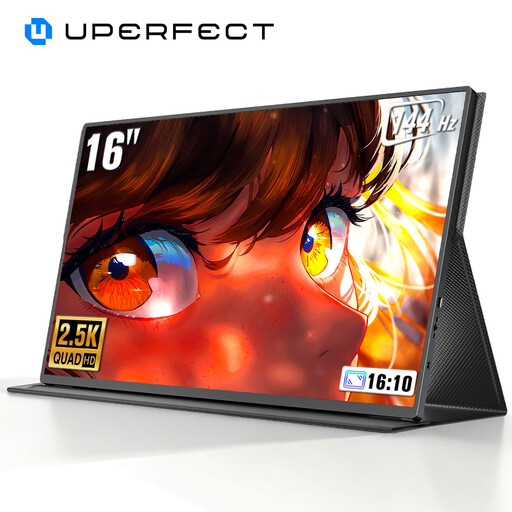
UPERFECT 16-inch 2560 × 1600 144Hz Portable Monitor
This portable format is an option when moving the display matters more than having a large desk-based view of game environments.
The product title lists a 16:10 QLED screen, 144Hz refresh rate, Mini HDMI and Type-C, and advertises 450 nits. Check how its screen handles reflections in the places you plan to use it.
View on Joybuy
 No image available
Gawfolk 24.5-inch FHD 100Hz Curved Monitor
Consider this smaller FHD screen if desk fit matters more to you than the fine landscape detail of 4K.
The product title lists a 100Hz refresh rate, AMD FreeSync, HDMI and an anti-glare screen. An anti-glare label alone cannot establish how visible dark scenes will be beside your windows or lamps.
View on Joybuy
Frequently asked questions
Is a high HDR peak-brightness figure enough for gaming in a bright room?
No. Bright-room visibility also depends on reflections and where light falls on the screen. RTINGS identifies reflection handling as a distinct bright-room consideration, so check it alongside brightness and move lamps or the monitor where possible.
Should I choose WOLED or QD-OLED if I cannot control daylight?
WOLED is worth closer consideration if you want OLED in a well-lit room: RTINGS reports that it preserves low black levels better than QD-OLED under those conditions. Compare the exact monitors’ reflection handling and brightness before choosing, as the panel type alone does not settle bright-room suitability.


