
24/7 Customer Support

Free returns

Same-day & Next-day Delivery

Quality Guaranteed

Unlock Your Welcome Offers: FREE Delivery | Up to 80% OFF | Free 30-day JoyPlus trial
Download the APP
Buying one of the many gaming monitors available in the UK can be confusing. Refresh rates, HDR badges, OLED panels and adaptive sync features all sound appealing, but a long specification list does not automatically mean the display suits your games, graphics card or desk.
The sensible approach is to match the monitor to your actual use. A competitive PC player may value a high refresh rate above 4K resolution, while a console gamer may need HDMI 2.1. A designer or content creator could prioritise colour coverage, USB-C and calibration instead.
A 240Hz gaming monitor can display up to 240 frames per second, but your PC must generate those frames to make full use of it. If your graphics card produces 90fps in your preferred games, the practical difference between 165Hz and 240Hz may be limited.
Check the monitor’s maximum refresh rate at your chosen resolution. Some dual-mode displays offer 4K at 240Hz but switch to Full HD at 480Hz. This can be useful, but it is not the same as running 4K at 480Hz.
HDR gaming monitors vary considerably. Look beyond the HDR name and check brightness, panel technology, contrast and the relevant certification. OLED and QD-OLED monitors can produce very deep blacks because individual pixels can switch off, while IPS panels typically offer wide viewing angles and consistent colour.
A basic HDR label on a relatively dim screen may not deliver the bright highlights you expect. For HDR films and games, also consider your room lighting: reflections can reduce perceived contrast, particularly near windows.
A monitor may support an impressive resolution and refresh rate, but the connected device and cable must support the required bandwidth. DisplayPort, HDMI 2.1 and USB-C have different capabilities depending on the specific implementation.
Measure your desk before choosing a 34-inch or 49-inch curved gaming monitor. Ultrawide screens need considerable width, while a deep stand can reduce usable desk space. Check VESA compatibility and the monitor arm’s weight rating if you plan to mount the display.
For sharp images, 4K gaming monitors use 3840 × 2160 pixels. They are suitable for detailed single-player games, console gaming, photo work and video editing, although 4K requires more graphics processing power.
QHD, usually 2560 × 1440, is a practical middle ground for many PC gamers. Full HD remains suitable for compact displays and budget-conscious systems, particularly when high frame rates are the priority.
A 27-inch screen is a common size for competitive play. A 32-inch 4K monitor provides more detail and workspace, while ultrawide gaming monitors offer extra horizontal space for racing games, strategy titles and multitasking.
The refresh rate, measured in hertz, indicates how many times the display can update each second. 165Hz gaming monitors and 180Hz models can provide visibly smoother motion than 60Hz screens. 240Hz gaming monitors are aimed at players who prioritise rapid on-screen updates in competitive titles.
Response time is often listed as GtG, or grey-to-grey. Treat extremely low figures with care: check whether the quoted value applies to a particular overdrive mode and whether it may introduce visible overshoot. A suitable combination of refresh rate, response behaviour and stable frame delivery matters more than one headline number.
FreeSync monitors work with compatible AMD graphics hardware, while G-Sync monitors are designed for compatible NVIDIA systems. Some displays support both, but compatibility can vary by connection and graphics card. Confirm the manufacturer’s supported range and enable the feature in both the monitor menu and graphics settings.
IPS panels are commonly selected for viewing angles and colour consistency. VA panels can offer stronger native contrast. OLED and QD-OLED monitors provide self-lit pixels, rapid response and strong dark-scene contrast, but buyers should use built-in panel-care functions and avoid displaying static images for extended periods.
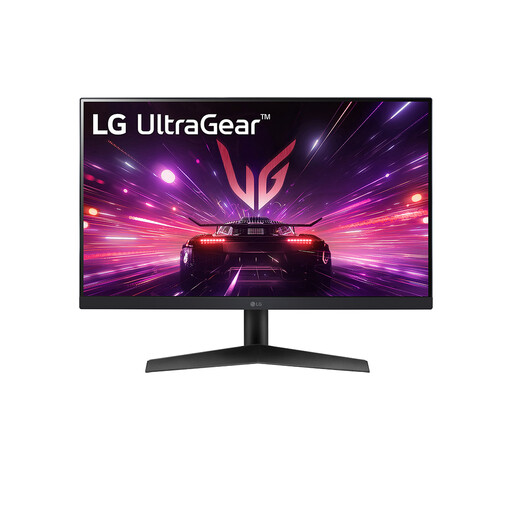
Why This Fits Their Persona: A compact Full HD option for UK bedrooms and players who need a small footprint while upgrading from a standard 60Hz monitor.
Its 180Hz refresh rate is clearly paired with 1920 × 1080 resolution, avoiding the confusion of a high refresh figure that only applies in a lower-resolution mode.
23.8-inch IPS display, 180Hz refresh rate, 1ms GtG response time, HDR10 and compatibility with NVIDIA G-SYNC and AMD FreeSync.
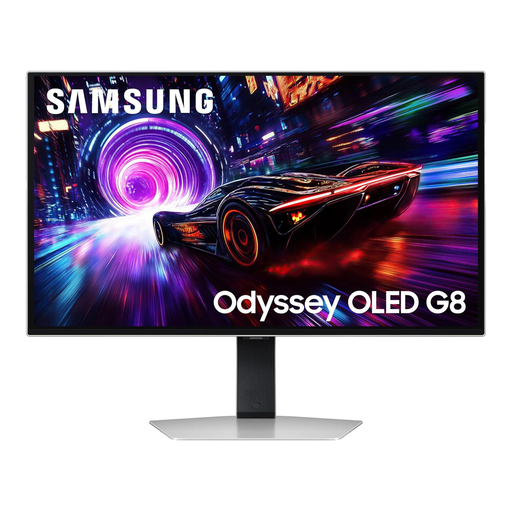
Why This Fits Their Persona: Suits PC gamers who want 4K detail, OLED contrast and a premium 32-inch format for both competitive and cinematic games.
The specification identifies 3840 × 2160 at 240Hz, while OLED Safeguard+ and screen-care functions address the need for sensible OLED ownership.
32-inch 4K QD-OLED panel, 240Hz refresh rate, 0.03ms GtG response time, DisplayHDR TrueBlack 400 and AMD FreeSync Premium Pro.
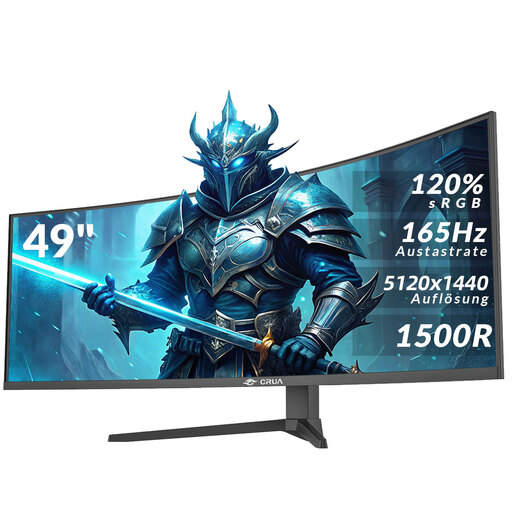
Why This Fits Their Persona: Designed for users who want one expansive screen for racing games, wide-format gaming, editing timelines and several office windows.
The 5120 × 1440 resolution is stated alongside the 165Hz refresh rate, and the product guidance highlights desk depth, weight and heavy-duty mounting requirements.
49-inch 32:9 curved VA panel, 165Hz refresh rate, AMD FreeSync, two HDMI 2.1 ports and two DisplayPort 1.4 ports.
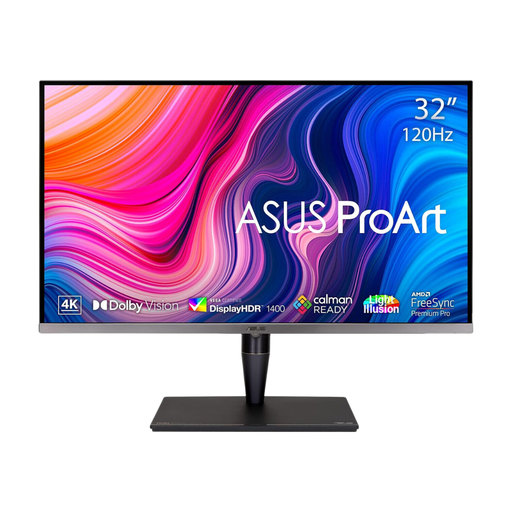
Why This Fits Their Persona: A strong match for creators, designers and professionals who game occasionally but need detailed colour-focused work output.
Its listed colour coverage, hardware calibration support and Mini LED backlight provide more useful information than an HDR badge alone.
32-inch 4K IPS Mini LED display, 120Hz refresh rate, 100% DCI-P3, 99% Adobe RGB and HDMI, DisplayPort and USB-C connectivity.
We have compiled a complete, real-time list of products that fully satisfy these strict selection criteria and UK safety regulations.
They can be worthwhile for users with a graphics card or console capable of producing detailed 4K output. They are also useful for editing, streaming and general productivity. If your priority is competitive gaming at very high frame rates, QHD or Full HD may allow more accessible frame rates.
Running costs depend on screen size, brightness, refresh rate and daily usage. Large OLED, Mini LED and ultrawide models can consume more power than a smaller IPS display. Check the stated typical and maximum consumption, and use automatic brightness or energy-saving settings where suitable.
Lifespan depends on build quality, usage and environment. Keep the monitor dry, well ventilated and free from impact. OLED owners should follow the panel-care guidance and avoid leaving static desktop elements at high brightness for long periods. For any display, retain purchase records and review the manufacturer’s UK warranty terms.