
24/7 Customer Support

Free returns

Same-day & Next-day Delivery

Quality Guaranteed

Unlock Your Welcome Offers: FREE Delivery | Up to 80% OFF | Free 30-day JoyPlus trial
Download the APP
Choosing among gaming monitors is less straightforward than comparing refresh-rate numbers on a product page. Screen size, resolution, panel type, connectivity and adaptive-sync support all affect how a display performs with your PC or console. A monitor that suits competitive esports may be unsuitable for cinematic single-player games, streaming or office work.
The right choice starts with avoiding common marketing traps and matching the specification to how you actually play.
A 240Hz or 500Hz monitor can display more frames per second than a 60Hz model, but your computer must also produce enough frames to benefit from it. A mid-range graphics card may struggle to maintain very high frame rates at 4K resolution.
Check the connection standard too. Some monitors only reach their advertised refresh rate through DisplayPort, while HDMI may support a lower maximum. For example, the MSI MAG 274CXF reaches 280Hz through DisplayPort and up to 240Hz through HDMI.
Response-time figures may use different measurement methods, including GtG and MPRT. A listed minimum response time is not necessarily the average response across every brightness transition.
Look for the measurement method, supported refresh rate and whether the figure is a minimum or typical value. A monitor with a slightly higher stated response time may still offer a more consistent experience than one advertised with an exceptionally low minimum.
A 34-inch ultrawide gaming monitor, or a 49-inch 32:9 display, needs considerably more desk width than a 27-inch screen. Curved gaming monitors can also have deeper stands than flat models.
Measure your desk before ordering, including space for speakers, a keyboard and viewing distance. Also check whether the stand offers height, tilt or swivel adjustment. A VESA mount can help where the supplied stand is too large for the workspace.
VA panels generally offer strong native contrast and are common in curved displays. OLED and QD-OLED panels provide self-emissive pixels, deep blacks and fast listed response times. However, buyers should consider OLED care features and avoid leaving static images, logos or taskbars displayed for extended periods.
IPS panels are often selected for viewing-angle consistency and general-purpose use. Panel type should be considered alongside colour coverage, brightness, HDR certification and the type of games you play.
A high refresh rate monitor can make cursor movement and supported gameplay appear smoother when the connected device produces matching frame rates. Competitive players may consider 240Hz gaming monitors, while 500Hz gaming monitors are aimed at systems capable of producing very high frame rates in lower-resolution esports titles.
Adaptive-Sync monitors adjust the display refresh rate to the graphics card’s output, helping reduce visible tearing and stuttering. Compatibility varies, so check whether the model supports G-SYNC Compatible, FreeSync gaming features or both. Console users should verify supported resolution, refresh rate, VRR and HDMI version rather than assuming PC specifications apply to a PlayStation or Xbox.
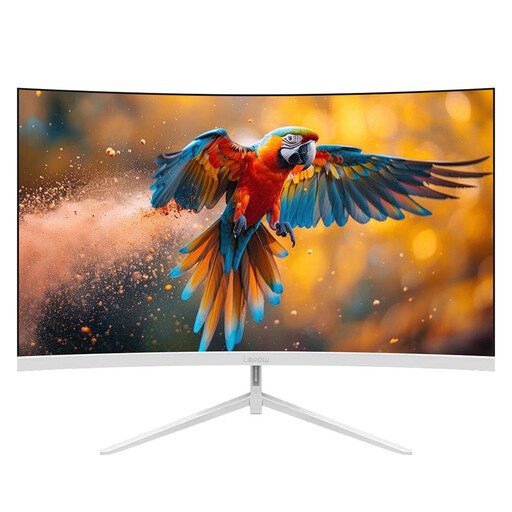
Why This Fits Their Persona: A straightforward option for UK buyers wanting a 27-inch screen for everyday gaming, study or office work without moving to premium OLED pricing.
Its listed 180Hz refresh rate is paired with clearly stated Full HD resolution and HDMI and DisplayPort connectivity, making the core specification easier to check before purchase.
27-inch curved VA display; 180Hz refresh rate; 1-year limited warranty listed in the product information.
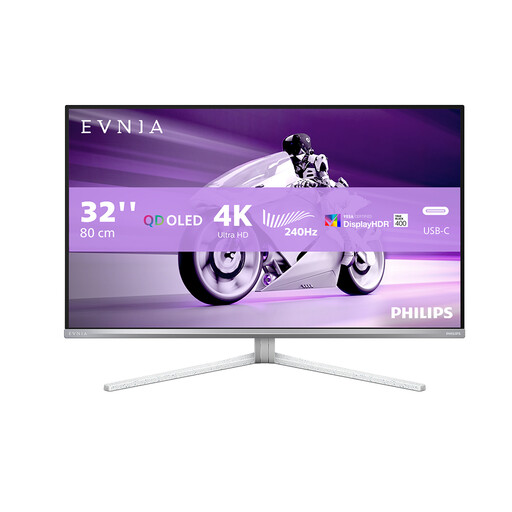
Why This Fits Their Persona: A suitable match for players and content creators seeking 4K detail, OLED contrast and modern connectivity in one 32-inch display.
The listing identifies its 4K UHD resolution, 240Hz refresh rate, 0.03ms response figure and HDMI 2.1, DisplayPort and USB-C connections separately.
32-inch UHD OLED panel; 240Hz refresh rate; FreeSync Premium Pro and G-SYNC Compatible support listed.
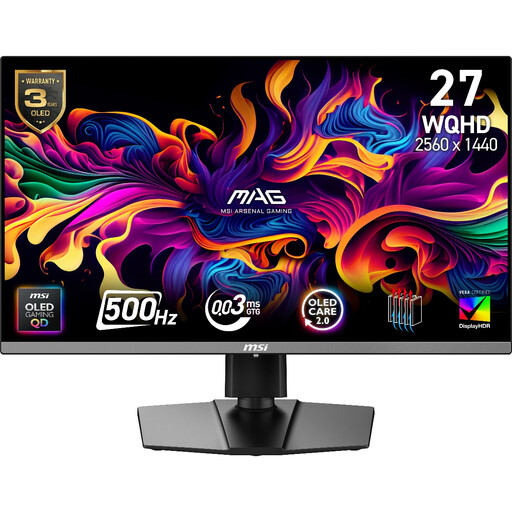
Why This Fits Their Persona: Designed around very high frame-rate PC esports, particularly for players with hardware capable of using a 500Hz mode at WQHD.
Its specification lists the resolution, refresh rate, connection limits and Adaptive-Sync range, helping buyers assess whether their graphics card and cables are suitable.
27-inch WQHD QD-OLED panel; 500Hz refresh rate; 0.03ms GtG response specification and three-year burn-in warranty listed.
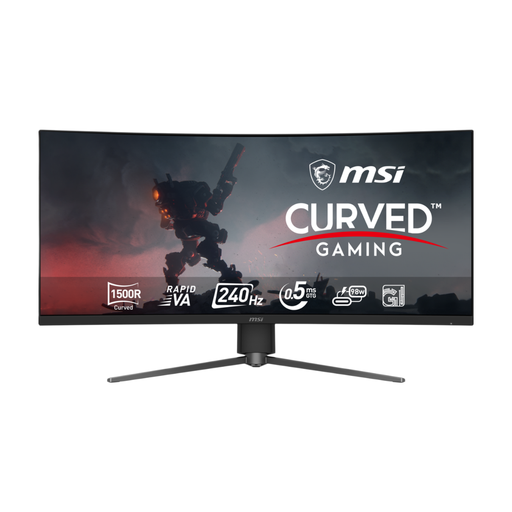
Why This Fits Their Persona: A practical fit for racing, simulation, streaming and productivity users who want one wide screen rather than a dual-monitor arrangement.
The listing states its 34-inch UWQHD resolution, 240Hz support across DisplayPort, HDMI 2.1 and USB-C, plus height, tilt and swivel adjustment.
34-inch 3440 × 1440 curved display; 240Hz refresh rate; USB-C with 98W power delivery and Adaptive Sync.
We have compiled a complete, real-time list of products that fully satisfy these strict selection criteria and UK safety regulations.
They can be worthwhile for competitive PC gaming when your system regularly produces high frame rates. For slower-paced games, films or console gaming, resolution, HDR, panel quality and HDMI support may matter more than moving beyond 144Hz or 165Hz.
Yes, but compatibility depends on the monitor’s HDMI version and supported console modes. Check whether it supports the console’s required resolution, 120Hz output, VRR and HDMI-CEC functions. A monitor’s maximum DisplayPort refresh rate does not automatically apply through HDMI.
OLED gaming monitors should use their built-in panel-care functions where available. Avoid leaving static desktop elements on screen for long periods, keep ventilation clear and follow the manufacturer’s cleaning instructions. Check the supplied warranty terms, particularly any panel or burn-in coverage, before buying.