For a PC simulator that supports 21:9, a curved ultrawide is a sensible choice when horizontal screen space matters most during circuit practice. Choose a 16:9 4K monitor instead if you prioritise its resolution or share the games room with a console; in either case, check the game, source device and connection before relying on a particular refresh rate or variable refresh rate (VRR) mode.
Who each format suits
PC racers seeking a wider cockpit view
If your simulator supports 21:9, a curved ultrawide can provide more horizontal game space in a fixed, centrally seated setup. Confirm that the particular game offers the view you want rather than relying on screen width alone.
Console or mixed-platform circuit learners
A standard 16:9 screen is a straightforward format to consider for console output. PlayStation and Xbox document display modes that depend on the connected equipment, so check the resolution, refresh rate and VRR combination you intend to use.
Dedicated-room builders focused on practical setup
If a large curved screen matters more to you than a 240 Hz OLED specification, compare connector-specific refresh rates, stand adjustment and how the monitor will fit your desk or rig. The BenQ MOBIUZ EX3410R illustrates why the input matters: BenQ UK lists 144 Hz over DisplayPort and 120 Hz over HDMI.
What matters when choosing
Decide whether the monitor will chiefly serve a PC simulator with confirmed ultrawide support or a mix of PC and console games. Then check which display mode your actual connection can deliver.
| Concern |
What to check |
Who this matters to |
| Wider racing view |
Confirm 21:9 support in the simulator and check the screen's width and position at your seat. |
If I practise from a fixed cockpit, I want the game to use the extra horizontal space rather than merely stretch across a wider monitor. Around 42% of consumers put that supported wider view first. |
| Detail and device compatibility |
Match the desired resolution, refresh rate and VRR mode to the game, source device and monitor input. |
When I switch between PC and console, I want a screen shape and display mode both can use as intended. For around 33% of consumers, compatible high-resolution output is the primary concern. |
| Motion and room setup |
Read refresh limits by port, then check stand or mount adjustment and physical fit. |
I want smooth circuit practice without choosing a refresh-rate specification my connection cannot reach, and the screen still has to fit my rig. Practical motion and setup come first for around 25% of consumers. |
Checks before you buy
-
Assuming every port supports the headline refresh rate
BenQ UK specifies up to 144 Hz over DisplayPort but 120 Hz over HDMI for the EX3410R. The connection you use can therefore change the available mode.
Check the monitor's per-port specification against your PC, console or dock, as well as the intended cable.
-
Buying 21:9 before checking the game and console
An ultrawide panel does not establish that a particular racing game will use its full width. Xbox Support describes its 1440p display area as 16:9.
For PC play, check ultrawide support in the exact simulator. For console-first use, establish how your game and console display on a 21:9 monitor before choosing that shape.
-
Treating OLED care as protection against all image retention
ASUS ROG describes cooling and OLED-care features for its monitors, but its risk-reduction claim is not a guarantee against image retention. Static timing overlays and desktop elements make the panel-care decision worth considering.
Read the exact model's care guidance and warranty terms, and compare an OLED with a non-OLED option if static content will be extensive.
-
Choosing 4K without checking the attainable game mode
A monitor's 4K refresh-rate specification does not establish what a console or a particular game will output. PlayStation and Xbox describe supported modes in relation to the connected display.
Check the game's available modes, then match the source device, cable and monitor input to the resolution and refresh rate you plan to use.
Relevant brands and models
These model examples show different display routes; their specifications do not apply to every monitor from the same brand.
BenQ MOBIUZ
BenQ UK specifies the EX3410R as a 34-inch, 3440 × 1440 curved VA ultrawide.
- The EX3410R specification includes a height-adjustable stand and 100 × 100 mm VESA mounting.
- Its listed refresh limit is 144 Hz over DisplayPort and 120 Hz over HDMI; choose with your intended input in mind.
LG UltraGear
LG UK presents the 34GS95QE-B as a 34-inch, 3440 × 1440 curved OLED ultrawide with a 240 Hz specification.
- The specified 21:9 format provides an ultrawide option for a PC simulator that supports it.
- Confirm the game's 21:9 behaviour and the exact model's panel-care terms before choosing OLED.
ASUS ROG
ASUS ROG specifies the PG34WCDM as a 3440 × 1440 curved OLED and the PG32UCDM as a 3840 × 2160 QD-OLED, offering examples of ultrawide and 4K routes.
- The PG32UCDM specification lists HDMI 2.1 for buyers assessing a 4K connection.
- ASUS's statements about reducing burn-in risk through cooling and OLED care are not a guarantee against image retention.
Alienware
Dell UK lists the AW3423DWF as a 34-inch, 3440 × 1440 curved QD-OLED ultrawide.
- Dell specifies refresh rates of 165 Hz through DisplayPort and 100 Hz through HDMI, making the input distinction clear.
- Dell UK labels this particular model as currently unavailable; treat it as a format reference rather than a confirmed purchase option.
Joybuy monitor choices
These monitors cover both the 4K route for standard-shaped output and ultrawide choices for a PC simulator with confirmed wide-screen support. Compare each model's stated configuration with your game, connection and room layout.
 No image available
LG UltraGear OLED 32GS95UV-B, 32-inch 4K
Consider this for a 4K setup where you also want to assess high-refresh PC gaming. The named dual modes are 4K at 240 Hz and Full HD at 480 Hz; 480 Hz is not its stated 4K mode.
The title lists HDMI 2.1, DisplayPort, NVIDIA G-SYNC and AMD FreeSync Premium Pro. Confirm which mode your game, device and chosen connection can deliver.
View on Joybuy
 No image available
LG UltraGear 34GX900A-B, 34-inch OLED
Consider this ultrawide route for a PC racing game after confirming that the game supports the screen shape you want. The product title specifies a 34-inch OLED monitor at 240 Hz.
Check the intended connection and read the model's OLED care and warranty terms if static HUD elements will be on screen for extended periods.
View on Joybuy
 No image available
Dahua 32-inch 4K 165 Hz curved OLED monitor
This is a 4K option to assess if you prefer that format to an ultrawide. Its title specifies 3840 × 2160, 165 Hz and a 0.03 ms GtG response time.
Confirm the console or PC mode you need, including VRR where relevant, and check the applicable OLED care and warranty terms.
View on Joybuy
 No image available
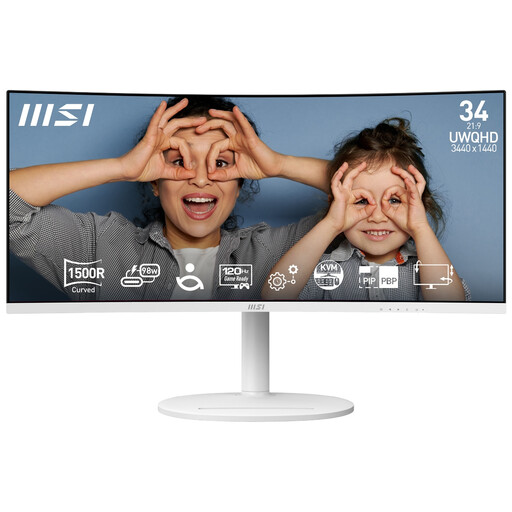
Modern MD342CQPW, 34-inch 3440 × 1440, white
Consider this curved ultrawide for a PC simulator once you have checked the game's wide-screen output. The title specifies a 120 Hz refresh rate and 1500R curvature.
Check the refresh rate available through your intended input and whether the monitor fits your desk or rig.
View on Joybuy
 No image available
Lenovo R34w-30, 34-inch UWQHD gaming monitor
This 34-inch UWQHD model is another screen to consider for a PC racing setup if the simulator supports the intended ultrawide output.
Confirm its exact native resolution and refresh rate through the connection you plan to use, as well as its fit at your seating position.
View on Joybuy
Common questions
Should I choose a 34-inch ultrawide to learn a street circuit?
A 34-inch 21:9 ultrawide makes sense for a PC simulator that supports ultrawide output, particularly in a fixed cockpit-style setup. For a console-led room, check the exact display behaviour first: Xbox Support describes its 1440p output as a 16:9 viewing area.
What should I check before using a 1440p monitor with a PS5?
Check the connected display through the PS5 video-output settings and test its 1440p modes. PlayStation says the test can cover SDR and HDR at 60 Hz or 120 Hz and VRR where supported; the display, connection and game must support the mode you intend to use.
Can an Xbox Series X|S use a 4K monitor at 120 Hz?
Xbox Support says Series X|S supports 4K at 120 Hz, provided the connected display supports that mode. Check the chosen monitor's HDMI input and cable, and do not treat a DisplayPort refresh-rate figure as its HDMI capability.
Are DisplayHDR labels interchangeable?
No. VESA describes DisplayHDR as a standard with defined testing criteria, but certification levels differ. Compare the exact tier and panel type on the monitors you are considering rather than treating every HDR label as the same specification.


