What matters when choosing?
Decide how much space the controls leave for a display, then weigh a smaller Full HD screen against a 27-inch QHD view. Screen curvature is a separate preference: it does not remove the need to measure the monitor’s physical fit.
Compact Full HD
Choose it when: Controls take priority on a small desk and a smaller screen suits the way you play.
Trade-off: You give up the extra pixels of QHD for terrain and interface detail.
27-inch QHD
Choose it when: More pixels for the landing view and cockpit are worth accommodating a wider display.
Trade-off: Check both physical clearance and whether your gaming device can deliver acceptable performance at QHD. A curved version still needs room for its screen and stand.
| Concern |
What to check |
Who this matters to |
| Physical fit and mounting |
Measure usable desk width and depth with the controls in place; compare the stand footprint or check the monitor and mount specifications. |
If my controls fill the desk, I need the screen and its support to fit without displacing them. Around 36% of consumers would put physical fit first. |
| Terrain and cockpit detail |
Compare Full HD with QHD, then check your device’s QHD output and the game settings you intend to use. |
When I am judging terrain and reading virtual instruments, I care more about available image detail than a smaller panel. QHD detail would come first for around 29% of consumers. |
| Motion and response |
Check the refresh rate through your intended input and whether the response-time figure depends on a particular mode. |
For fast manoeuvres, I want motion settings that work with my gaming device rather than relying on a headline figure. Around 21% of consumers would prioritise motion and response. |
| Connection compatibility |
Match the PC, console or laptop output to the monitor’s inputs; confirm the required cable and available display mode. |
If I switch between devices, I need each intended connection to support the mode I plan to use. Connection compatibility would be the primary concern for around 14% of consumers. |
Joybuy monitor choices
These monitors cover smaller Full HD screens as well as larger QHD options. For a controls-heavy moon-landing setup, compare each screen and stand with the space you actually have before choosing by resolution or refresh rate.
 Image unavailable
KOORUI MG24A12FV2 24-inch curved Full HD monitor
Consider this smaller-screen route when your simulator controls need much of the desk. The product name specifies a VA panel, 1500R curve, 180 Hz and Adaptive Sync.
Measure the stand’s fit and check which refresh mode your device can use through the intended connection. Do not treat the listed response-time measures as interchangeable.
View on Joybuy
 Image unavailable
MSI MAG 274QF 27-inch WQHD Rapid IPS monitor
Consider this QHD route if cockpit and terrain detail matter more than keeping the screen small. Its product name specifies Adaptive Sync and a 180 refresh-rate figure.
Allow for the 27-inch screen, confirm the stand’s dimensions, and check the refresh mode available through your chosen port and device.
View on Joybuy
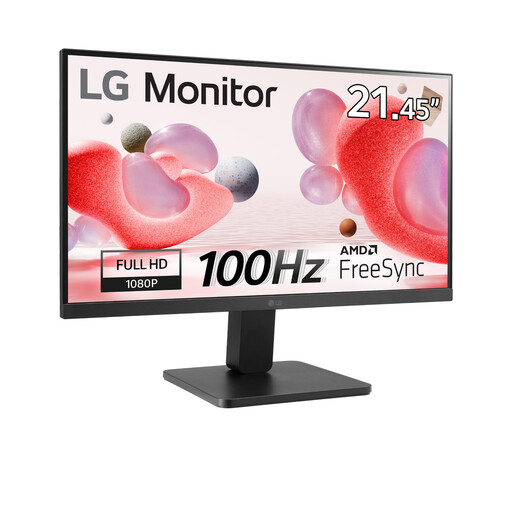 Image unavailable
LG 22-inch Full HD VA monitor, 100 Hz
The 22-inch screen is an option to assess when desk room is particularly tight and 100 Hz suits the way you play. Its product name specifies HDMI.
Check the full monitor and stand dimensions rather than assuming that the smaller diagonal guarantees a workable footprint; confirm your device’s output mode too.
View on Joybuy
 Image unavailable
Gawfolk 24.5-inch Full HD curved monitor, 100 Hz
Consider this option if you want a curved screen without moving to a 27-inch panel. The product name specifies a 3000R curve, 1 ms MPRT, built-in speakers and AMD FreeSync.
Confirm the actual width and stand depth for your desk. Check the mounting pattern against the exact monitor before buying an arm, and verify the refresh mode for your intended connection.
View on Joybuy
 Image unavailable
CRUA 32-inch 1500R curved QHD monitor
Consider this larger-screen route only if the simulator station has room for it. The product name specifies 2560 × 1440 resolution, 165 Hz, Adaptive Sync and 100 × 100 mm VESA mounting.
Measure the available width and viewing distance, then confirm the monitor’s stand dimensions or compatibility with your proposed mount. Check your device’s QHD refresh mode as well.
View on Joybuy
Common questions
Do I need a floor stand for a small simulator setup?
No: start by checking whether a monitor fits on the desk or can use a compatible arm or wall mount. ASUS specifies 100 × 100 mm VESA mounting for the ROG Strix XG27ACS-W, but the mount and the desk or wall supporting it need separate checks.
Will a monitor reach its advertised refresh rate through HDMI?
Not necessarily. ASUS lists up to 180 Hz through USB-C or DisplayPort on the ROG Strix XG27ACS-W, compared with up to 144 Hz through HDMI. Check the exact monitor input, gaming device output and cable for the mode you intend to use.
Does a quoted 1 ms response time apply in every setting?
No: it can depend on the selected mode and the measure used. LG states that the 27GS60QC-B reaches its quoted 1 ms grey-to-grey figure in Faster mode. Check the exact model’s settings before relying on its headline response-time figure.
Do I need QHD for a moon-landing simulator?
No: Full HD remains a route when a smaller screen and desk fit matter most. QHD provides more pixels for terrain and cockpit interfaces, but weigh that detail against screen size and the performance your gaming device can deliver at your chosen settings.


