Dark-scene clue seekers
If you spend time reading documents, maps and small object clues, compare native resolution and image controls rather than choosing by refresh rate alone. An HDR label does not tell you how a particular dark scene will look.


For detective games in a shared bedroom, start with a monitor that fits the desk and lets you inspect clues without disrupting the other person. A 27-inch QHD model is worth considering if your device supports 2560 × 1440 and fine on-screen detail matters most; Full HD may suit a simpler setup. Check reflections, screen positioning, private audio and the refresh rate available through the port you will actually use.
If you spend time reading documents, maps and small object clues, compare native resolution and image controls rather than choosing by refresh rate alone. An HDR label does not tell you how a particular dark scene will look.
When someone else is sleeping, reading or studying nearby, consider headphone connectivity, reflections and where the stand will sit. Screen settings can help you adjust the display, but room lighting and positioning matter too.
If detective games share your library with faster titles, check motion-related features against your source device. The monitor’s maximum refresh rate may differ between HDMI and DisplayPort.
Decide whether clue detail, a workable shared-room setup or compatibility with your other games would settle the choice for you; then check the exact monitor and connection against that priority.
| Concern | What to check | Who this matters to |
|---|---|---|
| Readable clues and dark scenes | Compare native resolution and available image controls. Confirm that your PC or console can output the resolution you choose; do not rely on an HDR label alone. | If small text, maps and objects are central to my detective games, I want enough detail to inspect them without making refresh rate my only criterion. Around 38% of consumers put clue and scene detail first. |
| Shared-room setup | Measure the desk including stand depth, and check reflections, positioning options and how you will connect headphones. | Playing beside someone who needs a quieter, less distracting room makes screen placement and private audio my priority. For around 31% of consumers, shared-room comfort comes first. |
| Motion and connection fit | Match your source device, cable and intended resolution to the monitor’s per-port refresh-rate specifications. | If I switch between detective and faster games, I want the connection I use to support the motion settings I care about. That is the primary concern for around 31% of consumers. |
The maximum may depend on the input. ASUS specifies up to 144 Hz over HDMI and 180 Hz over DisplayPort for the VG27AQ3A; Dell lists the same QHD limits for the AW2725DM.
Check your device output, cable and intended resolution against the exact port specification before ordering.
Low-blue-light and flicker-free features are model settings, not substitutes for managing reflections or taking breaks. The Health and Safety Executive advises arranging screens and lighting to avoid glare.
Adjust brightness to suit the room, position the screen away from direct reflections and take regular breaks.
Stand depth and height adjustment affect whether a monitor fits a shared desk. BenQ specifies 100 mm of height adjustment for the EX2710Q, while ASUS specifies no height adjustment for the VG27AQ3A.
Measure the usable desk and check the stand dimensions. If you plan to use an arm, confirm the monitor’s mounting pattern and the arm’s suitability for the desk.
A stand that does not fit your preferred position may mean rearranging the desk or using a compatible arm or riser.
An HDR label alone cannot establish how clues in shadow will appear on a particular monitor in your room.
Compare the exact model’s panel and image controls, consider reflections, and check the retailer’s return conditions if you want to assess dark scenes after delivery.
The EX2710Q is a relevant 27-inch QHD example if stand adjustment and headphone output matter in your shared-room setup.
The 27GS60F-B offers a 27-inch Full HD route for consumers placing lower rendering demand ahead of QHD detail.
The VG27AQ3A is a QHD example for a mix of detective and faster-paced games, provided its connection and stand suit your setup.
Dell’s AW2725DM is another 27-inch QHD example for checking PC connections alongside the desired refresh rate.
These monitors offer different screen sizes and stated features relevant to detective games. Compare each one against your desk, source device and private-audio plan; a larger screen or higher stated refresh rate does not settle those checks.
 No image available
Consider this 27-inch option if QHD detail and a high stated refresh rate suit both your games and source device.
The product name specifies OLED and 240 Hz. Check the rate available through your intended connection and how you will route private audio.
 No image available
Consider this model if you have room for a 31.5-inch display and want to assess a larger screen for maps and documents.
The product name specifies an IPS panel, adaptive sync and built-in speakers. Measure the desk and check how you would use private audio in the shared room.
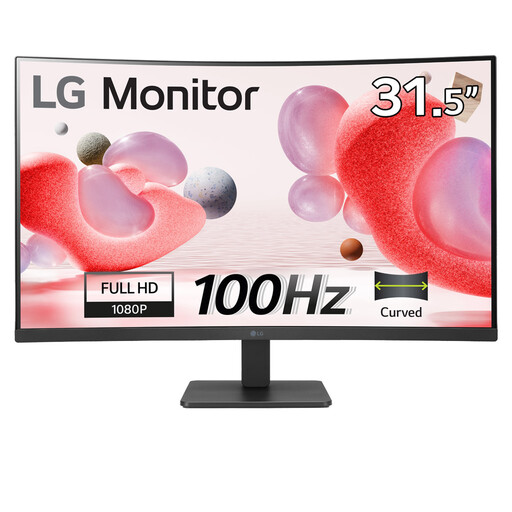 No image available
Consider this larger Full HD option if its screen size fits your desk and you are comfortable with fewer displayed pixels than QHD for fine clues.
The product name specifies a VA panel, 100 Hz, AMD FreeSync, anti-glare treatment and HDMI. Check your private-audio arrangement and intended connection.
 No image available
Consider this QHD model if a 32-inch curved screen fits your viewing position and you also play faster games.
The product name specifies 2560 × 1440, 165 Hz, HDMI, DisplayPort and VESA 100 × 100 mounting. Check the refresh rate supported by your chosen port and whether the screen finish suits the room’s lighting.
 No image available
Consider this smaller screen if desk space matters more to you than the extra displayed pixels of QHD.
The product name specifies a 3000R curve, anti-glare treatment, HDMI and built-in speakers. Check your private-audio connection; confirm the mounting pattern before choosing an arm.
Choose QHD if your device supports 2560 × 1440 and inspecting fine text and scene detail is your priority; choose Full HD if lower rendering demand matters more. Compare screen size and the resolution available through your intended connection as well.
No setting replaces a workable screen and lighting arrangement. Treat those features as options to adjust; the Health and Safety Executive also advises reducing reflections and glare and taking breaks when using display screens.
Not necessarily: the limit depends on the exact monitor and connection. ASUS specifies up to 144 Hz over HDMI and 180 Hz over DisplayPort for the VG27AQ3A, so check your source device, cable and the port you intend to use.
Check your local electronics-recycling arrangements or ask the retailer about take-back options rather than treating the monitor as ordinary household rubbish. GOV.UK describes UK waste electrical and electronic equipment regulations as encouraging recovery, reuse and recycling.