What matters when choosing
Start with reflections in the room, then settle on a resolution your device can use satisfactorily. Check stand positioning and connections against the way you play rather than treating refresh rate as the main bright-room specification.
| Concern |
What to check |
Who this matters to |
| Reflections and readability |
Check the surface finish, typical brightness and whether the screen can be angled away from windows; do not substitute an HDR peak figure for everyday brightness. |
If a window is visible in my screen during play, I need to control the reflection before finer detail will help. Around 36% of consumers put reflection control first. |
| Resolution and PC performance |
Match QHD or 4K to your GPU, game settings and desired frame rate; a game’s minimum requirements do not establish 4K performance. |
When I read maps and menus, I want enough detail without asking my PC to render more pixels than it can handle comfortably. For around 29% of consumers, that resolution-and-performance fit is the primary concern. |
| Positioning for longer sessions |
Confirm the exact stand’s height and angle adjustments, or mounting compatibility if you plan to use an arm. |
At a desk where I spend long sessions planning and managing a farm, I need to place the screen where I can see it without distracting glare. Comfortable positioning comes first for around 21% of consumers. |
| Device connections |
Check each required port and supported video format against your source and game; PS5 owners can inspect detected output in the console settings. |
If I move between a console and PC, I need the chosen inputs to carry the video modes I intend to use. Around 14% of consumers make connection fit their first priority. |
Joybuy product choices
These choices cover OLED, IPS and VA monitors at several screen sizes and resolutions. Compare their stated features with your lighting and device setup; their order is not a verdict on which screen will handle your room’s reflections most effectively.
 No image available
Samsung Odyssey G6 S27DG612 27-inch QHD OLED
Consider this for QHD play if you also want an OLED monitor for other games; check its everyday brightness and reflection handling against your room.
27-inch display; 240 Hz and 0.03 ms stated in the product name. Confirm which video modes your device and connection can use.
View on Joybuy
 No image available
LG UltraGear 34GX900A-B 34-inch WQHD OLED
Consider this if a 34-inch WQHD screen suits your desk and you also use the monitor for other games. Check typical brightness and the screen’s fit in your room before choosing it for daylight use.
240 Hz stated in the product name. Confirm the resolution and refresh rate available from your device.
View on Joybuy
 No image available
AOC Q32V4 31.5-inch IPS monitor
Consider this if you want a larger IPS screen, but confirm its exact resolution and the stand’s adjustment range before deciding whether it fits your farming-simulation setup.
The product name states 4 ms, Adaptive Sync and built-in speakers. Check the screen position and brightness against your room lighting.
View on Joybuy
 No image available
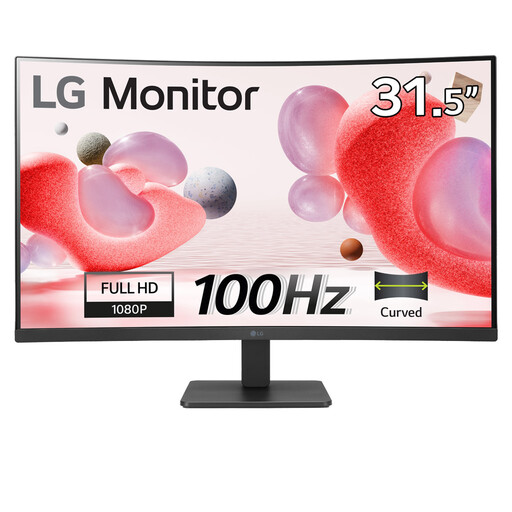
LG Electronics 32MR50C-B 32-inch curved Full HD
Consider this matte, anti-glare option if Full HD detail is sufficient at your viewing distance. Check whether its brightness and stand positioning suit the room.
VA panel; 100 Hz, 5 ms GtG, AMD FreeSync and HDMI stated in the product name.
View on Joybuy
 No image available
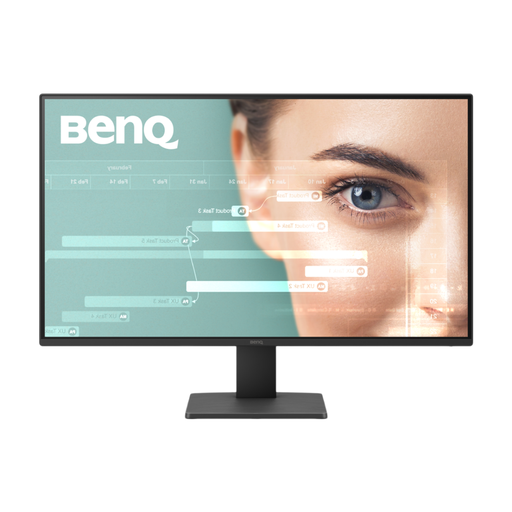
BenQ GW2791 27-inch Full HD IPS
Consider this general-purpose monitor if Full HD meets your detail needs and gaming-specific features are not your main priority. Check whether its positioning and brightness work in your room.
100 Hz and 5 ms stated in the product name.
View on Joybuy
Frequently asked questions
Will a brighter monitor fix reflections from a window?
Not on its own: a brighter image does not remove reflected light. The Health and Safety Executive advises positioning the screen to avoid glare from windows and bright lights; changing the screen position or using curtains or blinds may help.
Should I choose QHD or 4K for Farming Simulator on PC?
Choose according to the detail you want and the performance your PC can deliver at your preferred settings: 4K has more pixels to render, while QHD places a lower rendering demand on the PC. GIANTS Software’s minimum requirements for Farming Simulator 25 are not a guarantee of satisfactory 4K performance.
How can I check whether a monitor works with my PS5 video settings?
Connect it and inspect the current signal and connected-display information under the PS5’s Screen and Video settings. PlayStation also provides a 1440p output test; available HDR, variable refresh rate and 120 Hz output depend on the connected display and, for 120 Hz play, game support.
Is a very high refresh rate essential for farming simulations?
It need not be your first criterion for this bright-room setup: reflections, usable resolution and screen placement are more immediate checks. A higher refresh rate is relevant when your source and games can supply the corresponding frame rate; Samsung notes that refresh-rate performance can vary with the input source.
Can a retailer take back my old monitor when I buy a new one?
Check the seller’s electrical-equipment take-back arrangements before ordering. GOV.UK says retailers covered by its guidance must offer take-back of waste equipment of the same type as the item purchased, including for online purchases; confirm how the particular seller arranges collection or drop-off.


