
24/7 Customer Support

Free returns

Same-day & Next-day Delivery

Quality Guaranteed

Unlock Your Welcome Offers: FREE Delivery | Up to 80% OFF | Free 30-day JoyPlus trial
Download the APP
Choosing between gaming monitors can be harder than comparing graphics cards. Refresh rates, OLED panels, HDR labels and curved designs all sound appealing, but a high specification on its own does not guarantee a suitable display for your desk, games or devices.
For UK buyers, the main risks are paying for features your hardware cannot use, overlooking connection limits and choosing a screen that is physically too large for the room. This guide explains the specifications that matter and highlights practical options for different user profiles.
A 240Hz gaming monitor can display up to 240 frames per second, but your PC must generate comparable frame rates for the benefit to be visible. In demanding AAA games, a mid-range graphics card may not reach that level at 4K or ultrawide resolutions.
For competitive esports, where lower settings and high frame rates are common, 240Hz or above may be relevant. For console gaming, check the console’s output limits. PlayStation 5 and Xbox Series X|S commonly target up to 120Hz in compatible games, so a 320Hz screen may offer limited practical value for console-only use.
Manufacturers may quote response times using different methods, such as GtG or MPRT. A 0.5ms GtG figure and a 1ms MPRT figure should not be treated as identical measurements.
Look at the complete specification: panel type, refresh rate, adaptive sync support and the conditions behind the quoted response time. A high refresh rate monitor with inconsistent pixel transitions can still show visible smearing in dark scenes.
HDR performance depends on brightness, contrast, local dimming or OLED pixel control, colour coverage and compatible content. An entry-level screen may carry an HDR label without producing a major improvement over standard dynamic range.
OLED and QD-OLED gaming monitors can provide individually controlled pixels and deep blacks. However, OLED buyers should also consider static desktop use, screen-care functions and the manufacturer’s burn-in coverage. Enable pixel-shift, panel-care or automatic-dimming features where available.
A QHD gaming monitor usually refers to 2560 × 1440 resolution. It provides more detail than Full HD without requiring the same graphics performance as 4K. A 27-inch QHD display is a practical format for many PC gaming desks.
A 4K gaming monitor uses 3840 × 2160 resolution and suits high-end PCs, compatible consoles and users who value fine detail for games, films or creative work. Confirm that your graphics card and chosen connection can support the desired refresh rate at 4K.
Ultrawide screens use wider aspect ratios such as 21:9 or 32:9. A curved gaming monitor can make a wide panel easier to view from a central seating position, but measure your desk first. A 49-inch 32:9 model is considerably wider and heavier than a standard 27-inch screen.
Colour gamut figures such as 99% DCI-P3 or 120% sRGB describe the range of colours a display can reproduce. They do not, by themselves, confirm professional calibration. Designers should look for factory calibration information and a suitable colour mode.
Check the exact bandwidth of HDMI and DisplayPort. HDMI 2.1 can be important for high-refresh 4K and modern consoles, while DisplayPort is commonly used for high-refresh PC gaming. USB-C is particularly useful for laptops, but verify whether it supports video, data and power delivery.
AMD FreeSync, Adaptive-Sync and G-SYNC Compatible features are designed to synchronise the display with a compatible GPU, helping reduce tearing and stuttering. Compatibility depends on the graphics card, cable, resolution and refresh-rate range.
For long sessions, prioritise a height-adjustable stand, tilt and swivel adjustment. VESA mounting can help with desk space, but check the mounting pattern and the arm’s weight rating before installation.
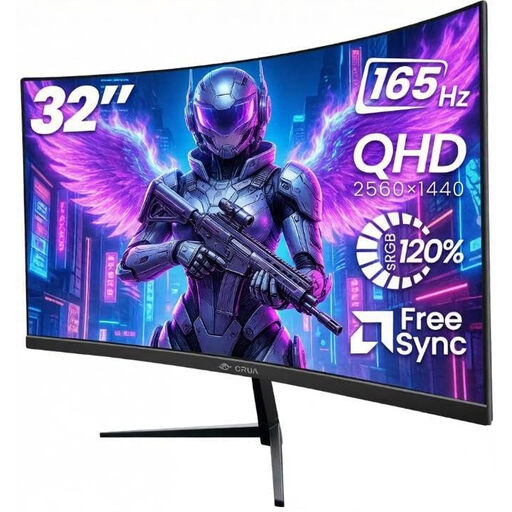
Why This Suits Their Persona: A sensible starting point for UK bedrooms, home offices and console setups requiring QHD resolution without moving to OLED pricing.
Its 2560 × 1440 resolution, 165Hz refresh rate and adaptive sync are clearly specified, while the dual HDMI and dual DisplayPort layout supports several devices.
32-inch 1500R VA panel, 165Hz refresh rate, 120% sRGB specification and VESA 100 × 100mm mounting.
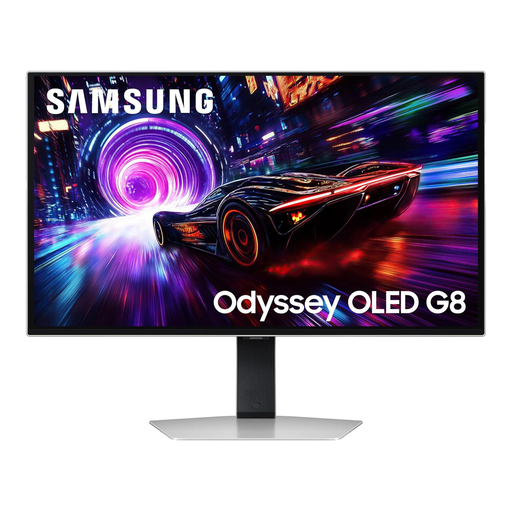
Why This Suits Their Persona: Suitable for users with a powerful PC who want high-resolution gaming, HDR support and OLED contrast in a conventional 16:9 format.
The specification identifies 4K resolution, QD-OLED technology, HDMI 2.1 and OLED Safeguard+ features, allowing buyers to assess compatibility and screen-care needs.
3840 × 2160 resolution, 240Hz refresh rate, 0.03ms GTG response specification and VESA DisplayHDR TrueBlack 400.
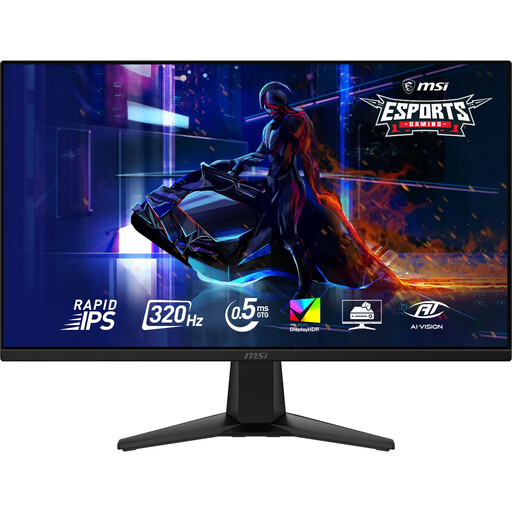
Why This Suits Their Persona: Designed around high frame-rate PC gaming, particularly competitive FPS titles where a fast refresh rate is a priority.
The 320Hz figure is paired with QHD resolution and a Rapid IPS panel, making the intended high-frame-rate use clearer than a refresh-rate claim alone.
2560 × 1440 resolution, 320Hz refresh rate, 0.5ms GtG specification and VESA DisplayHDR 400 support.
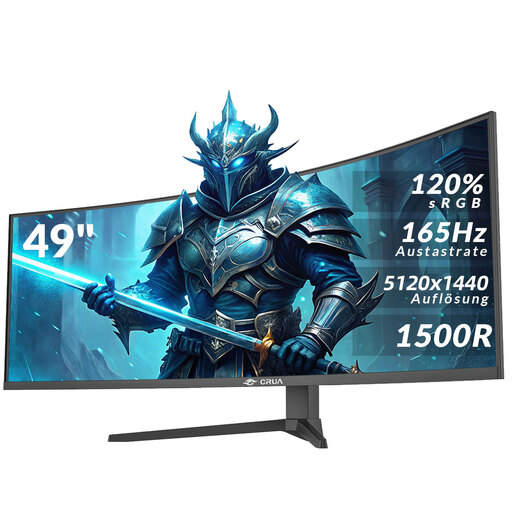
Why This Suits Their Persona: A single-screen workspace for racing games, video timelines, spreadsheets, multiple windows and wide-format PC gaming.
The product clearly states its 32:9 format, DQHD resolution and required HDMI 2.1 or DisplayPort 1.4 connections. Buyers should still measure desk depth and plan two-person handling.
5120 × 1440 resolution, 165Hz refresh rate, 1500R VA curvature, AMD FreeSync and height adjustment.
We have compiled a complete, real-time list of products that fully satisfy these strict selection criteria and UK safety regulations.
It depends on your graphics card and preferred games. QHD usually offers a practical balance between image detail and frame rate, particularly at 27 or 32 inches. 4K provides finer detail but demands more GPU performance, especially when combined with HDR and high refresh rates.
They can be, but static elements such as taskbars and application panels require sensible use. Enable the monitor’s OLED protection features, use automatic sleep settings and avoid leaving a bright static image on screen for long periods. Check the specific manufacturer’s warranty terms, including any panel burn-in coverage.
Power consumption varies by panel type, brightness, HDR mode, screen size and operating hours. A larger ultrawide or high-brightness OLED display may use more power than a smaller QHD model. Check the product’s stated wattage and use standby or automatic sleep settings when the monitor is not required.