
24/7 Customer Support

Free returns

Same-day & Next-day Delivery

Quality Guaranteed

Unlock Your Welcome Offers: FREE Delivery | Up to 80% OFF | Free 30-day JoyPlus trial
Download the APP
By Joybuy Product Recommendation Officer
Buying gaming monitors can be confusing when refresh rates, panel types and HDR labels compete for attention. A high number on the product page does not automatically mean a better fit for your desk, graphics card or console.
The most useful approach is to match the monitor’s specifications to the way you actually play. A competitive PC gamer may prioritise 240Hz, while a console player may gain more from HDMI 2.1. For mixed gaming and office work, an ultrawide gaming monitor can offer more practical screen space than a standard 16:9 display.
A 240Hz gaming monitor only displays up to 240 frames per second when the connected PC and game can produce them. If your system normally delivers 90–140 frames per second, a 144Hz or 165Hz display may provide a more balanced purchase.
Console output also has limits. Check the console model, game and connection standard before paying extra for a very high refresh rate.
Response time can be listed as GtG or MPRT, and the two measurements are not directly interchangeable. A 1ms MPRT figure may depend on a motion-blur-reduction mode, while GtG describes pixel transition behaviour under specified conditions.
Look at the full specification, not just the headline. Adaptive sync, overdrive settings and the panel’s real-world motion handling also affect how clear fast movement appears.
An HDR gaming monitor may accept HDR signals without producing the brightness or contrast needed for a substantial visual difference. OLED panels can provide very deep blacks, while LCD models may offer higher peak brightness depending on their backlight design.
Check the stated brightness, HDR certification and panel type. Avoid judging HDR from the label alone.
Measure your desk before selecting a 34-inch or larger curved gaming monitor. Check the stand depth, viewing distance and whether your desk can support the weight.
An IPS gaming monitor generally offers wide viewing angles and consistent colour across the screen. It is a sensible option for mixed gaming, creative work and multi-person viewing.
A VA gaming monitor typically offers stronger native contrast, which can make dark scenes appear more pronounced. It may be suitable for cinematic games and general entertainment.
An OLED gaming monitor produces individually lit pixels, allowing very deep blacks and rapid pixel transitions. However, buyers should read the manufacturer’s OLED care guidance and consider varied usage rather than leaving static desktop elements displayed continuously.
A high refresh rate monitor can make camera movement and scrolling appear smoother when the source device supplies enough frames. Compare the maximum rate available through each port: some models reach their advertised refresh rate only through DisplayPort.
FreeSync monitors and G-SYNC monitors use variable refresh technology to help reduce tearing and stuttering when supported by the connected hardware. Confirm compatibility with your graphics card and connection method.
For a monitor for PC and console gaming, HDMI 2.1 is worth checking if you want 4K at higher refresh rates from compatible modern consoles. Also look for height adjustment, VESA support, headphone output and sufficient cable length.
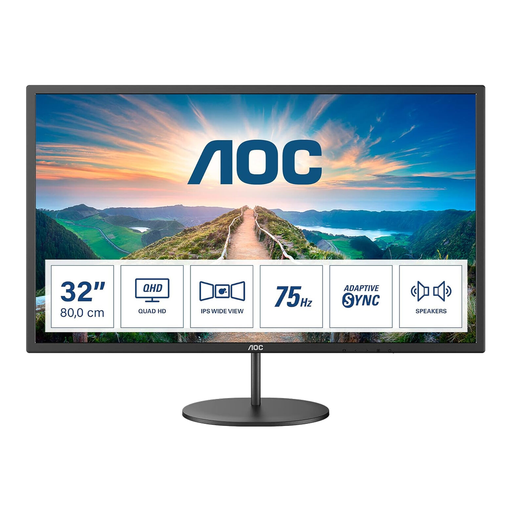
Why This Fits Their Persona: Its 31.5-inch QHD screen suits first-time buyers who want more workspace for games, streaming and study without moving to a premium high-refresh category.
The specification states QHD resolution, 75Hz refresh rate and AdaptiveSync, rather than presenting an inflated esports refresh figure.
IPS panel, 2560 × 1440 resolution, integrated 2 × 2W speakers and VESA 100 × 100mm support.
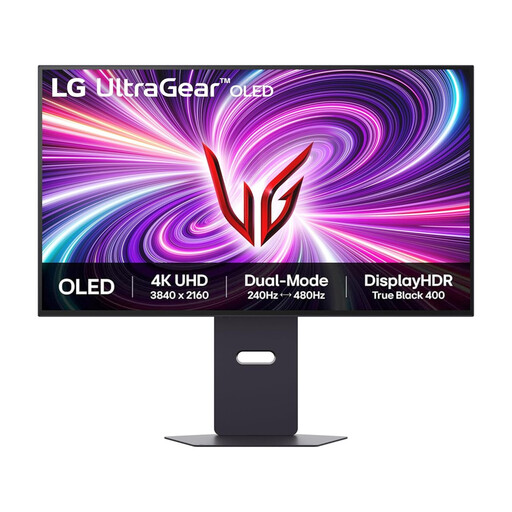
Why This Fits Their Persona: This suits buyers seeking one display for detailed 4K gaming, fast competitive play and console connectivity, provided their hardware supports the required output.
Its dual-mode specification clearly separates 4K at 240Hz from Full HD at 480Hz, helping buyers match expectations to resolution.
OLED panel, 0.03ms GtG response time, HDMI 2.1, DisplayHDR400 True Black support and G-SYNC Compatible and FreeSync Premium Pro support.
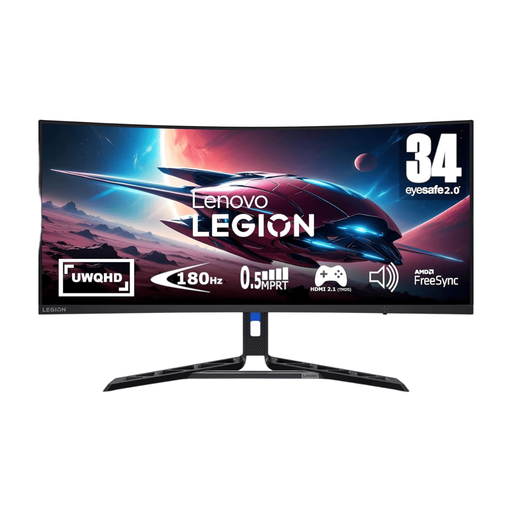
Why This Fits Their Persona: The 21:9 format is suited to simulation and racing players, streamers and UK home workers who want gaming and multiple applications on one screen.
The UWQHD resolution and 180Hz rate are stated together, making the relationship between wide-screen detail and performance easier to assess.
3440 × 1440 VA panel, 180Hz refresh rate, 0.5ms stated response time, FreeSync Premium and height, tilt, pivot and swivel adjustments.
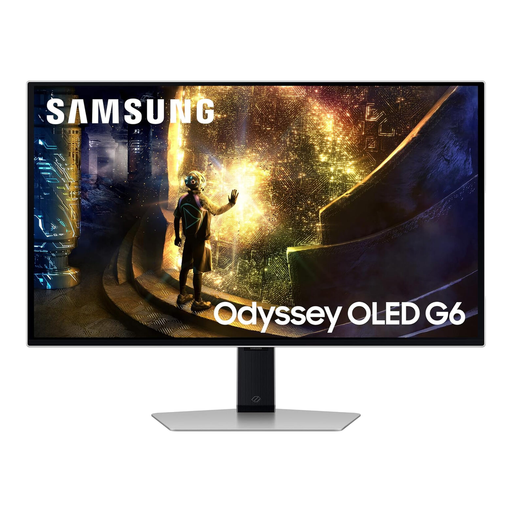
Why This Fits Their Persona: A 27-inch 16:9 format keeps the image easy to scan during esports titles while offering QHD detail for everyday gaming.
The product listing identifies QHD resolution, 240Hz refresh rate and 0.03ms GtG separately, so the principal performance figures are not hidden behind one generic speed label.
QD-OLED panel, 2560 × 1440 resolution, HDMI 2.1, 240Hz refresh rate and compatibility with FreeSync Premium Pro and G-SYNC.
We have compiled a complete, real-time list of products that fully satisfy these strict selection criteria and UK safety regulations.
For many PC players, 144Hz or 165Hz provides smooth motion when the system can maintain a similar frame rate. Competitive players with a high-frame-rate setup may prefer 240Hz, but the benefit depends on the game, hardware and personal priorities.
They can be, but buyers should follow the manufacturer’s pixel-care guidance and avoid leaving static images on screen for extended periods. Use screen-saving features and vary content when the monitor is also used for work.
Many do. Check resolution, refresh-rate support and the available HDMI standard for your specific console. A monitor with HDMI 2.1 may be more suitable for compatible 4K high-refresh console output, while older HDMI connections may limit resolution or refresh rate.