Campaign-map and coursework multitaskers
A 27-inch QHD screen is worth considering if you want space for map labels, tooltips, guides and study windows, provided your computer supports the resolution and intended refresh rate.


For map-heavy historical war games and coursework, start by comparing 27-inch QHD monitors: their 2560 × 1440 resolution gives more pixels for maps and windows than Full HD. A compact Full HD screen may suit a tighter desk or a less capable computer, while a larger ultrawide needs enough desk space, suitable graphics output and support from the game.
A 27-inch QHD screen is worth considering if you want space for map labels, tooltips, guides and study windows, provided your computer supports the resolution and intended refresh rate.
A compact Full HD monitor may be easier to accommodate on a shallow desk or to pair with a modest gaming laptop. Acer Store UK lists a 23.8-inch Full HD IPS option at 144Hz, showing that a smaller format need not mean giving up high refresh altogether.
A larger or wider screen is an option if you value a broad battle view more than a compact setup. Measure the desk, check graphics capability and confirm the game supports the intended aspect ratio before choosing an ultrawide.
Choose when: Desk space is tight or the computer is better suited to 1920 × 1080; Acer Store UK lists a 23.8-inch IPS model at 144Hz.
Trade-off: Full HD has fewer pixels for dense maps and simultaneous windows than 2560 × 1440 QHD.
Choose when: Map interfaces and study windows matter, and your computer can drive QHD at a refresh rate you want to use.
Trade-off: QHD places more demand on the graphics hardware than Full HD; the available refresh rate can also depend on the connection. Dell UK lists QHD 180Hz through DisplayPort but QHD 144Hz through HDMI for its G2725D.
Choose when: You specifically want a wider battlefield or more room for other windows and have measured space for the display.
Trade-off: A wider screen takes more desk space; check the exact resolution against your graphics hardware and the game’s aspect-ratio support.
| Concern | What to check | Who this matters to |
|---|---|---|
| Map clarity and workspace | Compare native resolution and screen size, then check that your computer can output the intended mode. | I want room to read campaign maps while keeping a guide or coursework window open. Around 43% of consumers put map detail and multitasking first. |
| Battle movement | Check refresh rate at native resolution through your intended port, including any requirements for higher modes. | When I move the camera through a real-time battle, I want motion to feel responsive without assuming the game will reach the screen’s maximum refresh rate. Smooth battle play comes first for around 29% of consumers. |
| Desk fit and setup | Measure the desk against dimensions with the stand; check adjustment, mounting needs and the cable you will use. | A screen has to fit my student-room desk and connect to my existing computer without an awkward setup. Around 28% of consumers prioritise compactness and practical setup. |
The highest stated mode may depend on a particular input, graphics output or cable. LG UK says the 200Hz overclocked mode of its 27GS75QN-B requires DisplayPort 1.4-capable graphics hardware and cable.
Compare the exact monitor’s resolution and refresh limits with the ports on your laptop or desktop before ordering.
You may need a compatible cable or adapter if your existing connection cannot provide the mode you intend to use.
Screen size and pixel count answer different questions. A larger 1920 × 1080 screen does not provide the additional desktop pixels of a 2560 × 1440 QHD screen.
If map labels and study windows drive the purchase, compare native resolution alongside the diagonal size.
Positioning and mounting features vary by model. Acer Store UK specifies 120 mm height adjustment and 100 × 100 VESA mounting for the XV272UP; those details should not be assumed for another monitor.
Check dimensions with the stand, the adjustments you need and the exact VESA pattern before deciding how the screen will sit on your desk.
If the supplied stand cannot provide the position you need, a separate monitor arm may be necessary.
A monitor offered for a different market may need closer attention to its supplied power arrangement and product documentation before it is suitable for your setup.
Confirm the seller and product identification, the supplied power arrangement and the documentation applicable to your delivery location before paying.
LG UK lists 27-inch QHD IPS gaming monitors with different refresh-rate and adjustment specifications.
Dell UK specifies different connection limits for its 27-inch QHD Fast IPS G2725D.
Acer Store UK lists both compact Full HD and 27-inch WQHD IPS models, useful formats to compare against your desk and computer.
These choices cover 27-inch high-resolution screens, a compact Full HD option and an ultrawide. Compare each one with your desk measurements, computer outputs and preferred game rather than treating refresh rate alone as the deciding factor.
 No image available
Consider this 27-inch QHD option if map space and a high stated refresh rate both matter to you. Its listed OLED panel and 240Hz rate do not establish which mode your computer can deliver: check the refresh limit for the port and cable you intend to use, as well as desk fit and the supplied power arrangement.
 No image available
This dual-mode option suits someone considering UHD for detailed maps as well as a lower-resolution, higher-refresh mode. The stated modes are UHD at 144Hz and Full HD at 288Hz; check which modes your computer and intended connection can use, and confirm the screen fits your desk.
 No image available
The 2560 × 1440 resolution makes this a QHD option for maps and study windows. Its title states a 220Hz refresh rate; check the rate available through your computer’s intended connection, plus stand adjustment and dimensions with the stand before deciding whether it suits the desk.
 No image available
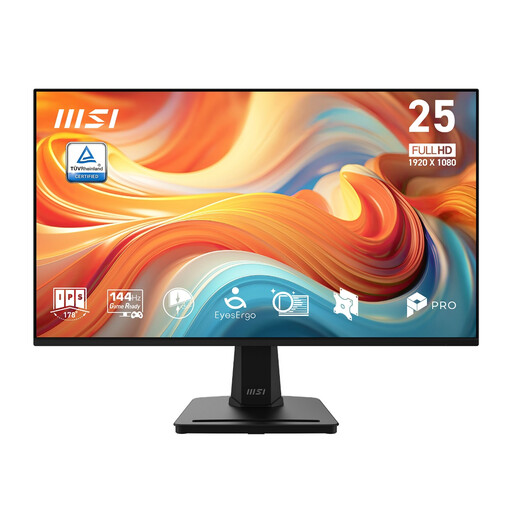
This 24.5-inch Full HD option is worth considering when desk space or the computer’s graphics capability takes priority over QHD workspace. The title specifies 1920 × 1080, 144Hz and Adaptive-Sync; check that your computer can use the intended refresh rate through its chosen connection.
 No image available
The 3440 × 1440 format offers a wider screen for players who have room for it and whose game supports the intended aspect ratio. The listed refresh limits are 175Hz through DisplayPort and 100Hz through HDMI; measure the desk and check the computer, cable and game before choosing this format.
No: choose 27-inch QHD if map detail and room for study windows matter more, and your computer can drive the intended mode. Compact Full HD remains a useful choice when desk space or graphics capability limits the setup.
Not necessarily: the limit depends on the exact monitor, source device and connection. Dell UK specifies up to QHD 180Hz through DisplayPort 1.4 but up to QHD 144Hz through HDMI for the G2725D, so check the port-specific modes of the model you choose.
No: an HDR label alone does not establish a particular viewing experience. If HDR matters to you, compare the specific display information; VESA says its DisplayHDR specification covers measures including luminance, colour gamut, bit depth and rise time.
Confirm the seller and product identification, supplied power arrangement and documentation relevant to the delivery location. GOV.UK guidance from the Office for Product Safety and Standards addresses the Electrical Equipment (Safety) Regulations 2016 for equipment supplied in or into Great Britain; check the applicable arrangements separately if delivery is to Northern Ireland.