For narrative puzzles played from a compatible laptop, prioritise a monitor whose USB-C upstream connection supports both video and enough Power Delivery for that laptop: one cable can replace the laptop’s separate display and charger connections, though the monitor still needs a mains socket. Choose 4K when fine detail matters most; choose QHD with a higher refresh rate if faster games are also important. If you play from a console or desktop, check its HDMI or DisplayPort output rather than paying particular attention to laptop charging.
Who each setup suits
One-cable laptop puzzle players
If your laptop runs the game and wall sockets are scarce, a monitor that carries video and supplies sufficient power over USB-C could free the socket used by the laptop charger. Check that the laptop can output display video over USB-C and that the monitor’s stated Power Delivery rating meets its charging needs.
Detail-first story-game players
If you spend time reading in-game notes and examining scenery, a 27-inch 4K monitor is worth considering when your device can run your games at that resolution. Resolution may matter more to you than the extra refresh-rate headroom of a QHD model.
Mixed-genre players with limited sockets
If narrative puzzles share your desk time with faster games, a high-refresh QHD monitor with USB-C video and charging may suit both uses. Confirm the refresh rate available through the input you intend to use, as well as the laptop’s USB-C compatibility.
What matters when choosing
With limited plug sockets, settle the laptop-power question first. Then weigh 4K detail against higher-refresh QHD according to the games you actually play.
| Concern |
What to check |
Who this matters to |
| One-cable laptop setup |
Check the laptop’s USB-C display output, the monitor’s upstream video support and its Power Delivery wattage. |
If I have few free sockets, I want the monitor to show my laptop’s game while supplying enough power to leave the laptop charger unplugged. Around 42% of consumers put that one-cable need first. |
| Fine image detail |
Compare native 3840 × 2160 and 2560 × 1440 resolution, and check what your device can run at your chosen settings. |
When I linger over scenery or small clues, I care more about image detail than extra refresh-rate headroom. For around 33% of consumers, detail is the primary concern. |
| Faster-game flexibility |
Check the refresh rate at the intended resolution and input; retain the USB-C power checks if you also need laptop charging. |
I play story-led puzzles but also want the same screen for faster games, so refresh-rate flexibility carries more weight for me than 4K. Around 25% of consumers make that versatility their main priority. |
Dell UK lists its S2725QC at 4K with up to 120 Hz and up to 65 W USB-C Power Delivery, while its S2725DC is listed at QHD and 144 Hz with up to 65 W. BenQ UK specifies 180 Hz through DisplayPort for the QHD EX271Q, alongside 65 W USB-C Power Delivery. Those figures describe particular models and connections, not a refresh rate or charging level you can assume for every USB-C monitor.
Checks before you buy
-
Assuming a USB-C socket guarantees video and charging
The connector shape alone does not establish that a laptop can send video or that a monitor can supply the power it needs.
Check the laptop’s documented display-output capability and the monitor’s upstream USB-C video and Power Delivery specifications before relying on a one-cable setup.
-
Treating 65 W as enough for every laptop
A monitor rated for up to 65 W may not meet the charging requirement of the laptop you intend to connect.
Compare the monitor’s stated Power Delivery limit with the laptop manufacturer’s recommended charging input. If they differ, resolve whether you will still need the laptop charger.
-
Assuming the headline display mode works through every input
A stated 4K resolution and maximum refresh rate do not establish that your source device and chosen connection can deliver both together.
Check the device’s output modes, the monitor’s specifications for the intended input and the required cable before planning your gaming setup around a particular mode.
-
Forgetting the old monitor when replacing it
A replacement also leaves you with an electrical item to reuse or dispose of appropriately. UK guidance on waste electrical and electronic equipment addresses recovery and recycling rather than disposal with general waste.
Check suitable retailer take-back or local-authority electrical-waste options for the monitor you are replacing.
Relevant brands to consider
Dell
Dell’s Plus monitor listings provide examples of both 4K and QHD USB-C approaches to a laptop gaming desk.
- Dell UK lists the S2725QC with 4K, up to 120 Hz, DisplayPort Alt Mode over USB-C and up to 65 W Power Delivery; its S2725DC combines QHD and 144 Hz with up to 65 W USB-C Power Delivery.
- The S2725QS is a different 4K model listed with HDMI and DisplayPort. Check the exact model rather than assuming that every Dell Plus monitor can carry laptop video and charging over USB-C.
BenQ MOBIUZ
The EX271Q is a QHD option to examine if faster games share your screen with narrative puzzles.
- BenQ UK specifies a 2560 × 1440 IPS panel, 180 Hz through DisplayPort, USB-C DisplayPort Alt Mode and 65 W Power Delivery for the EX271Q.
- Its QHD resolution provides fewer native pixels than 4K. The stated 180 Hz is for DisplayPort, so check the mode available through the connection you plan to use.
LG
The 27UP850K-W is a 4K IPS model to consider when image detail is the main draw.
- LG UK lists a 27-inch UHD 4K IPS display, USB Type-C and VESA DisplayHDR 400 for this model.
- If replacing the laptop charger is essential, confirm the current model-specific USB-C video and Power Delivery specifications before choosing it.
Joybuy product choices
These choices cover 4K desk monitors and a smaller portable display for narrative puzzles and other games. Their screen sizes and connection details differ, so check the intended device’s video output and charging requirement before treating any USB-C model as a one-cable solution.
 No image available
BenQ MA270UP Nano Glossy 27-inch 4K USB-C Mac monitor
Consider this model if 4K detail for scenery and in-game text matters more to you than a high-refresh gaming specification.
- The product name identifies a 27-inch 4K UHD IPS display, USB-C, HDR, P3 and a height-adjustable stand.
- For laptop video and charging, confirm the laptop’s USB-C display output and compare its power requirement with the monitor’s current specifications.
View on Joybuy
 No image available
Dahua 32-inch 4K 165 Hz curved OLED gaming monitor
This larger 4K screen is worth examining if you want detailed puzzle scenes and also play games for which a higher refresh rate matters.
- The product name specifies 3840 × 2160, 165 Hz, OLED, HDMI 2.1, DisplayPort and Type-C power rated at 65 W.
- Confirm USB-C video support before planning a one-cable laptop connection, and compare 65 W with the laptop’s charging requirement.
View on Joybuy
 No image available
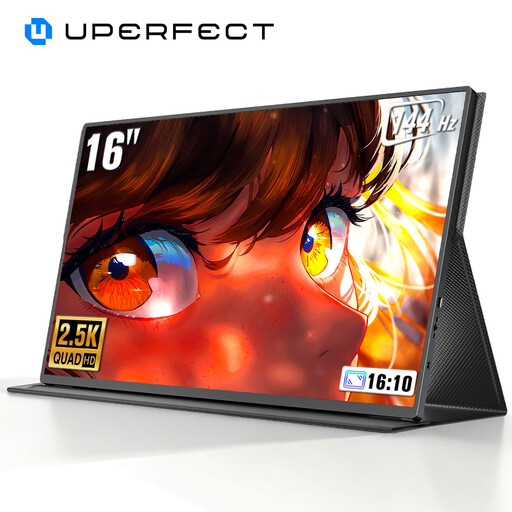
UPERFECT 16-inch 2K 144 Hz portable monitor
Consider this smaller portable display if a compact screen suits your gaming space and you want a stated 144 Hz refresh rate alongside puzzle play.
- The product name specifies a 16-inch, 2560 × 1600 QLED screen with a 16:10 aspect ratio, Mini HDMI and Type-C.
- Check which video and power functions the Type-C connection supports with your device; do not assume it replaces a laptop charger.
View on Joybuy
 No image available
PHILIPS Evnia 32M2N8900 32-inch UHD OLED gaming monitor
This model may interest you if a larger UHD OLED display is central to how you want to view detailed game environments.
- The product name identifies the 32M2N8900 variant, a 32-inch UHD OLED panel and HDR400.
- Confirm the exact model’s refresh rate before choosing it for faster games. If laptop charging matters, also check USB-C video support and whether the stated 65 W Power Delivery meets your laptop’s needs.
View on Joybuy
 No image available
Lenovo L32p-30 31.5-inch 4K UHD IPS USB-C monitor
Consider the larger 4K screen if you want room to inspect story-game scenery and read on-screen notes at your desk.
- The product name specifies a 31.5-inch 4K UHD IPS monitor with USB-C.
- Before relying on one cable for a laptop, confirm USB-C video compatibility and the monitor’s Power Delivery wattage against the laptop’s charging requirement.
View on Joybuy
Common questions
Will a USB-C monitor free every wall socket in my setup?
No: the monitor still needs mains power. With a compatible laptop and sufficient monitor Power Delivery, the connection can let you unplug the laptop’s separate wall charger while carrying display video over the same cable.
Can any USB-C laptop send video to a monitor and charge through it?
Not on the strength of the USB-C connector alone. Check the laptop’s documented USB-C display-output function, the monitor’s upstream video support and its Power Delivery rating against the laptop’s recommended charging input.
Is 4K or high-refresh QHD more useful for narrative puzzles?
Choose 4K if fine environmental detail and text are your priority and your device can run your games at that resolution. High-refresh QHD is a different trade-off if you also play faster games and value refresh-rate flexibility more than the extra pixels.
What should I do with a monitor I replace?
Use an appropriate electrical-waste or reuse route rather than putting it in general waste. UK waste electrical and electronic equipment guidance addresses recovery, reuse and recycling; check retailer take-back terms or your local authority’s collection options.


