For ranked tactical play, consider a high-refresh Full HD monitor if your PC and connection can use its advertised mode; choose a QHD screen if sharper visuals for other tasks matter more than the highest refresh ceiling. If a spare socket is the deciding constraint, check whether the monitor can deliver enough USB-C Power Delivery for your compatible laptop: a USB-C port alone will not replace its charger, and the monitor still needs mains power.
Who each monitor route suits
Ranked tactical FPS competitors
If Counter-Strike 2 or VALORANT is your main use, a high usable refresh rate and your preferred motion settings may matter more to you than QHD detail. ZOWIE by BenQ lists the 400Hz XL2566X+ with Fast TN and DyAc 2 for FPS play; Dell lists the 24.5-inch AW2524HF with up to 500Hz capability. Check what your PC can deliver before choosing by the headline figure.
Laptop-and-PC desk sharers
If a laptop charger occupies one of your few sockets, a monitor with suitable USB-C Power Delivery could take over charging a compatible laptop. A KVM can also help when switching peripherals between devices. The BenQ MOBIUZ EX271Q retailer listing specifies 65W USB-C Power Delivery and KVM; whether it can replace your charger depends on your laptop.
Competitive all-round users
If you also work, browse or play games where you value more screen detail, a 27-inch QHD monitor offers a different balance from a 24.5-inch Full HD esports model. Lenovo lists the Legion R27qe at QHD and 180Hz through DisplayPort; LG lists the QHD 27GS75QN-B at 180Hz, with a conditional 200Hz overclock mode.
What to prioritise
For ranked tactical play at a desk with limited sockets, decide whether usable match speed, replacing a compatible laptop charger or sharper mixed-use visuals is your primary reason for buying. Then check the connection and power requirements of the exact monitor.
| Concern |
What to check |
Who this matters to |
| Match speed and motion settings |
Check refresh modes by input, your in-game frame rate and whether your preferred blur-reduction mode works with variable refresh rate (VRR). |
When every ranked match is the main event, I want a refresh mode my PC can actually use and motion settings that suit my play. Around 42% of consumers would make usable match speed their primary concern. |
| Socket and cable use |
Check the monitor’s stated USB-C Power Delivery output against your laptop’s charging requirement; check KVM support if you switch peripherals. |
With a laptop and gaming PC sharing a desk, I want to know whether the screen can replace my laptop charger at the socket. For roughly 33% of consumers, that desk-power need would come first. |
| QHD detail for mixed use |
Compare the intended QHD refresh mode and connection with the frame rate your PC can sustain at 2560 × 1440. |
If I use the screen beyond tactical matches, I may value QHD workspace and game detail more than the highest esports refresh figure. Sharper mixed-use visuals would be the leading concern for about 25% of consumers. |
Buying mistakes to avoid
-
Assuming every USB-C port can charge a laptop
USB-C charging output differs by model. ASUS specifies 7.5W Power Delivery for the ROG Strix XG259CS, while the BenQ MOBIUZ EX271Q retailer listing specifies 65W. A port’s presence does not establish that it can replace your laptop’s charger.
Check the monitor’s Power Delivery output and your laptop’s USB-C charging support and required wattage before planning your socket layout.
If the combination cannot charge your laptop as needed, you will still need its separate charger and a socket for it.
-
Choosing by the maximum refresh figure alone
The usable mode can depend on the video connection. Dell lists different refresh modes for the AW2524HF, and LG says the 27GS75QN-B’s 200Hz overclock mode requires a DisplayPort 1.4-capable graphics card and cable.
Compare the exact monitor’s refresh modes by input with your graphics output, cable and typical in-game frame rate.
-
Assuming blur reduction always works with VRR
Feature combinations are model-specific. ASUS lists ELMB Sync with Adaptive-Sync on the XG259QN, whereas ZOWIE by BenQ says DyAc, DyAc+ and DyAc 2 must be turned off to use VRR on its relevant models.
Decide which setting you expect to use during matches, then check that exact model’s supported combination.
-
Moving to QHD without checking the PC workload
Rendering games at QHD requires more graphics work than Full HD at otherwise comparable settings. The QHD Lenovo Legion R27qe and LG 27GS75QN-B take a different resolution-and-refresh approach from the Full HD esports models listed by Dell and ZOWIE.
Use your PC’s frame rates at the resolution you intend to play before deciding whether QHD detail or a higher usable refresh rate matters more.
Relevant brands for reference
ZOWIE by BenQ
The 24.5-inch Full HD XL2566X+ represents ZOWIE’s FPS-focused 400Hz Fast TN route.
- According to ZOWIE by BenQ, its DyAc 2 feature is intended to improve motion clarity during FPS play.
- ZOWIE says DyAc 2 cannot be used with VRR, so check which setting you would keep enabled.
Alienware
Dell’s 24.5-inch Full HD AW2524HF represents a Fast IPS esports route with up to 500Hz capability.
- Dell lists height, pivot, swivel and tilt adjustments alongside the monitor’s high-refresh specification.
- Its Full HD resolution makes it a different choice from QHD models for buyers who also want more desktop detail.
ASUS ROG
ASUS lists the 24.5-inch Full HD XG259QN at 380Hz overclocked, while the XG259CS offers a separate USB-C-equipped route.
- The XG259QN specification includes Fast IPS and ELMB Sync.
- ASUS specifies 7.5W USB-C Power Delivery for the XG259CS; do not assume its USB-C port can replace a laptop charger.
LG UltraGear
The 27-inch QHD IPS 27GS75QN-B represents a 180Hz mixed-use gaming route with a 200Hz overclock option.
- LG lists adaptive-sync compatibility for this model.
- LG says its 200Hz mode requires a DisplayPort 1.4-capable graphics card and cable.
BenQ MOBIUZ
The EX271Q represents a 27-inch QHD 180Hz route for a desk shared with a compatible laptop.
- The Amazon UK listing specifies USB-C 65W Power Delivery and KVM for the EX271Q.
- Confirm that 65W meets your laptop’s charging requirement; its stated refresh ceiling also differs from the 380Hz-to-500Hz esports models discussed here.
Joybuy monitor choices
These choices span an ultrawide USB-C gaming monitor, a 32-inch 4K model with stated USB-C charging and a 27-inch Full HD speed-focused model. Compare each with your game’s frame rate, available desk space and laptop-charging needs rather than treating them as interchangeable esports displays.
 No image available
Acer X Predator X49X 49-inch curved ultrawide QD-OLED monitor
Consider this if an ultrawide display is part of your gaming and desk setup; check your games’ aspect-ratio support and the space available before choosing it for ranked play.
The listed configuration is 49 inches, 32:9, Double Quad HD and 240Hz, with an 1800R curve and USB-C. Confirm the refresh mode your PC can use and whether its USB-C connection meets your laptop’s charging needs; the monitor still needs mains power.
View on Joybuy
 No image available
Dahua 32-inch curved 4K OLED 165Hz gaming monitor
This is a route to consider if you want a 4K gaming screen and are checking whether one monitor can also charge your laptop. Its 32-inch format and resolution call for a check of your desk space and target game frame rate.
The title lists 3840 × 2160 resolution, 165Hz, a USB hub and Type-C 65W Power Delivery. Confirm that your laptop supports the connection and can charge at 65W, and check the intended 4K refresh mode against your PC and cable.
View on Joybuy
 No image available
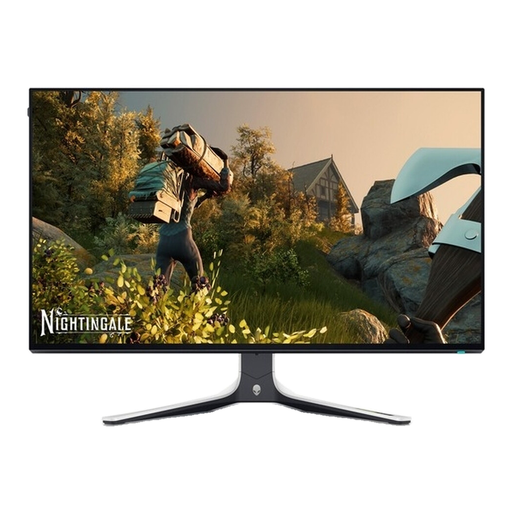
Alienware AW2724HF 27-inch Full HD 360Hz gaming monitor
Consider this model if Full HD ranked play matters more to you than QHD detail, and check how you will power any laptop sharing the desk.
The title states 360Hz and Fast IPS. Confirm the usable refresh rate for your chosen input, PC and cable before buying. Check separately for any laptop-charging capability you require; the monitor itself needs mains power.
View on Joybuy
Common questions
Will a USB-C gaming monitor free up a wall socket?
It can free the socket used by a compatible laptop charger if the monitor supplies enough USB-C Power Delivery for that laptop; the monitor still needs its own mains connection. ASUS lists 7.5W for the XG259CS, while the BenQ MOBIUZ EX271Q retailer listing states 65W, so check the exact model and your laptop’s requirements.
Is a 500Hz monitor worth choosing for ranked tactical games?
Choose a 500Hz-capable monitor for that aim only if your PC, game, output and cable can make use of the intended mode. Dell lists connection-dependent refresh modes for the AW2524HF; a higher headline figure alone does not establish the refresh rate you will use.
Can I use VRR and blur reduction at the same time?
That combination depends on the monitor and its specific feature mode. ASUS lists ELMB Sync with Adaptive-Sync on the XG259QN, but ZOWIE by BenQ says its relevant DyAc modes must be turned off for VRR. Check the manual for the exact model and setting you intend to use.


