Start with the usable desk space: a compact 24–25-inch Full HD monitor is worth considering when the stand and mouse space are tight, while a 27-inch QHD screen makes sense if it fits and your gaming system can handle the resolution. For dark survival-game scenes, compare model-specific contrast and motion results rather than relying on an HDR label, a curve or a quoted response-time figure.
Who is this for?
Players short on desk space
If your keyboard and mouse already occupy most of the surface, check the monitor's full width and stand depth before choosing a screen size. LG UK lists a 180.5 mm stand depth for its 24GS60F-B, illustrating why even a compact model needs measuring against your desk.
Players exploring dark environments
If forests, interiors and night scenes are central to your games, compare contrast and dark-motion behaviour for the exact monitor. RTINGS notes that higher contrast typically produces deeper blacks in dark rooms and that VA LCD panels generally have higher contrast than IPS panels.
Players balancing motion and connections
If responsive camera movement matters or you switch between a PC and console, check response behaviour and the refresh limit of the input you will use. Dell UK, for example, specifies different DisplayPort and HDMI refresh limits for its Alienware AW2725DM.
What matters when choosing?
Measure the desk and stand first, then decide how much you value dark-scene contrast, QHD detail and smooth motion. Check connections against your own PC or console before settling on a monitor.
| Concern | What to check | Who this matters to |
|---|
| Desk fit |
Compare width and stand depth with the usable surface; if using an arm, check the VESA pattern and arm limits. |
If the stand crowds my keyboard or mouse, a larger picture will not fix the cramped setup. Around 31% of consumers put desk fit first. |
| Dark scenes |
Look for model-specific contrast and dark-transition tests. RTINGS notes that VA generally has higher contrast than IPS, but panel type does not establish an individual monitor's results. |
When I explore dark interiors, I want to judge shadowed areas without distracting motion trails. For around 25% of consumers, dark-scene behaviour is the primary concern. |
| Detail and motion |
Balance Full HD or QHD against your system's frame rates; compare response and overshoot tests at the refresh rates you expect to use. |
I want to make out distant scenery while camera movement remains clear, even if that means adjusting game settings. Around 25% of consumers prioritise this balance. |
| Inputs and setup |
Check resolution, refresh and variable-refresh support for the intended port, plus the stand adjustments you need. |
If I connect more than one device, the input I actually use must support my intended display settings. Getting connections and positioning right comes first for around 19% of consumers. |
Buying pitfalls
-
Choosing by screen diagonal alone
The base can take up valuable desk depth even on a smaller monitor. LG UK lists a 180.5 mm stand depth for the 24GS60F-B.
Measure the usable surface after allowing for your keyboard, mouse and cables. If you plan to use an arm, check the exact monitor's VESA pattern and the arm's limits.
-
Assuming HDR, curvature or a quoted 1 ms means clear dark scenes
RTINGS identifies contrast as important to blacks in dark rooms and notes that slow pixel response can cause blur or inverse ghosting. Neither a feature label nor a single quoted response figure settles both questions.
Compare independent contrast and dark-motion tests for the exact model where available, particularly if night-time exploration is a priority.
-
Assuming every input supports the headline refresh rate
Dell UK specifies QHD at up to 180 Hz through DisplayPort on the Alienware AW2725DM, but up to 144 Hz through HDMI.
Match the monitor's per-port specifications to your PC or console, cable and intended resolution before ordering.
-
Treating an older model page as a current purchase option
A published specification can help you compare screen sizes and features without establishing that the same model is currently available.
Confirm the current model number, physical dimensions and availability for the particular monitor you intend to buy.
Brands to consider for these monitor types
LG UltraGear
The UK UltraGear range provides examples of both compact Full HD and larger curved QHD gaming monitors.
- LG UK specifies a 180.5 mm stand depth for the 23.8-inch 24GS60F-B, a useful point of comparison when measuring desk space.
- That compact example is marked discontinued; check the dimensions and stand adjustment of any current model separately.
ASUS ROG
The ROG Strix XG259CS is an example of a 24.5-inch Full HD Fast IPS monitor for the compact-screen route.
- ASUS ROG specifies a 180 Hz refresh rate and USB-C DisplayPort Alt Mode for the XG259CS.
- Check its physical dimensions, the inputs your device supports and model-specific motion tests rather than treating the quoted response time as a measured result.
Alienware
The AW2725DM is a 27-inch QHD Fast IPS example for buyers considering a larger screen and USB connectivity.
- Dell UK specifies up to 180 Hz through DisplayPort and up to 144 Hz through HDMI for this model.
- Check the refresh limit for your intended connection and measure the stand before choosing it for a small desk.
BenQ MOBIUZ
The EX2710Q is a 27-inch QHD IPS example for players considering built-in audio alongside game-oriented display controls.
- BenQ describes Light Tuner, Black eQualizer and integrated speakers as features of the EX2710Q.
- Those feature descriptions do not establish how its shadow detail or sound will suit you; also check the stand footprint.
Joybuy monitor choices
These choices cover compact and larger gaming screens, plus a smaller portable display. For a small desk, compare each screen's footprint and its refresh rate against the space and gaming system you have.
 No image available
KOORUI MG24A12FV2 24-inch curved gaming monitor
Consider this smaller-screen option if you need to preserve desk space, but check the stand depth against your mouse and keyboard area.
The title specifies Full HD, a VA panel, 180 Hz, Adaptive Sync, two HDMI inputs, DisplayPort and VESA compatibility. Its quoted 1 ms figure does not establish measured dark-transition or motion performance.
View on Joybuy
 No image available
MAG 274QP QD-OLED X24 27-inch gaming monitor
Consider its QHD screen if you can accommodate a larger display and want to assess a QD-OLED option for dark scenes.
The title specifies 2560 × 1440, 240 Hz and Adaptive-Sync. Check the stand footprint and independent contrast and motion results if those will determine your choice.
View on Joybuy
 No image available
MAG 275QF X32 27-inch QHD gaming monitor
This is a larger-screen route for a desk that can fit a 27-inch display and a system suited to QHD gaming.
The title specifies 2560 × 1440, 320 Hz, Rapid IPS and Adaptive-Sync. Confirm the refresh rate through your intended input and compare independent dark-scene and motion results.
View on Joybuy
 No image available
Acer X Predator X27U W3 26.5-inch QD-OLED gaming monitor
Consider this larger QHD option if the screen and stand will fit your desk and you want to compare QD-OLED models.
The title specifies 2560 × 1440, 240 Hz, FreeSync Premium Pro and G-SYNC compatibility. Check the exact stand footprint and independent contrast and motion results before choosing it for dark-scene play.
View on Joybuy
 No image available
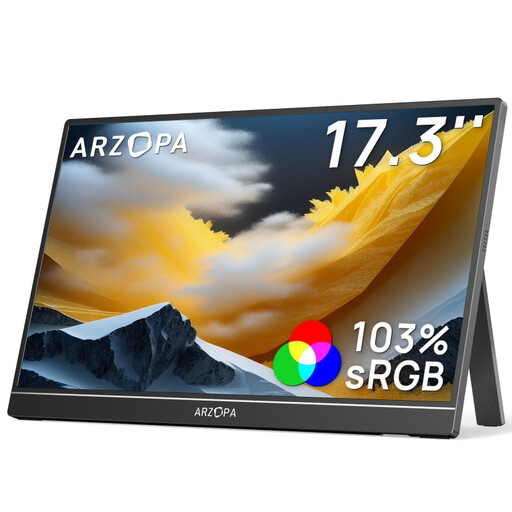
ARZOPA A1M 17.3-inch Full HD portable monitor
This smaller portable option may suit a particularly restricted desk if you are comfortable with its lower refresh rate.
The title specifies an IPS screen, kickstand, USB-C and HDMI. Its listed 60 Hz refresh rate makes it a different choice from the high-refresh gaming monitors above; check compatibility with the device you intend to connect.
View on Joybuy
Frequently asked questions
Will HDMI run a QHD monitor at its advertised maximum refresh rate?
Not necessarily: the limit depends on the monitor's particular input and the connected device. Dell UK specifies QHD at up to 180 Hz through DisplayPort on the Alienware AW2725DM, but up to 144 Hz through HDMI; check your chosen model, source and cable.
Does a quoted 1 ms response time tell me whether a monitor will ghost?
No: a quoted figure alone cannot describe motion across different pixel transitions and settings. RTINGS explains that slow response can cause blur or inverse ghosting, so compare independent response and overshoot tests at the refresh rates you expect to use.
How can I tell whether a monitor or monitor arm will fit my desk?
Compare the exact monitor's width and stand depth with the space left after your keyboard and mouse. For an arm, also match the monitor's VESA pattern and weight to the arm's limits; LG UK lists a 180.5 mm stand depth and 100 × 100 mm mounting pattern for the 24GS60F-B, not for every compact monitor.
What should I do with an old monitor when replacing it?
Look for an appropriate electrical-equipment collection route or check whether your retailer offers take-back. GOV.UK describes the UK waste electrical and electronic equipment framework as supporting recovery, reuse and recycling; confirm the arrangements available to you rather than assuming a particular retailer service.


