
24/7 Customer Support

Free returns

Same-day & Next-day Delivery

Quality Guaranteed

Unlock Your Welcome Offers: FREE Delivery | Up to 80% OFF | Free 30-day JoyPlus trial
Download the APP
Buying one of the many gaming monitors available in the UK can look straightforward until you compare refresh rates, resolutions, panel types and connection standards. Marketing often focuses on one impressive number, while less visible details can determine whether a display suits your desk, graphics card or console.
Before choosing, watch for three common traps:
The right choice depends on how you play, what hardware you own and whether the monitor also needs to support work, content creation or entertainment.
Resolution affects image detail, while screen size affects viewing comfort and desk requirements. A QHD gaming monitor or 1440p gaming monitor with 2560 × 1440 resolution provides more desktop space and sharper detail than Full HD at a similar screen size.
For many PC users, 27 inches is a practical size for QHD. A 31.5-inch or 32-inch display can offer a more spacious image, but individual pixels may be more noticeable at close range. A 34-inch ultrawide gaming monitor typically uses 3440 × 1440 resolution and a 21:9 aspect ratio, which is useful for panoramic games and side-by-side applications.
A 49-inch 32:9 monitor can replace two conventional screens, but check your desk width and graphics card output before ordering. Larger displays can also be harder to position correctly in a compact UK home office.
A high refresh rate monitor updates the image more frequently. A 144Hz, 180Hz gaming monitor or 240Hz gaming monitor can show smoother motion than a 60Hz model when the computer or console produces enough frames per second.
However, a higher number is not automatically useful for every player. Casual gaming, office work and many console setups may not benefit from 240Hz in the same way as competitive PC gaming. Confirm the maximum refresh rate supported by the input:
FreeSync gaming monitor models synchronise the display refresh with compatible AMD graphics hardware. Some displays also support G-SYNC compatibility. Adaptive sync can help reduce tearing and stuttering, but settings may need to be enabled in the monitor menu and graphics driver.
Response time should be read alongside panel technology and measurement type. A fast quoted figure does not guarantee identical motion performance across every mode.
VA panels commonly offer stronger stated contrast than IPS panels, which can suit dark game scenes and films. IPS displays are often selected for wide viewing angles and consistent colour. OLED and QD-OLED panels can provide very deep blacks and fast pixel response, but buyers should understand OLED care requirements.
An OLED gaming monitor may include pixel shifting, logo dimming or automatic dimming to help manage static-image exposure. These features do not remove the need to vary static content and follow the manufacturer’s care instructions. OLED panels can be unsuitable for users who display the same desktop elements for long periods every day.
For creative work, check colour gamut and calibration information rather than relying on general phrases such as “true colour”. The ASUS ProArt PA278CV, for example, lists 100% sRGB coverage and factory calibration. Brightness, HDR format, anti-glare treatment and low-blue-light modes are also worth checking, particularly for rooms with variable daylight.
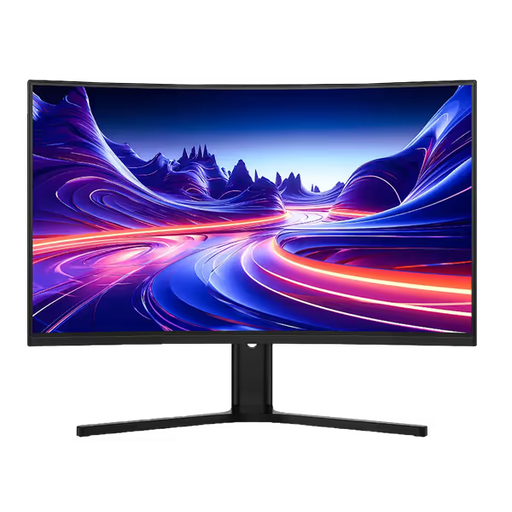
Why This Fits Their Persona: It combines a large 31.5-inch QHD screen with a 180Hz refresh rate for PC gaming, while HDMI inputs support console connections. Its 1500R curve can suit players seeking a more enveloping view without moving to an ultrawide format.
The listed specifications identify separate HDMI and DisplayPort limits: QHD reaches 144Hz over HDMI 2.0 and 180Hz over DP 1.4.
2560 × 1440 resolution, 180Hz refresh rate, VA panel, dual HDMI and dual DP ports, plus 100mm height adjustment.
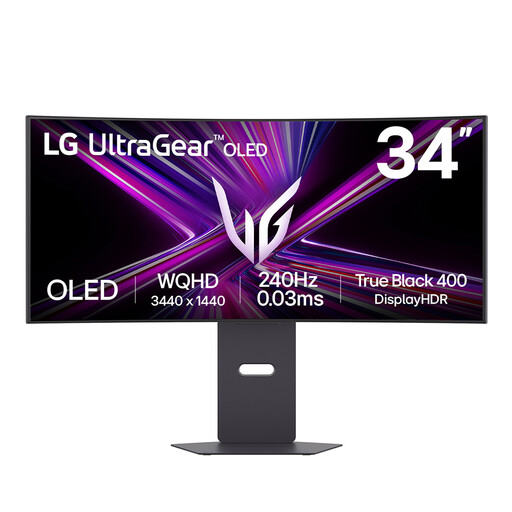
Why This Fits Their Persona: The 21:9 OLED panel is suited to users who want an immersive display for fast PC gaming, films and multitasking. USB-C with up to 65W power delivery also supports a compatible laptop-based workspace.
Its connection list includes HDMI 2.1 and DP 1.4, while the product guidance explicitly highlights OLED care features and burn-in precautions.
3440 × 1440 OLED display, 240Hz refresh rate, 0.03ms GtG response time, HDMI 2.1 and USB-C connectivity.
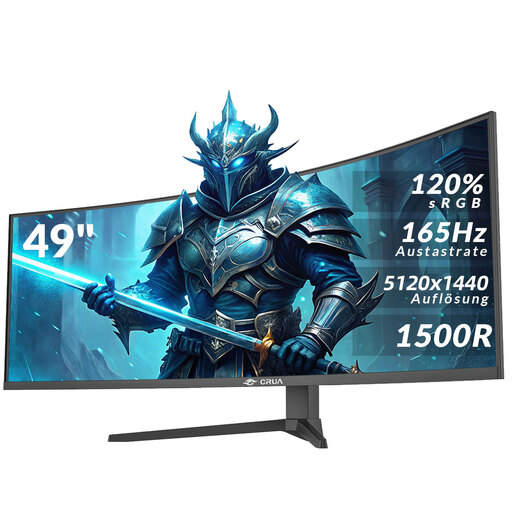
Why This Fits Their Persona: This model is aimed at users combining gaming, video editing, multiple windows and home-office work on one very wide screen. It requires a deep, sturdy desk and careful handling during installation.
The product information states the 5120 × 1440 resolution, 165Hz refresh rate and required HDMI 2.1 or DP 1.4 connections, helping buyers check compatibility first.
32:9 aspect ratio, 5120 × 1440 DQHD resolution, 165Hz refresh rate, AMD FreeSync and height adjustment.
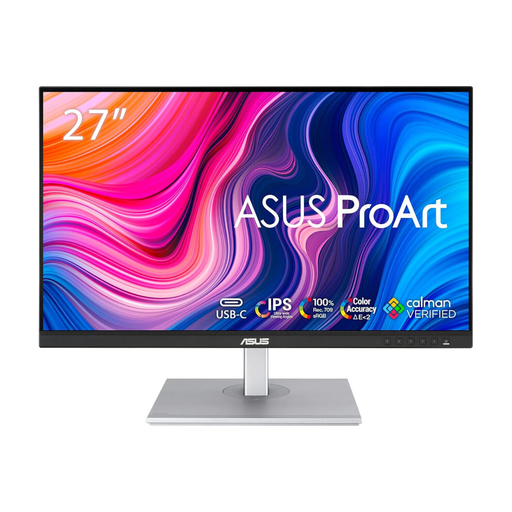
Why This Fits Their Persona: Its 27-inch QHD IPS format is suitable for design, photo work, office applications and casual gaming where colour consistency matters more than competitive refresh rates.
It prioritises listed colour and ergonomic specifications rather than presenting a gaming-only refresh-rate figure as a universal benefit.
2560 × 1440 IPS panel, 100% sRGB coverage, factory calibration, USB-C, USB hub and height, tilt, swivel and pivot adjustments.
We have compiled a complete, real-time list of products that fully satisfy these strict selection criteria and UK safety regulations.
They can be, but compatibility depends on the monitor’s HDMI version, supported resolution and refresh-rate modes. Check the monitor specification and console settings together. HDMI 2.1 is relevant for some high-resolution, high-refresh console configurations, while not every monitor supports every console mode.
The difference is visible mainly when the computer can consistently produce frame rates above 144 frames per second and the game benefits from rapid motion clarity. For mixed gaming, work and entertainment, resolution, panel quality and ergonomics may provide more practical value than the additional refresh-rate headroom.
There is no universal lifespan because usage, environment and panel type differ. Keep ventilation clear, avoid impact and use the manufacturer’s care settings. OLED owners should follow pixel-care guidance and avoid leaving static desktop elements displayed for extended periods. A suitable warranty and accessible support information are useful factors when comparing products.