For a shared-bedroom desk with room for a 27-inch screen, a QHD gaming monitor is a useful starting point for comparing image detail, refresh rate and physical fit. Consider a smaller QHD screen when desk space is tight, or Full HD when its lower native resolution suits your setup; whichever size you choose, check your device’s supported display modes and plan a headphone connection for quiet play.
Who these choices suit
Detail-first space explorers
If maps, cockpit text and distant scenery matter most, compare QHD screens that fit your desk and check whether your PC or console supports the intended output mode. ASUS and Dell list 27-inch QHD gaming models, while AOC lists a smaller 23.8-inch option.
Players with a compact bedroom desk
If the desk is shared or shallow, check the screen and stand dimensions before choosing a larger panel. AOC’s 23.8-inch Q24G4RE shows that a smaller QHD format is available.
Quiet late-night players
If someone nearby is sleeping or studying, plan how headphones will connect to the monitor, PC or console. Dell lists a headphone output for the G2725D, and BenQ lists one for the EX2710Q; check the connection on the exact model you choose.
What matters when choosing
Start with the space available on the desk and the resolution you want, then check the display modes your PC or console can actually use. In a shared bedroom, the audio connection deserves its own check rather than being left until setup.
| Concern |
What to check |
Who this matters to |
| Image detail |
Compare native QHD and Full HD resolution, then check the source device’s output and expected game performance. |
If small cockpit text and distant scenery are my priority, I want enough native resolution to make a detail-focused choice. Around 36% of consumers put image detail first. |
| Desk fit |
Measure usable width and depth, including the stand, keyboard and intended viewing position. |
When my bedroom desk has to serve more than gaming, I need a screen that leaves room to use it comfortably. Desk fit comes first for around 29% of consumers. |
| Motion and compatibility |
Check refresh rate at the intended resolution for the exact HDMI or DisplayPort input, plus relevant adaptive-sync support. |
I want smooth camera movement, but only at a display mode my PC or console can deliver. Around 21% of consumers make that connection their primary concern. |
| Quiet play |
Confirm a compatible headphone connection on the monitor or source device. |
If another person is sleeping or studying nearby, I need an audio route that does not rely on room speakers. Quiet play is the main concern for around 14% of consumers. |
Buying pitfalls
-
Assuming the maximum refresh rate works through every port
Dell specifies up to QHD 180Hz over DisplayPort for the G2725D, but up to QHD 144Hz over HDMI. Its headline refresh rate therefore does not describe every connection.
Match your device, cable and chosen input to the monitor’s port-by-port display modes.
-
Expecting QHD detail from a Full HD screen
LG specifies the 27GS60F-B at 1920 × 1080, while the cited QHD models use 2560 × 1440. A similar screen size or refresh rate does not make their native resolutions the same.
Choose Full HD with that resolution difference in mind, particularly if reading small game interfaces matters to you.
-
Relying on built-in speakers for quiet play
BenQ lists speakers on the EX2710Q, but speakers produce sound in the room. For a shared bedroom, the practical question is where compatible headphones will connect.
Check the monitor’s headphone output or plan to connect headphones directly to the PC or console.
-
Overlooking the old monitor when replacing it
UK government guidance on waste electrical and electronic equipment encourages recovery, reuse and recycling of electrical equipment.
Check the retailer’s applicable take-back arrangements or a local electrical-waste collection route.
Brands to consider
These model examples illustrate different screen sizes, resolutions and connection features; check the exact variant before treating a brand name as a specification.
ASUS TUF Gaming
A 27-inch QHD route for comparing high-refresh gaming specifications.
- ASUS specifies the VG27AQL3A as a 2560 × 1440, 180Hz Fast IPS monitor with FreeSync Premium and G-SYNC Compatible features.
- Check its ports, stand and exact retailer variant against your desk and source device.
AOC AGON
A smaller-panel QHD option for a constrained desk.
- AOC lists the Q24G4RE with a 23.8-inch, 2560 × 1440 IPS panel and 180Hz refresh rate.
- Its smaller panel occupies less physical space than a 27-inch screen but also presents the game on a smaller screen.
Dell Gaming
A 27-inch QHD example with published input-specific modes and a headphone output.
- Dell specifies the G2725D as a 180Hz Fast IPS monitor and lists a headphone output.
- Dell lists up to QHD 144Hz over HDMI and QHD 180Hz over DisplayPort for this model; match the intended connection to those limits.
LG UltraGear
A 27-inch Full HD alternative when QHD is not the chosen resolution.
- LG specifies the 27GS60F-B as a 1920 × 1080 IPS monitor with a 180Hz refresh rate.
- Its native resolution is lower than that of the cited QHD models, a relevant distinction for detailed interfaces and scenery.
BenQ MOBIUZ
A 27-inch QHD example with both room-audio and headphone options.
- BenQ specifies the EX2710Q at 165Hz with a headphone jack, integrated speakers and 100mm height adjustment.
- For quiet shared-room play, check the headphone route rather than relying on its speakers.
Joybuy monitor choices
These choices cover larger curved QHD screens, 27-inch QHD screens and a 27-inch Full HD option. Compare their physical fit and connection modes alongside resolution; a smaller QHD screen is another route discussed above.
 Image unavailable
Dahua 32-inch QHD 180Hz curved gaming monitor
Consider this larger curved screen if your desk has room for it and QHD detail is a priority.
The product title specifies 2560 × 1440 resolution, a VA panel, 180Hz refresh rate, two HDMI inputs and two DisplayPort 1.4 inputs. Check the display mode available through your chosen input and whether the audio connection suits your headphones.
View on Joybuy
 Image unavailable
CRUA 32-inch 1500R curved QHD 165Hz gaming monitor
Consider this larger QHD format if you can accommodate the screen and want to check mounting as an alternative to its stand.
The product title specifies 2560 × 1440 resolution, 165Hz refresh rate, HDMI and DisplayPort connections, and a 100 × 100mm VESA mounting pattern. Confirm the refresh mode for your chosen input and whether the audio output works with your headphones.
View on Joybuy
 Image unavailable
Samsung Odyssey G6 S27DG612 27-inch QHD OLED 240Hz
This is a 27-inch QHD choice to compare when both image detail and a high stated refresh rate matter.
The product title specifies an OLED panel and 240Hz refresh rate. Check input-specific display modes against your device and arrange a suitable headphone connection for shared-room play.
View on Joybuy
 Image unavailable
HKC G27H2DPro 27-inch QHD Fast IPS 220Hz
This 27-inch QHD model is another option if you want a high-refresh screen without moving to a larger panel.
The product title specifies 2560 × 1440 resolution, a Fast IPS panel and 220Hz refresh rate. Check the supported mode on your intended input, along with stand adjustments and a headphone route if you need them.
View on Joybuy
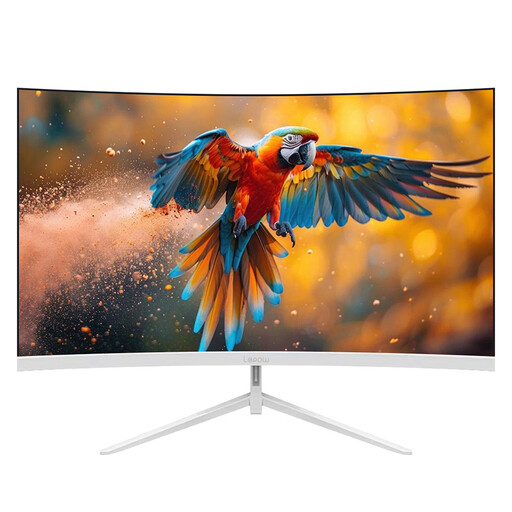 Image unavailable
Lepow HC-27Q5 27-inch curved 180Hz monitor
Consider this 27-inch option only if Full HD provides the native resolution you want for game interfaces and scenery.
The product information identifies a 1920 × 1080 curved display with a 180Hz refresh rate. Check input-specific display modes and your headphone connection before choosing it for a shared bedroom.
View on Joybuy
Common questions
Can I use a 1440p gaming monitor with an Xbox?
Yes, with an Xbox model and monitor that support 1440p. Xbox Support identifies the Xbox Series X|S, Xbox One X and Xbox One S as compatible console models for 1440p output; check the monitor’s HDMI modes for the refresh rate you intend to use.
How do I check 1440p output on a PS5?
Use the PS5’s 1440p output test with the monitor and connection you intend to keep. PlayStation Support says the test can check supported SDR and HDR modes at 60Hz or 120Hz, as well as variable refresh rate where the display supports it.
What is the quieter audio setup for a shared bedroom?
Plan a compatible headphone connection rather than relying on monitor speakers. Check whether headphones can connect through the exact monitor or directly through your PC or console; a headphone jack on one model does not establish that another model has one.
What should I do with an old monitor in the UK?
Use an appropriate electrical-waste collection or recycling route. UK government guidance on waste electrical and electronic equipment addresses recovery, reuse and recycling; ask the retailer about any applicable take-back service or check your local authority’s collection options.


