Map-first historical strategy players
If you spend long sessions reading unit tooltips, terrain and diplomacy panels alongside a campaign map, screen space and a comfortable viewing position may matter more to you than a very high refresh rate.


For map-heavy historical strategy games, consider a 27-inch QHD monitor before choosing mainly by its refresh-rate figure. If spare sockets are scarce, built-in speakers may also remove the need for a separately powered speaker set; check that your PC can use the resolution you want and that the monitor’s audio and power arrangement suit your desk.
If you spend long sessions reading unit tooltips, terrain and diplomacy panels alongside a campaign map, screen space and a comfortable viewing position may matter more to you than a very high refresh rate.
If you want to avoid another powered device on your desk, look for speakers on the exact monitor model. Built-in audio can replace a separate speaker set for some setups, though the monitor still needs power.
If you play faster-moving games as well as historical strategy titles, refresh rate and adaptive-sync features may matter after you have settled your resolution, connections and audio setup.
Decide whether map space or avoiding a separate powered speaker set sets your minimum requirement, then check the display modes your PC can use.
| Concern | What to check | Who this matters to |
|---|---|---|
| Maps and interface space | Check native resolution and whether your PC can run your games at that resolution. The cited 27-inch QHD models have 2560×1440 pixels, compared with 1920×1080 for Full HD. | When I have a campaign map and information panels open together, I want room to read them without constantly rearranging the view. Around 45% of consumers put map and interface space first. |
| Powered desk equipment | Check whether the exact model has speakers and what power equipment it uses; consider whether your existing audio equipment needs a socket. | If speakers would take my last spare socket, I want to know whether the monitor’s audio will meet my needs. For around 33% of consumers, avoiding another powered device is the primary concern. |
| Mixed-game use | Match the refresh mode you want to your graphics output and cable, and check the available ports if you connect more than one device. | When I switch between long campaigns and faster games, I want a display mode my PC can actually use. Around 22% of consumers prioritise mixed-game responsiveness and connections. |
Speakers are model-specific: BenQ lists them for the EX2710Q, and Samsung lists them for the Odyssey G65B. A gaming label alone tells you nothing about a monitor’s audio.
If avoiding a powered speaker set is important, confirm speakers on the exact model and consider whether they will meet your listening needs.
LG states that the 27GS85Q-B runs at 180Hz natively, while its optional 200Hz mode requires a DisplayPort 1.4-capable graphics card and a DisplayPort 1.4 cable.
Check the entire connection path before treating an advertised overclocked mode as one you can use.
BenQ UK lists 29 W normal and 70 W maximum consumption for the EX2710Q. Those figures describe different conditions, so neither should be compared with another monitor’s figure for a different mode.
For monitors on your shortlist, compare energy information on the same stated basis, particularly if you expect long sessions.
BenQ UK specifies the MOBIUZ EX2710Q as a 27-inch, 2560×1440 IPS monitor with a 165Hz refresh rate, integrated 2.1-channel speakers and 100 mm of stand height adjustment.
LG UK specifies the 27GS85Q-B as a 27-inch QHD Nano IPS monitor with 180Hz native operation and an optional 200Hz overclock.
Samsung UK describes the Odyssey G65B as a curved 27-inch QHD gaming monitor with a 240Hz refresh rate and Gaming Hub; Samsung Business UK lists speakers for the model.
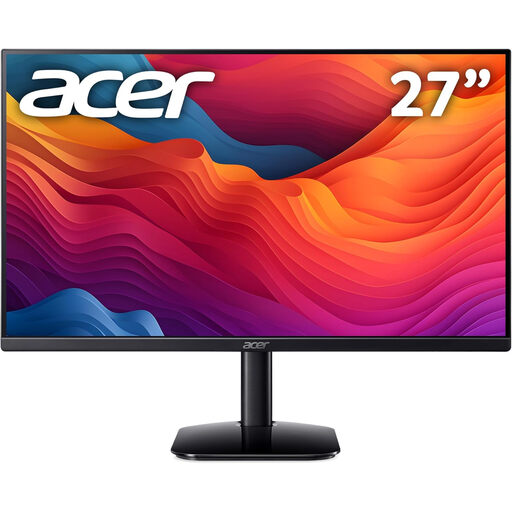
This Acer model offers built-in speakers for a desk with few spare sockets. It is a Full HD choice, so weigh that against the QHD map space discussed above.
 No image available
Its built-in speakers may suit a desk where a separate powered speaker set would use another socket.
The 27-inch Full HD model lists a 144Hz refresh rate and FreeSync. Full HD has fewer pixels than QHD; consider whether that gives you enough room for your maps and panels, and whether the speakers meet your listening needs.
They can remove the need for a separately powered speaker set, but the monitor itself still needs power. BenQ UK lists integrated 2.1-channel speakers and an external power adapter for the EX2710Q; check the power arrangement and audio equipment for the model you choose.
Not necessarily: for map-heavy play, first decide whether resolution, audio and positioning meet your needs. Samsung UK lists 240Hz for the Odyssey G65B, which may be relevant if you also play faster-moving games, but that figure alone does not establish a benefit for every strategy player.
LG UK says its optional 200Hz overclock requires both a DisplayPort 1.4-capable graphics card and a DisplayPort 1.4 cable. The monitor’s stated native refresh rate is 180Hz, so check your PC and cable before planning to use the higher mode.
Compare figures for the same operating mode rather than treating every wattage as equivalent. BenQ UK lists 29 W normal and 70 W maximum consumption for the EX2710Q; check the stated conditions and energy information for each monitor you are considering.