Players with limited desk space
If arena matches are the priority and the desk is shallow or shared, a compact screen, high-refresh connection and manageable stand footprint matter more than extra screen area.


Choose a compact 24–25-inch Full HD high-refresh monitor if desk space is tight or your PC is better suited to running arena matches at 1920 × 1080. A 27-inch QHD model makes more sense when you also want room for study work and your desk and graphics system can accommodate it. In either case, check the refresh rate available through your intended connection, along with stand adjustment and variable-refresh compatibility.
If arena matches are the priority and the desk is shallow or shared, a compact screen, high-refresh connection and manageable stand footprint matter more than extra screen area.
A 27-inch QHD screen offers more room for coursework as well as games, provided the desk has space and the PC can deliver suitable frame rates at 2560 × 1440.
Students sharing a display between a gaming PC and a study laptop or console should pay particular attention to inputs and, if useful, USB-C and keyboard-and-mouse switching.
Decide whether Full HD or QHD fits your desk and PC, then check the exact connection needed for your preferred refresh mode. Convenience features matter most if you regularly switch devices.
| Concern | What to check | Who this matters to |
|---|---|---|
| Smooth, synchronised play | Check refresh rate at your chosen resolution and input, plus variable-refresh compatibility. Read the conditions attached to any response-time figure. | For fast arena matches, I want a refresh mode my PC can supply without relying on a response-time label alone; around 36% of consumers put smooth, synchronised play first. |
| Desk fit and resolution | Measure the space available for the screen and stand, and compare your PC’s Full HD and QHD game performance. | If my desk also holds study materials, screen footprint and useful workspace need balancing against graphics demand; roughly 29% of consumers make that balance their primary concern. |
| Device connections | Confirm the supported mode on each intended input. For laptop switching, check USB-C video compatibility and any KVM connection requirements. | Switching between a gaming PC and a study laptop is easier when the connections suit both devices; about 21% of consumers prioritise that practicality. |
| Ownership and replacement | Check the seller’s returns process and inspect the screen after delivery. Plan an appropriate electrical-equipment recycling route if replacing a monitor. | Before ordering a screen I cannot inspect in person, I want to understand the return process and what to do with the old one; around 14% of consumers put these considerations first. |
Dell specifies QHD at 180Hz through DisplayPort 1.4 on the Alienware AW2725DM, but QHD at 144Hz through HDMI. The connection can therefore change the mode available on that model.
Match your PC or console output, cable and monitor input to the resolution, refresh rate and variable-refresh feature you intend to use.
Rendering 2560 × 1440 places greater demands on a graphics system than 1920 × 1080 at otherwise similar settings. A larger QHD screen does not, by itself, ensure the frame rates you want for arena matches.
Compare your own game results at both resolutions, or look for a relevant benchmark for your graphics card before settling on a screen size.
Manufacturers attach response-time figures to particular measures or modes: LG cites a Faster setting for the 24GS60F-B, while Dell cites Extreme Mode for the AW2725DM. Those figures are not interchangeable whole-screen motion measurements.
Consider the stated response-time measure alongside refresh rate, panel type and variable-refresh support rather than choosing by the smallest millisecond figure alone.
GOV.UK describes cancellation rights for eligible distance purchases; the applicable conditions differ from remedies for faulty or misdescribed goods. Replacing a screen also leaves an electrical item to dispose of responsibly.
Read the seller’s return instructions before ordering, inspect the new monitor promptly and find a suitable electrical-equipment recycling route for the old one.
LG UK lists compact Full HD gaming monitors as well as larger QHD options, making the range relevant to the desk-space decision.
ASUS UK lists compact Full HD models alongside larger gaming displays; connections and stand features differ by model.
The BenQ UK EX271Q is a 27-inch QHD option worth examining when one desk display must serve gaming and another device.
Dell’s Alienware AW2725DM represents the 27-inch QHD, high-refresh route for a desk with enough room.
These models offer different ways to set up a screen for arena matches and study. The larger displays call for particular attention to desk space and PC performance; check each model’s input modes before choosing.
 No image available
Consider this 27-inch QHD option if your desk has room and your PC can deliver the gaming mode you want.
The product title specifies an OLED panel and 240Hz refresh rate. Confirm which input, cable and graphics output support your intended mode.
 No image available
The 24-inch Full HD format is an option when a smaller screen and high-refresh play matter more than QHD workspace.
The product title lists a curved VA panel, adaptive sync, two HDMI inputs, DisplayPort, tilt adjustment and VESA compatibility. Check which input supports your intended 180Hz mode; the stated 1ms figure is MPRT, not an independent motion test.
 No image available
This 27-inch QHD model suits consideration when study workspace and arena play both matter, provided your desk and PC can accommodate them.
The product title specifies 2560 × 1440, a Fast IPS panel and 220Hz. Check the refresh mode available through your intended input and whether the stand adjusts as you need.
 No image available
Consider this larger screen only after measuring the space available on a student-room desk and checking your PC’s QHD performance.
The product title lists 2560 × 1440, a VA panel, two HDMI inputs and two DisplayPort 1.4 inputs. Its stated 1ms figure is MPRT; confirm variable-refresh support if you need it.
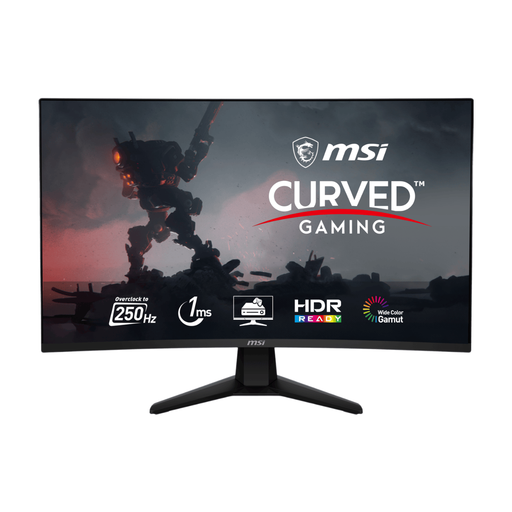 No image available
This Full HD option needs a substantially larger desk footprint than a compact 24-inch screen, so measure the setup before ordering.
The product title specifies adaptive sync and up to 250Hz in an overclocked mode. Confirm that your PC, connection and monitor settings support the mode you intend to use.
Choose the compact Full HD format if desk space is limited or high frame rates at 1920 × 1080 are your priority. Choose 27-inch QHD if you also want more desktop space for study and your PC can deliver suitable frame rates at 2560 × 1440.
Check the exact monitor and resolution rather than assuming one connection always wins. Dell specifies QHD at 180Hz through DisplayPort 1.4 on the AW2725DM, compared with QHD at 144Hz through HDMI; your graphics output and cable must also support the mode you choose.
Eligible distance purchases have cancellation rights, as GOV.UK explains, but the applicable conditions matter. Check the seller’s return process before ordering; remedies for a faulty or misdescribed monitor are a separate matter from changing your mind.