If freeing a plug socket is the priority, look for a gaming monitor that accepts video from your laptop over USB-C and provides enough USB Power Delivery to meet that laptop’s charging requirement. A USB-C port alone does not establish either capability. If viewing room layouts and colours matters more, choose the screen format and resolution first, then decide how much refresh rate you need for other games.
Who this setup suits
Laptop players short of wall sockets
If your laptop supports video over USB-C, a monitor with sufficient USB Power Delivery may let you leave the separate laptop charger unplugged. Compare the monitor’s output with your laptop’s charging requirement before choosing one for this purpose.
Detail-focused virtual decorators
If you spend more time arranging rooms and comparing furnishings than playing fast competitive games, consider resolution, screen space and the exact model’s stated colour coverage before chasing the highest refresh-rate figure.
Players who also enjoy faster games
A high refresh rate and adaptive-sync support may matter for your other games, provided your computer and connection can use them. Neither feature reduces the number of occupied sockets on its own.
What to check when choosing
For virtual-house decorating with limited sockets, decide whether freeing the laptop charger’s socket matters more to you than extra viewing space or responsiveness in other games. Check that your computer can drive the screen mode you intend to use.
| Concern | Buying check | Who this matters to |
|---|
| Occupied sockets |
Confirm USB-C video support and compare the monitor’s Power Delivery output with the laptop’s charging requirement; check the cable too. |
With a USB-C laptop, I want to avoid using a separate charger socket while connecting the display. Around 46% of consumers put that socket-saving need first. |
| Layout and colour detail |
Compare native resolution, aspect ratio and stated colour coverage, then check desk space and computer output support. |
When arranging furnishings, I want enough room to inspect the layout and distinguish colours. Roughly 36% of consumers prioritise that viewing need. |
| Other games |
Check refresh rate and adaptive-sync support for the connection and resolution you plan to use. |
I also play faster games and want the same monitor to serve those sessions. About 18% of consumers make mixed-game responsiveness their primary concern. |
Buying pitfalls
-
Assuming any USB-C port can replace a laptop charger
USB-C video and charging are separate capabilities. For example, LG specifies 65W Power Delivery for the 34GX900A-B, while ASUS specifies 15W for the ROG Strix OLED XG32UCDS; neither figure establishes what your laptop needs.
Check the exact monitor’s video input and Power Delivery rating against the laptop’s specifications, and confirm that the cable supports the intended connection.
If the connection cannot meet those requirements, you may still need the laptop’s separate charger, another cable or a dock.
-
Choosing by refresh rate alone
A high refresh rate can be useful in fast games, but it does not provide more room for build menus or reduce the number of occupied sockets.
Choose a resolution and screen format that suit your decorating games, then assess refresh rate for the other titles you play and the output your computer can provide.
-
Adding adaptors instead of checking the socket setup
The Health and Safety Executive warns that overloading socket outlets with unfused adaptors can cause fires.
Do not overload adaptors. Check plugs and leads for damage, and seek competent advice if the existing electrical setup appears unsafe.
-
Comparing energy use by screen size alone
Screen size or a gaming label does not, by itself, establish which display uses less energy in the mode you will use.
For an in-scope display, look for the exact model’s energy label at the point of sale and compare alternatives on the same basis. UK guidance from the Department for Energy Security and Net Zero and the Office for Product Safety and Standards requires point-of-sale energy labels for products in scope.
Relevant brands to consider
LG UltraGear
The range includes conventional and ultrawide gaming monitors. LG lists the 34GX900A-B as a 34-inch, 3440 × 1440 OLED ultrawide with 65W USB-C Power Delivery.
- That model’s stated Power Delivery output gives laptop users a specific rating to compare with their charging needs.
- Do not assume every UltraGear model offers laptop charging, or that 65W is sufficient for every laptop.
ASUS ROG / TUF Gaming
The cited models span a 27-inch QHD TUF gaming screen and a ROG Strix OLED model with USB-C Power Delivery.
- ASUS lists the TUF VG27AQ5A at 2560 × 1440 with a maximum 210Hz refresh rate and Adaptive-Sync.
- ASUS specifies 15W Power Delivery for the ROG Strix OLED XG32UCDS. Check that output against your laptop rather than assuming its USB-C connection replaces the charger.
MSI
MSI lists a USB Type-C DisplayPort Alternate connection for the G274QPX gaming monitor.
- The specified connection gives shoppers a clear USB-C video feature to check against their computer.
- USB-C video does not establish a laptop-charging wattage; check Power Delivery separately on the exact model.
BenQ / ZOWIE
BenQ offers gaming-monitor ranges, while ZOWIE presents the XL2566X+ as a 400Hz model designed for FPS players.
- An FPS-focused model is worth considering if fast competitive games are an important second use.
- Do not select the cited ZOWIE model on the assumption that it can charge a laptop or free a plug socket.
Joybuy monitors for this setup
These monitors offer different screen sizes and formats for viewing virtual rooms. Some list USB-C, but check video support and charging output for your laptop before counting on a one-cable setup.
 No image available
Lenovo L32p-30 31.5-inch 4K UHD IPS monitor
Consider this 31.5-inch screen if viewing room layouts at 4K UHD is your priority.
The product name lists IPS and USB-C. Check USB-C video capability and Power Delivery output against your laptop before relying on it to replace a separate charger.
View on Joybuy
 No image available
Acer X Predator X49X 49-inch curved QD-OLED ultrawide
The 32:9 format offers a particularly wide screen to consider for room layouts, provided it fits your desk and your computer supports the intended display mode.
The product name lists Double Quad HD, a 1800R curve, 240Hz, AMD FreeSync Premium, HDMI, DisplayPort and USB-C. Check the USB-C video and charging specifications separately if freeing a laptop charger socket matters to you.
View on Joybuy
 No image available
MAG 272QP QD-OLED X50 27-inch WQHD gaming monitor
This 2560 × 1440 screen is an option if you want a conventional-size display for decorating and also play faster games.
The product name lists 500Hz and AMD FreeSync. Check which connection and computer output would let you use the refresh rate you want; confirm USB-C charging requirements separately before expecting to free a socket.
View on Joybuy
 No image available
Dahua 32-inch 4K 165Hz curved OLED gaming monitor
Consider its 3840 × 2160 screen if 4K viewing suits your decorating games and your computer can drive the display mode you intend to use.
The product name lists 99% DCI-P3 coverage and 65W Type-C output. Check USB-C video support, cable capability and your laptop’s charging requirement before treating it as a one-cable connection.
View on Joybuy
 No image available
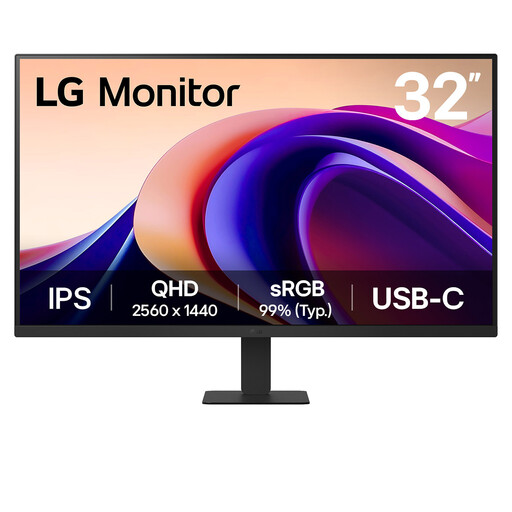
LG 32U631A 32-inch QHD IPS monitor
This QHD screen is an option for viewing room layouts if you prefer a 32-inch monitor.
The product name lists 100Hz, USB-C and HDMI. Confirm the USB-C video function and charging output against your laptop before planning to leave its charger unplugged.
View on Joybuy
Common questions
Can a USB-C gaming monitor free my laptop charger’s plug socket?
Yes, if the laptop supports the required USB-C video connection and the monitor’s Power Delivery output meets its charging requirement. ASUS advises matching the device’s power needs to the monitor’s Power Delivery capability; the monitor itself still needs power.
Does every monitor USB-C port charge a laptop?
No. USB-C functions vary by model: MSI specifies a DisplayPort Alternate connection on the G274QPX, while ASUS explicitly lists 15W Power Delivery on the ROG Strix OLED XG32UCDS. Look for the exact model’s video and charging specifications rather than relying on the connector alone.
What energy information should I compare?
Compare energy information for the exact monitors you are considering on the same basis, rather than judging by size alone. UK guidance from the Department for Energy Security and Net Zero and the Office for Product Safety and Standards says products in scope must display an energy label at the point of sale.
Should I add more adaptors if I run out of sockets?
Do not overload socket outlets with unfused adaptors. The Health and Safety Executive warns that this can cause fires; check plugs and leads for damage and seek competent advice if the electrical setup appears unsafe.


