Start with a 27-inch QHD monitor if your computer can output 2560×1440 and the screen fits your desk: it gives you more pixels for zoo layouts and study work than Full HD at the same size. Choose Full HD if limiting the graphics workload matters more, and consider a larger display only after checking its footprint and your computer’s connection capabilities.
Who this setup suits
Compact-desk zoo builders
Students using one bedroom desk for zoo construction, coursework and everyday PC tasks. An adjustable stand or compatible mount may help with placement; Dell lists height adjustment and VESA mounting for its G2722HS, though desk fit still depends on the complete monitor dimensions.
Detail-first QHD players
Players who want more pixels for habitats, building controls and desktop windows on a 27-inch screen, provided their computer can output 2560×1440. Samsung lists that resolution for its 27-inch Odyssey G5 G50F.
Mixed-game high-refresh users
Students who build virtual zoos and also play faster games. AOC, LG and Samsung list 27-inch QHD models with 180Hz refresh rates, but the computer and connection must support the chosen display mode.
What matters when choosing
27-inch QHD
Choose when: You want more pixels for zoo layouts and study windows, and your computer supports 2560×1440.
Trade-off: QHD gives the computer more pixels to render than Full HD; the monitor’s advertised refresh rate also depends on the complete connection.
27-inch Full HD
Choose when: Keeping the rendering target at 1920×1080 matters more than extra pixels on the same-sized screen.
Trade-off: Fine building detail and desktop workspace are less dense than on a 27-inch QHD display.
Larger display
Choose when: You want more screen area and have measured enough room for the exact monitor and stand.
Trade-off: Check resolution and connection demands separately from physical fit; screen size alone does not establish either.
| Concern | What to check | Who this matters to |
|---|
| Detail and workspace |
Compare native resolution at your chosen screen size; confirm that the computer can output 2560×1440 if choosing QHD. |
If I spend time placing habitats and working across menus, I want more pixels on a screen that still fits my desk. Around 36% of consumers put detail and workspace first. |
| Desk fit and positioning |
Measure usable width and depth against the monitor-with-stand dimensions; check height adjustment or the VESA pattern if needed. |
With limited desk space, I need the screen and stand to fit before a larger panel is worth considering. Desk fit is the primary concern for around 29% of consumers. |
| Motion in other games |
Check the refresh rate available at your intended resolution through the computer, monitor input and cable; confirm adaptive-sync compatibility. |
I also play faster games, so I care whether my setup can use the monitor’s higher-refresh mode. Around 21% of consumers prioritise mixed-game motion. |
| Graphics demand |
Check whether 1920×1080 is a more suitable target for your existing computer, alongside any cable or adapter you would need. |
If my computer is better suited to Full HD, I would rather accept fewer pixels than choose a display mode I cannot use as intended. Around 14% of consumers put limiting graphics demand first. |
Checks before you buy
-
Assuming the computer can use the advertised refresh rate
A QHD monitor labelled 180Hz or higher does not establish what an existing laptop or desktop can output at 2560×1440.
Check the computer output, monitor input and cable or adapter against the resolution and refresh rate you intend to use.
A different cable, adapter or dock may be needed for the intended connection.
-
Treating 27-inch Full HD and QHD as interchangeable
At the same screen size, 1920×1080 has fewer pixels than 2560×1440. That changes the available detail and workspace as well as the rendering target.
Choose between them according to the computer’s capabilities and whether extra pixels for building and study tasks matter to you.
-
Measuring the panel but not the stand
A diagonal screen size does not tell you how much desk depth the complete setup needs. Adjustment and mounting options also vary by model.
Compare the exact monitor-with-stand dimensions with your desk, and check mount compatibility before planning to use an arm.
Using a separate arm or rearranging the desk may add setup work.
Relevant brands to consider
AOC / AGON
AOC’s Q27G4XFAD is a reference point for a 27-inch QHD Fast IPS setup with a height-adjustable stand.
- AOC lists 2560×1440, 180Hz and adaptive sync for this model.
- Check the dimensions and connections of the exact model rather than assuming those features apply across AOC monitors.
LG UltraGear
LG’s 27GS75QN-B is a 27-inch QHD IPS reference for buyers considering high refresh rates and gaming sync support.
- LG lists 180Hz, with a 200Hz overclock mode, for the 27GS75QN-B.
- Confirm the overclock conditions, connections and stand details for the exact listing.
Samsung Odyssey
Samsung’s 27-inch Odyssey G5 G50F illustrates a QHD Fast IPS route with a stated 180Hz refresh rate.
- Samsung lists G-SYNC Compatible and AMD FreeSync support for this model.
- Confirm the exact model code and the display modes available through your computer’s connection.
Dell
Dell’s G2722HS illustrates the 27-inch Full HD alternative when 1920×1080 is the preferred rendering target.
- Dell lists 165Hz, 100mm height adjustment and 100×100mm VESA mounting for the G2722HS.
- Full HD provides fewer pixels than QHD at the same screen size; check current availability before settling on this model.
Joybuy monitor choices
These monitors offer different ways to set up a virtual-zoo workspace, from 27-inch QHD screens to a 27-inch 4K option and a larger curved QHD display. Check desk dimensions and computer compatibility for the model you choose.
 No image available
Samsung Odyssey G6 S27DG612 27-inch QHD OLED 240Hz monitor
Consider this for a 27-inch QHD zoo-building screen if you also want the stated 240Hz mode for other games.
The product title specifies an OLED panel. Check the complete stand dimensions against your desk and confirm which resolution and refresh rate your computer can deliver through the intended connection.
View on Joybuy
 No image available
LG UltraGear G8 27G850A 27-inch 4K Nano IPS dual-mode monitor
Consider this 27-inch option if you want a 4K display and can confirm that your computer supports the mode you plan to use.
The product title lists dual-mode 240Hz/480Hz operation, DisplayPort 2.1 and HDMI 2.1. Check the resolution available in each refresh mode, the full connection path and the stand footprint before buying.
View on Joybuy
 No image available
HKC G27H2DPro 27-inch QHD Fast IPS 220Hz monitor
This is a 27-inch QHD option for zoo layouts and mixed gaming when your computer can use the intended display mode.
The product title specifies 2560×1440 and 220Hz. Confirm the stand’s adjustment options and whether your computer, ports and cable can deliver QHD at the refresh rate you want.
View on Joybuy
 No image available
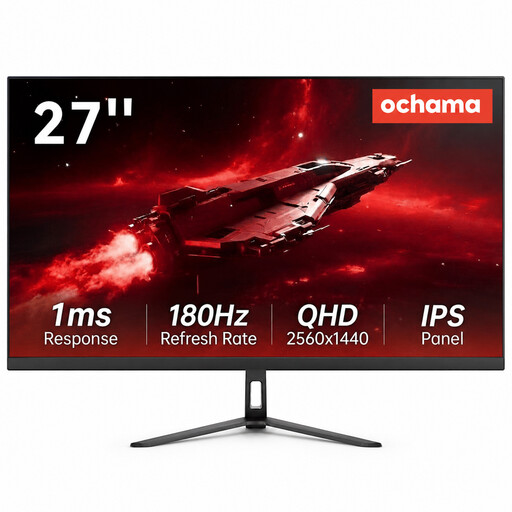
Ochama 27-inch QHD IPS 180Hz monitor with keyboard offer
Consider this 27-inch QHD option if you want the stated 180Hz refresh rate alongside space for zoo-building menus.
Check whether the keyboard offer applies to your purchase, and confirm adaptive-sync support if you need it. Measure the stand footprint and verify that your computer can output QHD at the intended refresh rate.
View on Joybuy
 No image available
CRUA 32-inch 1500R curved QHD 165Hz monitor
This larger QHD option is worth considering only if the complete screen and stand fit your student-room desk.
The product title specifies 2560×1440, a 1500R curve and VESA 100×100mm mounting. Check the exact dimensions and intended connection; the product information says reaching 165Hz at QHD requires the supplied DisplayPort cable and that HDMI may limit refresh rate.
View on Joybuy
Frequently asked questions
Is a 27-inch QHD monitor a sensible choice for building a virtual zoo?
Yes, if your computer supports 2560×1440 and the complete monitor fits your desk. QHD gives you more pixels than Full HD at the same screen size; choose Full HD instead if 1920×1080 is the more suitable target for your computer.
Do I need a 180Hz monitor for zoo building?
You do not need to choose 180Hz solely for zoo building. A higher refresh rate is more relevant if you also play faster games and your computer and connection can use that mode; resolution and desk fit may matter more for this setup.
What should I check before connecting a QHD high-refresh monitor to a laptop?
Check the laptop’s video output, the monitor input and the cable or adapter as one connection path. Confirm that the complete combination supports your intended resolution and refresh rate rather than relying on the monitor’s headline specification alone.
What should I do with an old monitor when replacing it?
Check an appropriate local-authority or retailer collection and recycling route for the old display. UK government guidance covers waste electrical and electronic equipment; confirm the arrangements and any collection terms that apply to your replacement purchase.


