
24/7 Customer Support

Free returns

Same-day & Next-day Delivery

Quality Guaranteed

Unlock Your Welcome Offers: FREE Delivery | Up to 80% OFF | Free 30-day JoyPlus trial
Download the APP
By Joybuy Product Recommendation Officer
Choosing a gaming motherboard is less about selecting the board with the longest feature list and more about matching the platform to your processor, case, memory and upgrade plans. A board may advertise Wi-Fi 7, PCIe 5.0 or very high memory speeds, but those features only add value when the rest of your system can use them.
The wrong choice can leave you with incompatible parts, unused expansion slots or a case that cannot accommodate the board. Use the following guide to compare practical specifications before buying a motherboard for a gaming PC.
The socket determines which processor physically fits the board. An Intel motherboard using LGA 1700 is not suitable for an AM5 processor, while an AMD AM5 motherboard cannot accept an Intel CPU. The chipset then affects features such as USB connectivity, PCIe lanes, memory support and overclocking options.
Always confirm all three details:
A DDR5 motherboard may list high frequencies such as 7,000MHz or above, but these figures can depend on the memory kit, processor, BIOS version and whether an overclocking profile is enabled. Compatibility is not guaranteed simply because the number appears on the product page.
Check the manufacturer’s supported memory list, use matched modules and confirm whether the advertised speed is marked as OC. For two memory sticks, the manual will usually identify the preferred dual-channel slots.
A Wi-Fi motherboard is useful when your router and location make wired networking difficult, but a Wi-Fi 7 board cannot create Wi-Fi 7 performance if your router only supports an older standard. Signal strength, walls and UK broadband equipment also affect real-world results.
For stable online gaming, check both wireless and wired networking. A 2.5GbE or 5GbE port may be useful for compatible routers, local file transfers and content creation, while Bluetooth can simplify connections to controllers and headsets.
For an LGA 1700 motherboard, suitable Intel processor generations and exact BIOS support should be verified before installation. The MSI MAG B760 TOMAHAWK WIFI Motherboard LGA 1700 ATX, for example, uses the Intel B760 chipset, has four DDR5 DIMM slots and supports up to 128GB according to its listed specifications.
An LGA 1851 motherboard is designed for a different Intel platform. Boards such as the MSI MAG B860 TOMAHAWK WIFI and MSI MPG Z890 CARBON WIFI are intended for compatible Intel Core Ultra processors. Do not assume that a newer chipset will support an older CPU simply because the manufacturer name is the same.
For AMD systems, AM5 boards support selected Ryzen 7000, 8000 and 9000 series processors, subject to the manufacturer’s support list. A B650 or B850 board may therefore suit a new AMD build, but check BIOS and processor compatibility before ordering.
An ATX motherboard normally provides more expansion space and is suitable for standard ATX cases. A micro-ATX motherboard is smaller and can suit compact gaming PCs, although it may offer fewer expansion slots. Mini-ITX boards are designed for particularly small systems and usually have less room for additional hardware.
Check:
A compact micro-ATX board may still include four memory slots, multiple M.2 connections and wireless networking. However, the physical layout matters when installing a large graphics card or capture card.
A PC motherboard with M.2 slots allows you to install compact NVMe SSDs directly onto the board. Count the slots and check their generation. Some boards provide PCIe 5.0 for one M.2 connection and PCIe 4.0 for additional drives. Lane sharing can also affect which ports remain available when several drives are installed.
PCIe 5.0 support can provide bandwidth for compatible future graphics cards or SSDs, but a PCIe 4.0 component will still operate according to its own interface. Review the manual if you plan to use several expansion cards, SATA drives or M.2 SSDs together.
Also inspect the rear I/O for the ports you actually need: USB Type-C, HDMI, DisplayPort, Ethernet, audio outputs and antenna connectors. Display outputs on the motherboard generally require a processor with suitable integrated graphics.
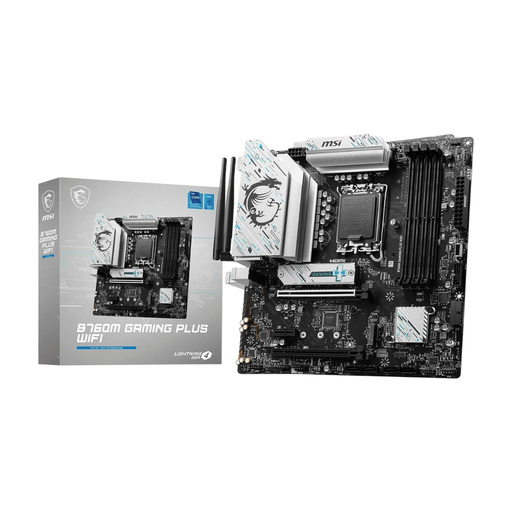
Why This Fits Their Persona: A practical micro-ATX starting point for a compact Intel gaming PC, with built-in Wi-Fi 6 and DDR5 support for a straightforward UK home setup.
The socket, chipset and form factor are clearly specified, helping buyers avoid mismatched CPUs and cases.
Four DDR5 slots, multiple M.2 and SATA connections, Wi-Fi 6 and Bluetooth 5.2.
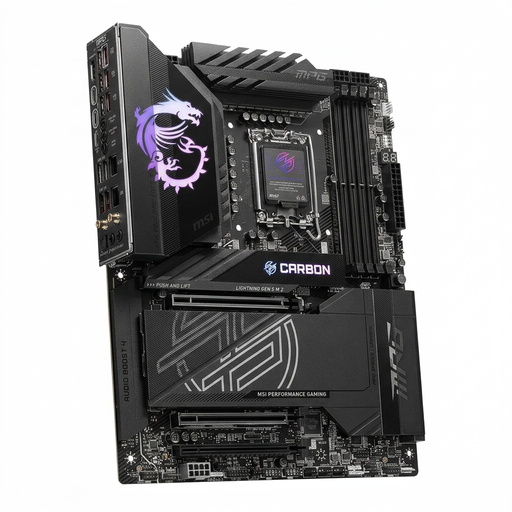
Why This Fits Their Persona: Suits buyers building an Intel LGA 1851 system with extensive storage, modern wireless networking and generous USB connectivity.
Its listed socket and chipset make platform compatibility easier to verify before selecting an Intel processor.
Five M.2 slots, four SATA interfaces, Wi-Fi 7, Bluetooth 5.4 and 2.5G/5G Ethernet.
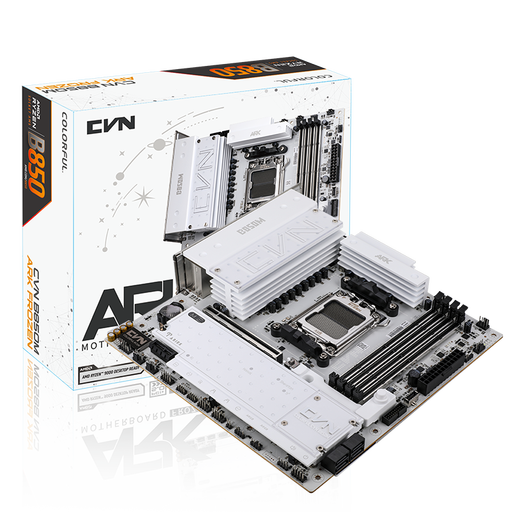
Why This Fits Their Persona: A micro-ATX AMD AM5 option for users who need several fast storage drives without moving to a full ATX case.
The specification separates PCIe 5.0 and PCIe 4.0 M.2 support, so storage planning is more transparent.
Three M.2 slots, four SATA ports, four DDR5 slots and support for selected Ryzen 7000, 8000 and 9000 series processors.
We have compiled a complete, real-time list of products that fully satisfy these strict selection criteria and UK safety regulations.
DDR5 is the current memory type used by many newer Intel and AMD platforms. It can provide higher rated transfer speeds than older memory standards, but the practical result depends on the CPU, memory kit and software. Choose DDR5 when the selected processor platform requires it or when you want a newer system foundation.
The motherboard usually does not directly increase frame rates in the same way as a graphics card or processor. Its role is to provide compatible power delivery, memory support, expansion slots, storage connections and networking. A suitable board helps the other components operate as intended and provides room for future upgrades.