
24/7 Customer Support

Free returns

Same-day & Next-day Delivery

Quality Guaranteed

Unlock Your Welcome Offers: FREE Delivery | Up to 80% OFF | Free 30-day JoyPlus trial
Download the APP
Choosing a gaming motherboard involves more than matching a processor socket and picking a board with impressive-looking heatsinks. The motherboard connects your CPU, graphics card, memory, storage and peripherals, so an unsuitable choice can restrict upgrades, create compatibility problems or leave useful features unused.
At Joybuy, our Product Recommendation Officer approach is straightforward: compare specifications that affect your build, then ignore features that do not match your actual hardware or usage.
An AM5 motherboard is designed for compatible AMD Ryzen processors, while an LGA 1700 motherboard supports a different generation of Intel processors. An LGA 1851 motherboard uses another Intel platform again. These sockets are not interchangeable, even when boards look similar or use the same DDR5 memory.
Check all three items before ordering:
For example, AMD B650 and B850 boards use the AM5 socket, but the processor support list can vary by model and BIOS version. Intel B760 boards use LGA 1700, while B860 and Z890 models are intended for LGA 1851 systems.
A PCIe 5.0 motherboard can provide additional bandwidth for compatible graphics cards or NVMe SSDs, but the connected component and processor must also support the relevant standard. Some M.2 slots may share CPU or chipset lanes, and not every slot on a motherboard operates at PCIe 5.0 speed.
If your build uses a PCIe 4.0 graphics card and PCIe 4.0 SSD, PCIe 5.0 may be an upgrade option rather than an immediate performance requirement. Read the slot layout carefully, particularly if you plan to install several M.2 drives or expansion cards.
A full-size ATX motherboard generally needs an ATX-compatible case. A Micro-ATX motherboard is smaller and can suit compact gaming builds, but it may provide fewer expansion positions. Mini-ITX boards reduce the footprint further, although they usually have fewer memory slots and headers.
Do not rely only on the product title. Check the board dimensions, case support, graphics card clearance, CPU cooler height and available fan headers before purchase.
Choose the processor first, then select the matching motherboard platform. AMD Ryzen 7000, 8000 and 9000 series processors compatible with AM5 are listed for several AMD boards in this range, subject to the manufacturer’s current support list.
For Intel systems, compare whether you need an LGA 1700 motherboard such as an MSI B760 model or an LGA 1851 motherboard for Intel Core Ultra-compatible systems. Chipsets also affect expansion, USB connectivity, memory support and overclocking features.
A DDR5 motherboard can support higher memory bandwidth than older memory platforms, but advertised speeds marked “OC” depend on the specific RAM kit, CPU and BIOS settings. XMP is commonly associated with Intel systems, while AMD platforms may use EXPO. Both are memory profile technologies rather than guarantees that every kit will run at its listed speed.
For a gaming PC, two matching modules are often a practical starting point. Content creators, streamers and professionals may benefit from four slots and a higher maximum capacity. The supplied specifications show some boards supporting up to 128GB, 192GB or 256GB, but always confirm the motherboard’s memory compatibility list.
An M.2 NVMe motherboard can make it easier to install fast, cable-free SSD storage. Check the number of M.2 slots, supported lengths such as 2280, interface generation and whether heatsinks are included.
Integrated networking is also worth comparing. A Wi-Fi motherboard can reduce cable clutter, while 2.5Gb Ethernet or 5Gb Ethernet may suit fast home networks and large file transfers. Wi-Fi performance depends on the router, operating system, local interference and regional frequency regulations, so included Wi-Fi does not automatically mean identical real-world speeds.
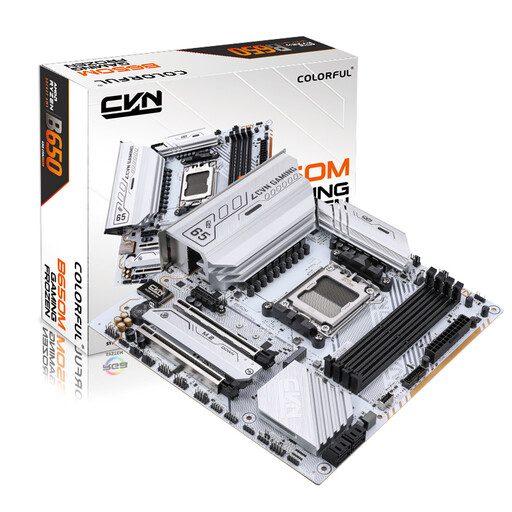
Why This Fits Their Persona: Its Micro-ATX layout suits a compact UK gaming build while retaining four DDR5 slots and support for AMD Ryzen processors using AM5.
The 245mm × 245mm dimensions make case checking clearer, while two M.2 slots and four SATA ports avoid relying on a single storage connection.
Supports DDR5, PCIe 5.0 on specified M.2 connections, 2.5G LAN and Wi-Fi 6.
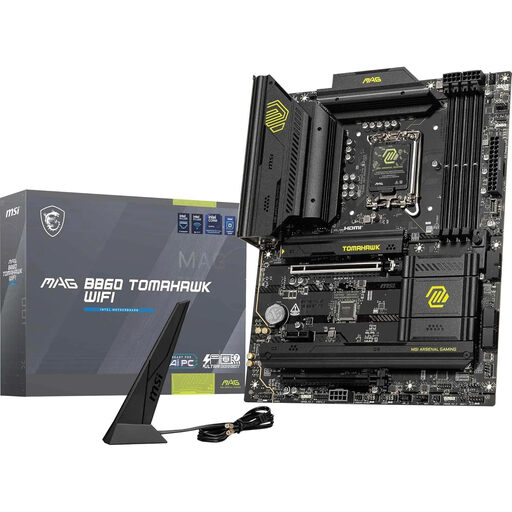
Why This Fits Their Persona: It gives builders using Intel LGA 1851 a full-size ATX platform with integrated wireless networking and extensive connectivity.
Its socket, DDR5 requirement and ATX format are clearly defined, helping prevent mismatched processors, memory or cases.
Includes a PCIe 5.0 x16 slot, Wi-Fi and 2.5G LAN, plus multiple PCIe 4.0 M.2 slots.
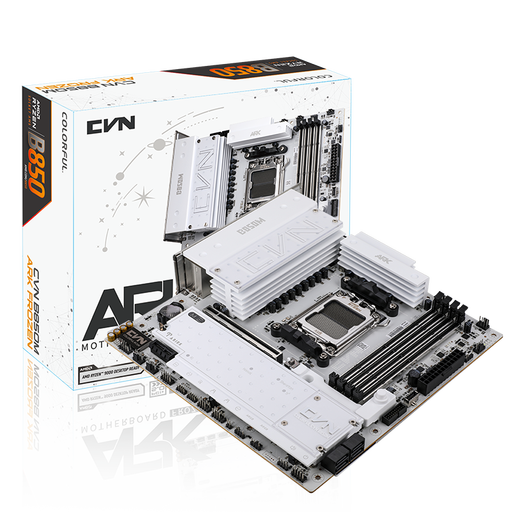
Why This Fits Their Persona: Content creators and storage-heavy users can use its Micro-ATX footprint, three M.2 slots and four DDR5 sockets.
It provides several storage and fan headers, reducing the need for avoidable adapters or expansion compromises in demanding builds.
Offers three M.2 slots, PCIe 5.0 graphics support, Wi-Fi 7 and 2.5G LAN.
We have compiled a complete, real-time list of products that fully satisfy these strict selection criteria and UK safety regulations.
It can be useful if your router is in another room or you want to avoid a separate wireless adapter. Wired Ethernet is generally the simpler choice where a cable is practical, while Wi-Fi 6, Wi-Fi 6E and Wi-Fi 7 boards depend on router compatibility, operating system support and local conditions.
Capacity depends on the software you use. A matched two-module kit can suit gaming, while creators who edit video, stream or run virtual machines may prefer a motherboard with four DIMM slots and a larger supported capacity. Confirm the board’s approved memory list before enabling XMP or EXPO.