Shortcut-heavy aquarium managers
If you repeatedly open menus, change tools or move the camera, reachable mouse controls may be useful—but only if the aquarium software lets you assign those actions.


Choose extra mouse controls if your virtual-aquarium software accepts bindings for actions you repeat. If free movement matters more, consider a lighter wireless mouse; for basic clicking and scrolling, a simpler mouse may be enough. Mouse lighting will not fix reflections on the monitor, so assess the bright-room display setup separately.
If you repeatedly open menus, change tools or move the camera, reachable mouse controls may be useful—but only if the aquarium software lets you assign those actions.
If daylight or overhead lights obscure aquarium details, check the screen before choosing mouse lighting. RTINGS identifies monitor brightness and reflection handling as factors in how an image appears under room lighting.
If you spend extended sessions browsing and tending the aquarium, consider mouse shape, mass, cable preference and the battery routine together rather than choosing by a sensor headline alone.
Start with anything that makes the aquarium hard to see, then decide whether you need shortcuts or simply comfortable basic control. Connection and battery upkeep matter once those choices are clear.
| Concern | What to check | Who this matters to |
|---|---|---|
| Seeing aquarium details | Check for reflections at the desk and whether monitor placement or room lighting can change. | If reflections cover darker parts of the aquarium, I need to address the screen rather than buy mouse lighting. Around 31% of consumers would put display clarity first. |
| Repeated controls | Check the aquarium software’s mouse-binding options and whether the controls sit within reach of your grip. | When I frequently change tools or open menus, I want those actions close to hand. Shortcut access would be the primary concern for around 31% of consumers. |
| Long-session comfort | Compare shape, mass and side-button reach; a lower stated weight does not establish a comfortable fit. | For a longer, relaxed session, I care most about how the mouse feels to move and hold. Around 19% of consumers would prioritise that physical comfort. |
| Cable-free upkeep | Check whether the mouse charges or uses replaceable batteries, and the conditions attached to its stated runtime. | I want the cable off my desk without an inconvenient charging or battery routine. That would be the leading need for around 19% of consumers. |
Mouse lighting changes the mouse’s appearance, not reflections on the monitor. RTINGS identifies display brightness and reflection handling as relevant to on-screen visibility.
Assess glare where you actually use the aquarium, then consider monitor position and room lighting separately from mouse controls.
Additional controls will not create useful shortcuts if the aquarium application cannot accept the assignments you want.
List your repeated actions and check the application’s input settings before choosing a multi-button layout.
A high stated sensor setting does not tell you whether the shape, scrolling or button placement suits casual aquarium navigation.
Prioritise the controls you will use and adjust sensitivity to a comfortable setting. Logitech G says its G HUB software supports DPI and button assignments for compatible products.
An AA-powered mouse and a rechargeable mouse require different routines. Logitech G states that the G305 runs for up to 250 hours on one AA battery; that stated runtime is not a promise for other models or conditions.
Decide whether keeping spare batteries or charging regularly suits you better. GOV.UK advises separate collection for batteries and electrical products marked with the crossed-out wheeled-bin symbol.
These product lines illustrate different control and connection choices; brand specifications do not establish which mouse will fit your hand or work with your aquarium software.
The wired G502 X and AA-powered wireless G305 offer different approaches to controls and battery upkeep.
The wired Basilisk V3 35K is relevant if you want numerous assignable controls and configurable scrolling.
The Aerox 5 Wireless combines a low stated mass with multiple programmable buttons.
The wired M65 RGB ULTRA is an alternative for someone considering an adjustable-weight design.
These wireless gaming mice are relevant if you want cable-free movement and are considering configurable controls for aquarium actions. Check your application’s binding support and your preferred grip before choosing; none of the mice addresses monitor glare.
 No image available
Consider it if you want cable-free movement and controls you can assign to repeated aquarium actions, subject to application support.
The Joybuy listing states 56 g and includes a magnetic charging base. Check the exact connection modes for this variant before buying.
 No image available
The configurable buttons may suit repeated aquarium commands if your application accepts their assignments.
The Joybuy listing states 53 g and 10 programmable buttons. Its stated runtime of up to 750 hours depends on enabling low-power mode at 1000 Hz after a driver update.
 No image available
Consider this wireless option if you want assignable controls for repeated actions and can confirm that the aquarium software accepts them.
The Joybuy listing states 53 g and 10 programmable buttons. Its stated runtime of up to 750 hours requires the latest driver and low-power mode at 1000 Hz.
 No image available
Its wireless connection and charging dock may suit a cable-free desk; check whether its assignable controls work with your aquarium software.
The Joybuy title specifies Bluetooth, 2.4G and USB-C modes. If weight will decide your purchase, confirm the figure for this variant before ordering.
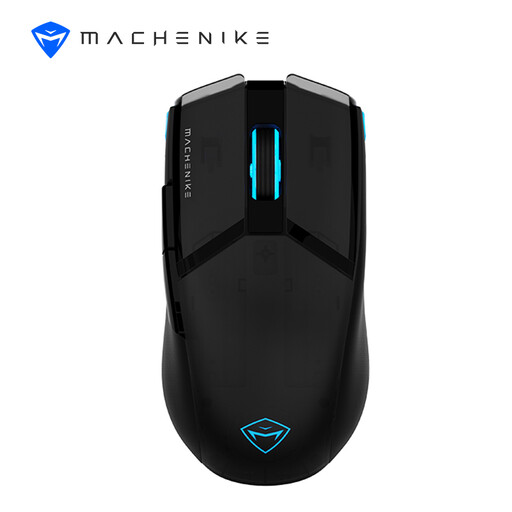 No image available
This is an option if you want wireless use and plan to check which controls can be assigned in your aquarium software.
The Joybuy title identifies a PAW3395 sensor. Confirm the mouse’s weight, button layout and configuration-software compatibility if those will affect your choice.
No: mouse lighting does not reduce reflections on the monitor. For a bright-room setup, check room lighting and screen position; RTINGS identifies monitor brightness and reflection handling as factors in on-screen visibility.
Extra buttons are useful when your particular aquarium game or application accepts assignments for actions you repeat, such as opening menus or moving the camera. Check its input settings and whether you can comfortably reach the buttons before choosing a denser layout.
You may need it if you want to change button assignments, sensitivity or lighting rather than use the mouse’s basic controls. Logitech G says G HUB supports DPI settings and assignments for compatible products; check the exact mouse’s software and operating-system compatibility.
Keep electrical products and batteries marked with the crossed-out wheeled-bin symbol out of ordinary household rubbish. GOV.UK advises appropriate separate collection; check local collection arrangements for the mouse and its batteries.