For ranked tactical matches, start with a mouse shape that suits your grip: assess symmetrical shells for claw or fingertip control, and right-handed ergonomic shells if you want more palm support. Then compare weight, connection and the polling mode you can use; playing in a bright room does not, by itself, establish a need for a different sensor, while RGB lighting is chiefly a personal preference.
Who this choice affects
Competitive claw or fingertip players
If you make frequent swipes and small aim corrections, assess shell size, hump position and side contours before choosing by sensor figures. SCAN UK's gaming-mouse guide likewise emphasises comfort when selecting a shape.
Right-handed palm or supported-claw players
If more of your hand rests on the mouse, compare a contoured right-hand shell with a symmetrical one. Razer positions its DeathAdder line for right-handed palm and claw grips; that positioning does not guarantee a fit for every hand.
Bright-room players
If lighting effects are hard to notice in your setup, decide how much you value RGB before letting it influence your choice. Grip fit and connection still deserve separate attention.
What to check before buying
Settle the grip and shell choice first, then compare movement and connection details; leave lighting preferences until those practical choices are clear.
| Concern |
What to check |
Who this matters to |
| Grip and shell shape |
Compare handedness, width, hump position and side contours against your usual palm, claw or fingertip grip. |
If my hand cannot settle comfortably on the shell, its headline specifications will not resolve the fit problem. Around 36% of consumers put grip fit first. |
| Aim control |
Check stated weight and, where independent tests are available for the exact model, click and sensor latency. Confirm what hardware a desired polling mode needs. |
Repeated swipes and small corrections make movement and response my main concern; roughly 29% of consumers prioritise aim control. |
| Connection and charging |
Confirm the connection modes, included receiver and charging arrangement. Check battery claims against the polling mode you intend to use. |
I want my connection and charging routine to suit ranked sessions without interrupting them. About 21% of consumers make that their primary concern. |
| Bright-room lighting |
Decide whether you value RGB effects or need only a visible status indicator; assess tracking and fit separately. |
In a bright room, I may care less about decorative lighting than the other buying factors. Around 14% of consumers put lighting preference first. |
Buying pitfalls
-
Choosing by maximum DPI or polling rate alone
A headline figure cannot tell you whether the shell suits your grip or whether you can use a particular polling mode with your setup.
Check shape, handedness and weight first. Then confirm the exact model's polling support and any receiver or other hardware needed.
-
Assuming a symmetrical shell will fit everyone
A neutral-looking shape and a right-handed contour support different ways of holding a mouse; neither settles questions of hand size or comfort on its own.
Identify your usual grip and compare dimensions and side contours. If you cannot try the mouse, review the seller's cancellation and returns information before ordering.
-
Treating RGB as a bright-room performance feature
Logitech G describes RGB as configurable lighting. Room brightness alone does not establish a different tactical tracking requirement.
Choose lighting for its appearance or useful indicators if those matter to you, rather than as a substitute for assessing fit and connection.
-
Relying on an older product listing
ZOWIE's UK U2 page identifies that model as discontinued, while Corsair's UK M75 AIR page points to a newer model. An older review may therefore describe a different buying situation from the listing you encounter.
Check the exact model, seller, current availability and applicable warranty and return terms before ordering.
Brands to consider
These ranges illustrate different shape and setup choices; a brand name alone cannot establish how a particular mouse will fit your hand.
Razer
The Viper and DeathAdder lines offer symmetrical and right-handed ergonomic routes, respectively.
- RTINGS identifies the Viper V4 Pro as its FPS pick among Razer mice and reports a 48.9 g default weight and 8,000 Hz wireless polling support.
- Razer positions the DeathAdder line for right-handed palm and claw grip; assess that contour rather than treating it as interchangeable with a Viper shape.
Logitech G
The PRO X SUPERLIGHT range includes differing shapes, including the right-handed PRO X SUPERLIGHT 2 DEX.
- Logitech G lists the PRO X SUPERLIGHT 2 DEX as a 60 g asymmetrical right-hand design.
- Confirm the precise Superlight variant before comparing features: Logitech G's stated polling specifications do not describe every model in the range.
ZOWIE
The U2 is a claw-grip-focused wireless design with inward-curved sides.
- ZOWIE describes the U2 as a driverless option with an enhanced receiver.
- ZOWIE's UK page identifies the U2 as discontinued; check the exact model and seller before considering a purchase.
Corsair
The M75 AIR provides a symmetrical wireless shape to compare with other grip routes.
- Corsair lists the M75 AIR at 60 g and describes wireless and Bluetooth connection modes.
- Corsair's UK page points shoppers towards a newer M75 Wireless model, so check which variant a seller is offering.
Joybuy products for ranked play
These gaming mice span an ergonomic option, wireless setups and a wired option. Compare each mouse with your grip and connection preferences rather than treating the list as one shape recommendation.
 No image available
Razer DeathAdder V3 Ergonomic Esports Mouse
Consider this contoured design if you are assessing an ergonomic shell for your grip. Compare its dimensions and hump position with the way you hold a mouse before choosing it over a symmetrical shape.
View on Joybuy
 No image available
AJAZZ AJ159 APEX Wireless Mouse with Magnetic Charging Base
For a wireless setup with a charging base, the product title lists a 56 g mouse, 8 kHz polling and 2.4G or wired operation. Confirm the shell dimensions for your grip and check the exact DPI specification before relying on it.
View on Joybuy
 No image available
AJAZZ AJ200 AI MC Gaming Mouse with Charging Dock
Consider this model if a charging dock and a choice of connection modes suit your desk. Its title lists Bluetooth, 2.4G and USB-C alongside a PAW3311 sensor; confirm the weight, handedness and shell dimensions before deciding whether it suits your grip.
View on Joybuy
 No image available
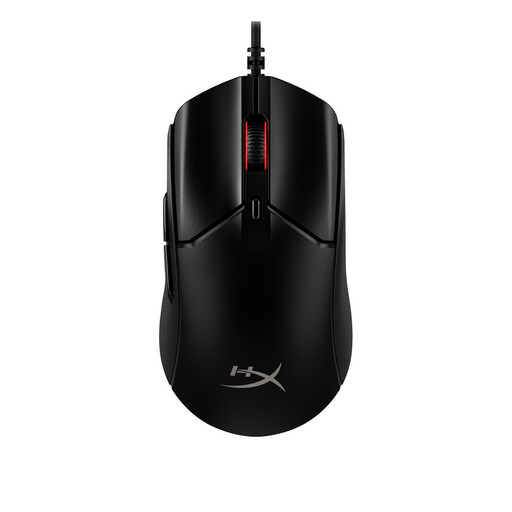
HyperX Pulsefire Haste Black Wired Gaming Mouse 2
This wired option is worth considering if you prefer not to manage charging or a wireless receiver. Check its shell shape, dimensions and weight against your grip, and confirm any sensor or polling specification important to your setup.
View on Joybuy
 No image available
Rapoo VT7 MAX Wireless Gaming Mouse, White
For a lightweight wireless option, the product title lists 53 g weight and 8 kHz polling. Check its shell shape before choosing it for your grip; the stated battery figure applies at 1,000 Hz with a driver update for low-power mode, not necessarily at 8 kHz.
View on Joybuy
Common questions
Do I need a different mouse sensor for a bright room?
A bright room alone does not establish a need for a different gaming-mouse sensor. Treat RGB visibility as a separate preference, and assess the mouse's shape, connection and relevant performance information for your setup.
Is wired or wireless better for ranked tactical matches?
Either connection can suit ranked play; choose according to how you want to manage the cable, receiver and charging. SCAN UK's gaming-mouse guide treats high-end wireless mice as competitive with wired models, but you should check the exact mouse and connection arrangement you plan to use.
Can I return an online mouse if its shape does not suit me?
For an eligible online purchase in the UK, GOV.UK describes a time-limited cancellation right even when an item is not faulty. Check the applicable deadline and return steps before ordering, and distinguish a change-of-mind cancellation from remedies if the mouse is faulty, damaged or misdescribed.
How should I dispose of an old wireless mouse?
In the UK, take an old wireless mouse to an electrical-waste collection point rather than treating it as ordinary rubbish. GOV.UK identifies local household waste recycling centres as an option for electrical products; check the centre's arrangements for equipment containing batteries.


