Start with a mouse shape that suits your grip and an opaque, non-reflective mouse pad rather than choosing by maximum DPI. For PC football games played with a mouse and keyboard, weigh a wired connection against cable-free movement, and choose extra buttons only if you have functions you want to assign to them.
Who this is for
Bright-desk PC football players
If you play with a mouse and keyboard near a strongly lit desk, check the tracking surface before paying for a higher sensor specification. Logitech advises using a mouse pad and avoiding glass, transparent and reflective surfaces.
Players who prioritise grip comfort
If you play several matches at a time, look for a shape that accommodates your natural palm, claw or fingertip grip. SCAN UK’s gaming-mouse guidance places comfort ahead of headline specifications.
Players who want configurable controls
If you have specific PC functions you want within reach, programmable buttons may be useful. EA Help confirms mouse-and-keyboard play for EA SPORTS FC 27 on PC; check whether your intended button assignments work with your game and setup.
What matters when buying
For PC football games in a bright room, decide which issue would settle your mouse choice first: the desk surface, grip fit, connection or configurable controls.
| Concern |
What to check |
Who this matters to |
| Tracking surface |
Try an opaque mouse pad instead of glass or a reflective desk area. Test ordinary pointer movements where you play. |
When my desk has a glossy area, I need dependable pointer movement through a match; roughly 37% of consumers put surface reliability first. |
| Grip fit |
Compare the stated shape and hand-size guidance with your palm, claw or fingertip grip. |
For several matches in a sitting, I want a shape that feels natural to hold; around 27% of consumers make grip comfort their primary concern. |
| Connection |
For wireless play, check for a dedicated 2.4 GHz receiver and the battery arrangement; for wired play, consider cable placement. |
If my gaming desk also serves other uses, I care about cable freedom without overlooking power needs; approximately 18% of consumers prioritise the connection. |
| Custom controls |
Identify the commands you want to assign, then check button placement and game or software support. |
When I use shortcuts alongside a football game, I want buttons I can reach deliberately; roughly 18% of consumers put configurable controls first. |
Buying pitfalls
-
Expecting maximum DPI to fix a difficult desk surface
DPI changes pointer sensitivity; it does not make a glass or reflective area a dependable tracking surface. Logitech advises using a mouse pad and avoiding those surfaces.
Start with an opaque pad and try the mouse in its usual position on your desk before settling on a sensitivity.
-
Choosing by low weight alone
A light mouse can still feel awkward if its shape conflicts with your grip. Razer describes the DeathAdder V3 as a mid-to-large ergonomic model, which is a more useful fit clue than its weight alone.
Work out whether you naturally use a palm, claw or fingertip grip, then compare the maker’s shape and size guidance.
-
Treating Bluetooth and dedicated gaming wireless as the same choice
A mouse with both connection modes gives you different setup options. SteelSeries describes the Rival 3 Wireless’s 2.4 GHz connection as gaming-focused, while Bluetooth offers another way to connect compatible devices.
If you intend to play using 2.4 GHz, check that the receiver is included and where you will place it.
Wireless use also means charging or replacing batteries, depending on the model.
-
Adding buttons without deciding what they will do
Extra controls add little value if the commands you want are inaccessible or cannot be assigned as intended. EA Help describes keyboard layouts for EA SPORTS FC 27 on PC, so side buttons are a choice rather than a requirement.
List the functions you would move to the mouse and check the button layout and configuration support before ordering.
Brands to consider for these mouse designs
Logitech G
The G502 models offer a concrete choice between the controls and adjustable weight of the G502 HERO and the lighter wired G502 X.
- Logitech G lists 11 programmable buttons for the G502 HERO.
- Logitech G’s model comparison lists the G502 HERO at 121–139 g and the wired G502 X at 89 g. Consider that difference if low mouse weight is a priority.
Razer
The wired DeathAdder V3 is a lightweight, mid-to-large ergonomic option; Razer’s Viper V3 Pro line offers a wireless shape aimed at different grip preferences.
- Razer states that the DeathAdder V3 weighs 59 g.
- Check hand fit before choosing its mid-to-large shape. Surface-tracking claims for other Razer models do not replace testing your own desk and pad.
SteelSeries
The Rival 3 range offers a wired model and a Rival 3 Wireless model with 2.4 GHz and Bluetooth connection options.
- SteelSeries lists a 200–8,500 CPI sensor range for the wired Rival 3 and two connection modes for Rival 3 Wireless.
- SteelSeries describes the wired Rival 3 for claw or fingertip grips. The wireless model also requires battery management.
Joybuy product choices
These choices cover wired mice, wireless mice and a mouse-and-mat bundle for PC gaming. Compare their shapes and connection methods, then use a suitable pad if your bright desk has a reflective surface.
 Image unavailable
ONIKUMA CW905 Wired Gaming Mouse
Consider this wired PC mouse if you want programmable controls without managing a battery.
The product name identifies adjustable levels and RGB lighting. Check its hand fit and use a suitable pad on a reflective desk.
View on Joybuy
 Image unavailable
Razer DeathAdder V3 Ergonomic Gaming Mouse
This wired option is worth considering if you want a lighter right-handed shape and its mid-to-large size fits your hand.
Razer states a weight of 59 g. Use a suitable mouse pad and test tracking on your own desk rather than treating surface-related claims as a guarantee.
View on Joybuy
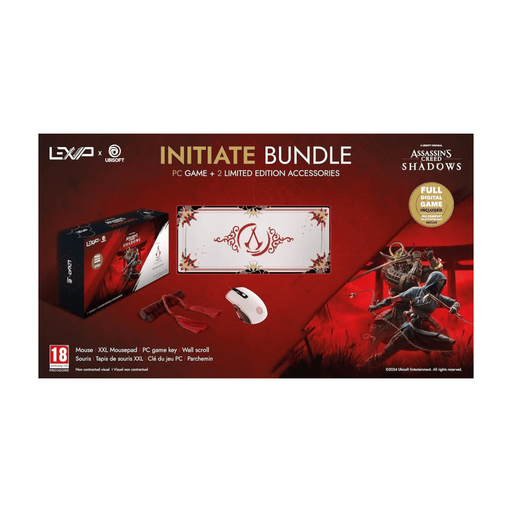 Image unavailable
Lexip X Ubisoft Assassin's Creed Shadows Initiate Box – PC Game, Mouse & Mat
Consider the bundle if you need a mouse and a separate mat for a desk with an unsuitable tracking surface.
It also contains a PC game; check that you want the complete bundle. Confirm the mouse’s shape suits your grip and test it with the mat in your room.
View on Joybuy
 Image unavailable
Rapoo VT2 Wireless Gaming Mouse, Purple
This model is an option if cable-free movement and configurable buttons are priorities.
Its product name states 53 g, 8K wireless polling and 10 programmable buttons. The stated battery life of up to 750 hours depends on a driver update and 1000 Hz operation; check the settings you intend to use.
View on Joybuy
 Image unavailable
MACHENIKE L9X1 Wireless Gaming Mouse
Consider this mouse if you want to switch between a wired connection, 2.4 GHz wireless and Bluetooth.
Its product name states 49 g and a PAW3395 sensor. Check grip fit and charging arrangements, and use an opaque pad if your desk surface is reflective.
View on Joybuy
Common questions
Can I play EA SPORTS FC 27 on PC with a mouse and keyboard?
Yes. EA Help says EA SPORTS FC 27 supports mouse-and-keyboard controls on PC, with WASD and Arrows keyboard layouts. Check the selected input device before an online session, particularly if you also use a controller.
Do I need a higher-DPI mouse for a bright room?
No particular DPI figure solves a difficult tracking surface. Logitech advises using a mouse pad and avoiding glass, transparent and reflective surfaces; set a sensitivity you can control after testing the mouse where you play.
Should I choose wired, Bluetooth or 2.4 GHz wireless?
Choose wired if you prefer continuous power and can accommodate the cable. If cable-free gaming matters more, check for a dedicated 2.4 GHz receiver; a model that also offers Bluetooth gives you another connection option for compatible devices.
What should I check about returns before ordering?
Check the seller’s change-of-mind returns information and how to report a faulty, damaged or misdescribed mouse. Keep your order confirmation and model details; do not assume a voluntary returns policy answers every question about a fault.


