
24/7 Customer Support

Free returns

Same-day & Next-day Delivery

Quality Guaranteed

Unlock Your Welcome Offers: FREE Delivery | Up to 80% OFF | Free 30-day JoyPlus trial
Download the APP
A gaming mouse can improve control, comfort and responsiveness, but only when its specifications suit your games and desk setup. A high DPI number alone does not guarantee accurate aiming, while wireless connectivity is not automatically more convenient if the battery is difficult to charge.
For UK PC gamers, the main buying traps usually involve inflated performance figures, unsuitable shapes and overlooked running costs. Use the guide below to compare a gaming mouse by the features that affect daily use rather than by marketing language.
A high DPI mouse can support very sensitive cursor movement, but most players do not use the maximum setting. FPS players often prefer a lower sensitivity for controlled aiming, while desktop users may favour a higher setting for navigating large screens.
Sensor quality, tracking consistency and software adjustment matter more than the headline DPI figure. Also check whether the mouse allows practical DPI steps and whether the setting can be changed quickly during play.
A standard 1,000Hz polling rate reports the mouse position up to 1,000 times per second. An 8K polling rate mouse can report more frequently, but the difference may be less noticeable on an older PC, a lower-refresh-rate monitor or in everyday applications. Higher polling rates can also increase processing demand and may affect battery life in wireless mode.
Treat 4,000Hz or 8,000Hz as an optional performance feature, not an essential requirement for every player.
A lightweight gaming mouse can feel fast during large swipes, but an extremely light design may not suit someone who prefers a substantial shell. Likewise, an ergonomic gaming mouse designed for the right hand may be uncomfortable for left-handed users or those who regularly change grip.
Check the mouse dimensions, hand orientation, button positions and surface finish. A shape that feels comfortable during a short session may still cause fatigue during longer gaming or work use.
A wired gaming mouse avoids battery charging and normally offers straightforward plug-and-play use. Look for a flexible cable that does not pull against the mouse during low-sensitivity FPS play.
A wireless gaming mouse is more convenient for a clean desk, but check the connection type. A 2.4GHz receiver is generally intended for responsive gaming, while Bluetooth is useful for laptops, tablets and office work. Tri-mode models combine wired USB, 2.4GHz and Bluetooth, giving you more flexibility across devices.
For wireless models, compare battery capacity, charging method and whether the mouse can be used while charging. A magnetic dock can be convenient, but it also takes up desk space and may increase the purchase cost.
Sensor specifications can include DPI, IPS tracking speed and acceleration. DPI describes sensitivity; IPS indicates the speed at which the sensor can track movement; acceleration describes how much movement the sensor can handle before tracking errors may occur.
For most PC gaming, a reliable sensor with adjustable settings is more useful than an unnecessarily high maximum. The ASUS ROG Keris II Ace, for example, lists a 42,000 DPI ROG AimPoint Pro optical sensor and track-on-glass capability. The MACHENIKE L9 X1 lists a PAW3395 sensor, up to 26,000 DPI and 650 IPS. These figures are useful comparison points, but your preferred sensitivity and surface remain important.
A 49–65g mouse is generally considered lightweight, while heavier MMO models may provide more buttons and a larger palm support. Consider:
A programmable gaming mouse can be useful for shortcuts, macros and application controls, but make sure the software supports your operating system. RGB lighting is primarily an appearance feature; it should not replace checking the sensor, switches or comfort.
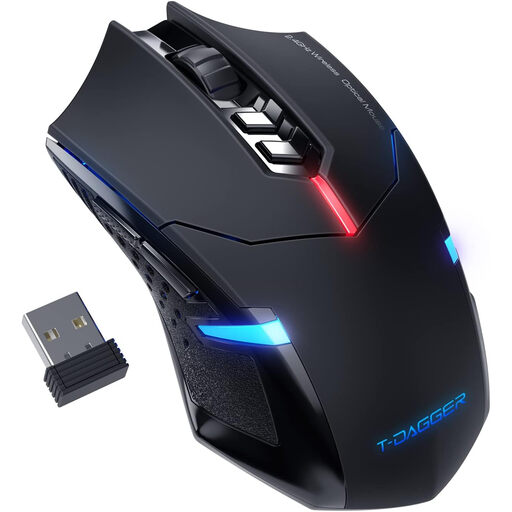
Why This Fits Their Persona: A practical option for casual PC gaming, study spaces and shared rooms where quiet clicking and wireless convenience are useful.
It uses five selectable DPI levels from 1,000 to 4,000 rather than relying on an inflated maximum figure. Battery-saving sleep mode is also listed.
Wireless USB connection, quiet left and right clicks, blue LED backlighting and plug-and-play compatibility.
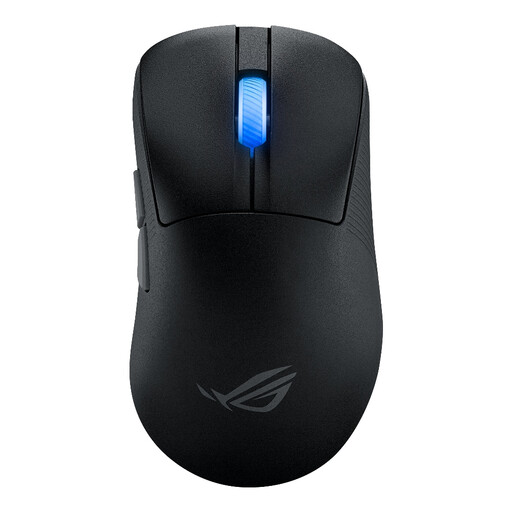
Why This Fits Their Persona: Suitable for FPS players who want a low-weight ergonomic gaming mouse with several connection options for a home setup.
The specification lists a 54g weight, 2.4GHz wireless, Bluetooth and wired USB modes, so buyers can select the connection suited to their use.
42,000 DPI optical sensor, up to 4,000Hz wireless and 8,000Hz wired polling with the booster, plus 100-million-click optical switches.
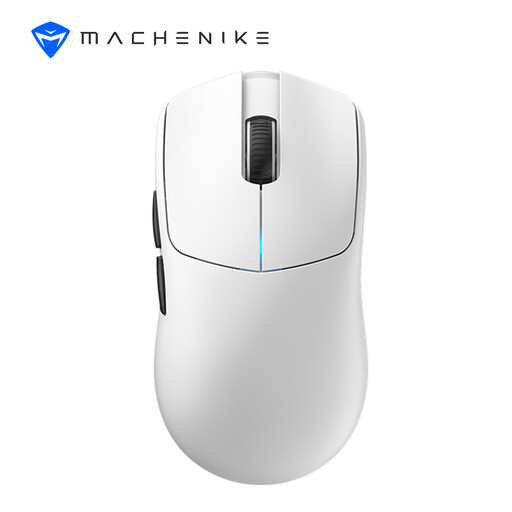
Why This Fits Their Persona: Its symmetrical 49g design and high polling specification suit players who make frequent, wide mouse movements in FPS titles.
The listed 49g weight, 700mAh battery and tri-mode connectivity make the core design easier to assess than a feature list focused only on DPI.
PAW3395 sensor, up to 26,000 DPI, dual 8,000Hz wired/2.4GHz polling and listed runtime of over 100 hours.
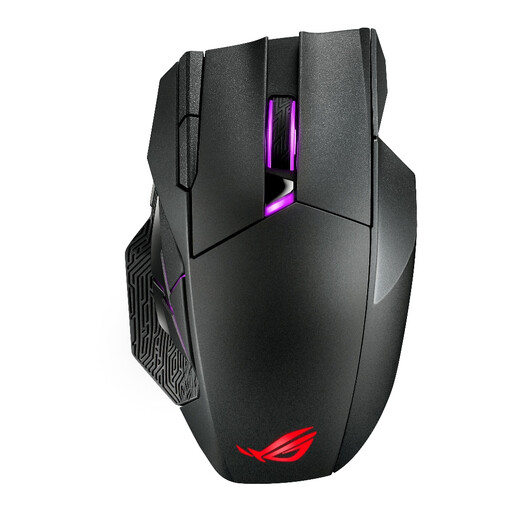
Why This Fits Their Persona: MMO and MOBA players can benefit from a larger mouse with numerous programmable controls for skills, commands and shortcuts.
The 12-button layout is clearly stated, as are the 1,000Hz polling rate and 2.4GHz or USB-C connection options.
Six side buttons, hot-swappable switches, up to 67 hours of battery life with RGB off and a magnetic charging dock.
We have compiled a complete, real-time list of products that fully satisfy these strict selection criteria and UK safety regulations.
A 2.4GHz wireless gaming mouse can be suitable, provided the receiver is positioned close to the mouse and away from sources of interference. Check the listed polling rate, battery runtime and charging method. Bluetooth is convenient for general use but may not be the preferred connection for competitive play.
Lifespan depends on switch construction, daily use, cleaning and cable or battery care. Product listings may state switch ratings such as 5 million, 90 million or 100 million clicks, but this is a rated specification rather than a guarantee of service life. Keep the sensor and feet free from dust, avoid liquids and follow the manufacturer’s battery safety instructions.
A wired model uses power through USB. A rechargeable wireless mouse needs occasional charging, while a battery-powered model may require replacement batteries. RGB lighting and higher polling rates can increase power consumption, so disable unnecessary lighting or reduce the polling rate when working away from games. For products containing batteries, follow the supplied disposal guidance and use appropriate UK electrical recycling routes.