Comfort-first card-game players
If you play for long sessions, you may care more about a comfortable shape, accessible clicks and an easy-to-use wheel than competitive speed settings.


For PC card games, choose a mouse whose shape, clicks and scroll wheel suit repeated use, then decide whether a cable would bother you. A bright room does not by itself establish a need for RGB lighting or esports-grade sensor settings; treat those as preferences for other uses rather than requirements for card play.
If you play for long sessions, you may care more about a comfortable shape, accessible clicks and an easy-to-use wheel than competitive speed settings.
If the same mouse serves card games and everyday PC tasks, you may value a wireless connection, configurable controls or a wheel that suits different kinds of scrolling.
If the mouse’s appearance matters to you, lighting may be worth considering. Treat RGB as a visual preference, not a requirement for tracking in a bright room.
For PC card games in a bright room, start with handling and the controls you use repeatedly. Then choose the connection that suits your desk; lighting can remain an appearance choice.
| Concern | What to check | Who this matters to |
|---|---|---|
| Comfort over longer sessions | Compare the exact mouse’s shape with your hand size and grip; check whether side buttons are easy to reach without pressing them accidentally. | If I play several games in a sitting, I want the mouse to feel manageable through repeated turns. Around 34% of consumers would put comfort first. |
| Clicks, scrolling and shortcuts | Check button placement and wheel behaviour; if you use more than one PC, confirm whether the exact model saves settings onboard. | When I navigate cards and menus, I want the controls I actually use to be easy to operate. For around 33% of consumers, everyday controls would be the primary concern. |
| Cable-free use | Confirm the exact connection modes and whether you will need a receiver, charging access or batteries. | If a cable gets in the way at my desk or I switch devices, connection flexibility matters most. Around 25% of consumers would prioritise cable-free use. |
| Lighting and appearance | Look at the exact model’s lighting options under your usual room lighting; do not assume RGB changes tracking performance. | If I enjoy a customised setup, I may want lighting even though it is not needed to play cards. Appearance would come first for around 8% of consumers. |
Logitech G, Razer and SteelSeries describe advanced gaming features on particular models, but room brightness is not itself a reason to choose those specifications for card games.
Choose the shape, connection and controls you need first. Consider competitive-gaming settings separately if you also play games where they matter to you.
Razer and SteelSeries describe designs intended for particular grips or hand positions; that does not establish how an individual mouse will feel in your hand.
Check the exact model’s dimensions and grip guidance. Before ordering, review the seller’s return procedure in case the shape or button reach does not suit you.
SteelSeries lists both 2.4 GHz and Bluetooth for the Rival 3 Wireless, while Logitech G describes LIGHTSPEED wireless for the G502 X PLUS. Connection options depend on the model.
Confirm its supported modes, receiver arrangement and power requirements before choosing it for your desk or laptop.
A wireless setup may also mean managing charging, batteries or a receiver.
The Joybuy listing identifies a G502 X LIGHTSPEED in white, whereas Logitech G’s G502 X PLUS is a separately named model. A shared family name does not establish identical features.
Match the complete model and variant name, colour and required controls before ordering.
Logitech G describes the G502 X PLUS as a wireless model with LIGHTFORCE switches, LIGHTSPEED connectivity, RGB lighting and customisation options.
Razer describes right-handed ergonomic designs across the DeathAdder Essential and the wired DeathAdder V3.
SteelSeries describes a wired Rival 3 with onboard settings storage and a separate Rival 3 Wireless with 2.4 GHz and Bluetooth connectivity.
These wired and wireless gaming mice offer different ways to equip a PC card-game desk. Compare their stated connection types and model-specific features with the handling and controls you want; lighting need not decide the choice.
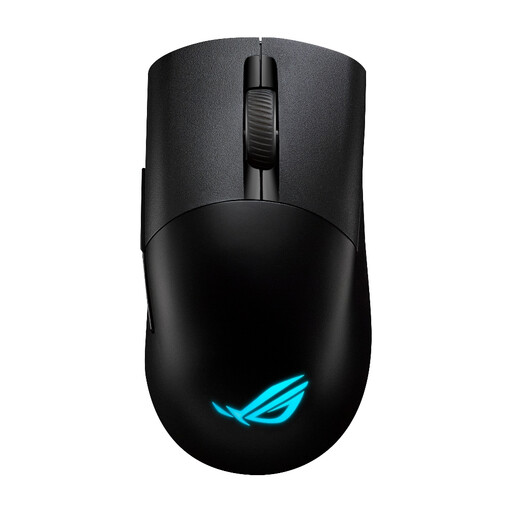 No image available
Consider this wireless model if you want to assess its grip and controls for repeated card-game actions. Check the exact weight and sensor specifications for the variant before relying on either figure.
 No image available
Consider this model if you want connection choices at a multi-use desk. Its name lists Bluetooth, 2.4 GHz and USB-C modes, a charging dock and a PAW3311 sensor rated at 24,000 DPI. Confirm the exact variant’s weight and power arrangement, and check its fit if you have smaller hands.
 No image available
A wired connection may suit a fixed card-game desk if you do not mind a cable. The product name lists RGB lighting, which you can treat as an appearance choice. Check dimensions for hand fit and confirm button functions if you need configurable shortcuts.
 No image available
This cordless model is worth considering if keeping a cable off your desk matters more than its LED lighting. Its name lists five adjustable DPI levels. Confirm its battery requirements, and check Mac side-button compatibility if you need those controls.
 No image available
Consider this model if you want to choose between connections for card games and other PC use. Its name lists wired, 2.4 GHz and Bluetooth modes and a 49 g weight. Check hand fit and charging requirements; confirm the supported modes if its polling-rate settings matter for your other games.
No: room brightness does not establish RGB as a requirement for mouse tracking. Logitech G and SteelSeries describe lighting options on particular models; choose them if you value their appearance or controls, not as a substitute for checking shape and buttons.
A wired mouse can suit a fixed desk if you do not mind the cable; wireless makes sense when cable-free use or switching devices matters more to you. Check the exact model’s connection modes and power requirements: SteelSeries lists both 2.4 GHz and Bluetooth for the Rival 3 Wireless, while Logitech G describes LIGHTSPEED wireless for the G502 X PLUS.
A change-of-mind cancellation and a remedy for faulty or misdescribed goods are separate matters. GOV.UK describes a time-limited cancellation right for online orders, while the Consumer Rights Act 2015 sets out remedies when goods do not meet statutory requirements. Check the applicable cancellation procedure promptly; if the mouse is faulty or misdescribed, tell the seller what is wrong rather than treating the issue solely as a change of mind.