Who needs to consider what?

Players distracted by mouse lighting

If you play in near darkness, check both decorative lighting and status indicators. Razer Support describes brightness and switch-off controls for supported devices, while SteelSeries Support says the Rival 3 Wireless Gen 2 has indicators that cannot be changed in GG.

Players who use frequent shortcuts

Extra buttons may help you keep commands such as crouch or push-to-talk within reach, provided you can press them without disturbing your grip. Razer lists 11 programmable buttons on the Basilisk V3 Pro 35K; button count alone cannot establish personal fit.

Players who reposition the mouse often

If light movement and cable-free play matter most, compare weight and connection options, then check the shape and lighting of the exact model. Logitech G specifies a 60 g wireless PRO X SUPERLIGHT 2; that figure does not establish how it will feel in your hand.

What matters when choosing?

Concern What to check Who this matters to
Lighting control Check the exact model’s brightness, switch-off and status-light controls, including what happens after a restart or when its software is closed. If even a small glow draws my eye away from a dark scene, I want to know which lights I can control. Roughly 42% of consumers would put mouse lighting first.
Grip and commands Compare the shape with a mouse you find comfortable, and check whether you can reach the buttons you intend to bind without shifting your grip. When I use crouch, lean or gadgets regularly, I need accessible buttons without compromising hand comfort. Around 33% of consumers would prioritise grip and command access.
Wireless use and power Check the connection mode used for gaming and whether battery-saving settings change polling or lighting. For repeated repositioning, I want cable-free movement without overlooking charging or changes to my gaming settings. About 25% of consumers would make wireless use and power management their main concern.

Buying pitfalls

  • Assuming RGB can always be switched off completely

    Lighting controls vary by model. SteelSeries Support says the Rival 3 Wireless Gen 2’s scroll-wheel indicators cannot be changed in GG, while Razer Support documents brightness and switch-off options for supported devices.

    Check the exact mouse’s support information for decorative lights, status indicators and behaviour when its control software is not running.

  • Counting buttons before checking the grip

    Buttons are less useful if reaching them disrupts your hold. The cited Basilisk V3 Pro 35K is specified by Razer at 112 g, while Logitech G specifies the PRO X SUPERLIGHT 2 at 60 g; those figures describe different models, not how either will fit your hand.

    Use your current comfortable mouse as a reference for shape and decide which shortcuts genuinely need dedicated buttons.

  • Enabling a power-saving mode without checking its effect

    SteelSeries Support says High-Efficiency mode on the Rival 3 Wireless Gen 2 turns lighting off but lowers polling to 125 Hz and may slightly increase input lag.

    Check how the mode feels in the games you play before relying on it for longer battery life.

  • Confusing a shop’s returns policy with statutory rights

    A voluntary change-of-mind policy is distinct from remedies for faulty or misdescribed goods. GOV.UK states that sellers must offer a full refund when goods are faulty, not as described or do not do what they are supposed to do.

    Keep the listing and order record, and tell the seller which problem you are reporting rather than assuming every return follows the same rules.

Brands to consider

Razer

The Basilisk V3 Pro 35K illustrates an ergonomic wireless option with configurable controls and lighting.

  • Razer specifies 11 programmable buttons and five onboard profiles for this model. Razer Support describes brightness and switch-off controls for supported Synapse devices.
  • Razer specifies a 112 g weight for the cited model and warns that some lighting settings can revert when Synapse is unavailable or exited. Check the behaviour under your usual PC startup conditions.

Logitech G

The PRO X SUPERLIGHT 2 represents a low-weight wireless option.

  • Logitech G specifies a 60 g chassis and HERO 2 sensor for the PRO X SUPERLIGHT 2.
  • Check the exact model’s lighting and button layout separately; low weight does not establish dark-room suitability or grip comfort.

SteelSeries

The Rival 3 Wireless family offers 2.4 GHz and Bluetooth connection options; lighting behaviour needs attention on the Gen 2 model.

  • SteelSeries states that the original Rival 3 Wireless offers both connection modes and up to 400+ hours of battery life.
  • SteelSeries Support says the Rival 3 Wireless Gen 2’s scroll-wheel indicators cannot be changed in GG. Its High-Efficiency mode disables lighting but reduces polling to 125 Hz and may slightly increase input lag.

Joybuy product choices

These wireless gaming mice offer different combinations of weight, controls and connection options for stealth-game play. Check the lighting behaviour and grip fit of each exact model before choosing one for a dark room.

Black Razer Viper V3 Pro wireless gaming mouse

Razer Viper V3 Pro Wireless Gaming Mouse, Black

Consider this option if wireless repositioning matters to you, but confirm its lighting behaviour and shape before choosing it for a dark room.

The product title specifies 54 g, a Focus Pro 35K sensor and HyperPolling 8 kHz.

View on Joybuy

White Rapoo VT7 MAX wireless gaming mouse

Rapoo VT7 MAX Wireless Gaming Mouse, White

This is an option to examine if you want a light wireless mouse with several controls. Check its lighting and hand fit for your setup.

The product title specifies 53 g, 10 programmable buttons and 8 kHz wireless polling. Its stated battery life is up to 750 hours; check the required low-power settings and driver update before relying on that figure.

View on Joybuy
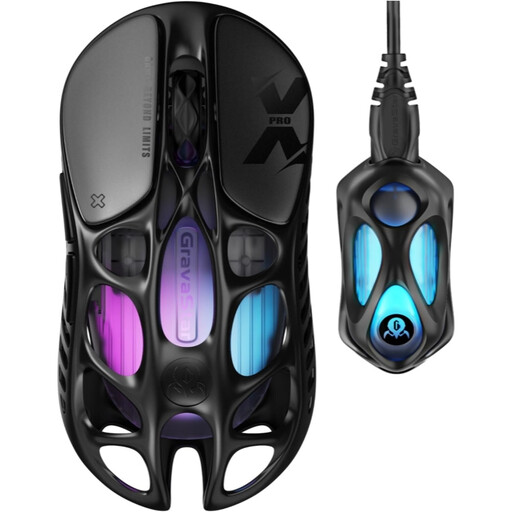
Black GravaStar Mercury X Pro Chinese retail version gaming mouse

GravaStar Mercury X Pro Wireless Gaming Mouse, Chinese Retail Version, Black

Consider this version if low weight and the listed controls appeal to you. Its RGB lighting makes the exact dimming or switch-off options particularly important to check.

The product title specifies 49 g, a PAW 3950 sensor, an 8K dongle and five programmable buttons.

View on Joybuy

AJAZZ AJ159 APEX wireless gaming mouse with magnetic charging base

AJAZZ AJ159 APEX Wireless Gaming Mouse with Magnetic Charging Base

This model is worth considering if you want wireless play with a wired fallback. Check the lighting of both the mouse and its charging base for a dark-room desk.

The product title specifies 56 g, a PAW3950 sensor and 2.4 GHz and wired modes. Confirm the maximum DPI before ordering, as the title and description give conflicting figures.

View on Joybuy

Common questions

How do I tell whether an RGB mouse will suit a dark room?

Check the exact model’s brightness, switch-off and indicator-light controls rather than relying on the RGB label. Razer Support describes display-off and idle switch-off options for supported Synapse devices, but also warns that some settings can revert when Synapse is unavailable or exited.

Does a battery-saving mode affect gaming controls?

It can change the settings you play with. SteelSeries Support says High-Efficiency mode on the Rival 3 Wireless Gen 2 disables lighting and lowers polling to 125 Hz, which may slightly increase input lag; check that trade-off in your games.

Should I choose a wired or wireless mouse for stealth games?

Choose according to the movement and power routine you prefer, after checking the exact mouse’s connection modes. A wireless model avoids a cable during play but needs charging or battery management; if it offers both 2.4 GHz and Bluetooth, check which mode provides the gaming settings you intend to use.

What if a gaming mouse bought online is faulty or not as described?

Contact the seller about the fault or discrepancy and keep the listing and order record. GOV.UK states that sellers must offer a full refund for goods that are faulty, not as described or do not do what they are supposed to do; a change-of-mind return is a separate question.

How should I dispose of an old gaming mouse?

Use an appropriate electrical-recycling route rather than treating the mouse as general household waste. GOV.UK describes rules for waste electrical and electronic equipment, and Coventry City Council specifically identifies computer mice as electrical waste; check your local authority’s collection options.