Players who map shortcuts
If you regularly inspect cards, confirm choices or open menus, reachable mouse buttons may reduce trips to the keyboard. Their value depends on the bindings your game allows, not button count alone.


For deck-building games, choose a mouse with controls you can comfortably reach and a scroll wheel that suits the way you browse cards and menus. A wired multi-purpose mouse keeps setup simple; consider more side buttons only if your game supports the actions you intend to map, or wireless if a cable-free desk matters enough to justify charging and receiver management. Playing with headphones does not, by itself, require a particular mouse feature.
If you regularly inspect cards, confirm choices or open menus, reachable mouse buttons may reduce trips to the keyboard. Their value depends on the bindings your game allows, not button count alone.
If you play for extended periods, shape, grip and thumb-button reach deserve attention alongside weight. A stated ergonomic shape cannot establish how the mouse will fit your hand.
A wireless mouse can remove one cable from a PC and headphone setup. Check how it charges and whether you can accommodate the receiver used for its gaming connection.
Start with the actions and scrolling you use in your deck-building game, then decide whether wireless positioning or physical fit changes your choice.
| Concern | What to check | Who this matters to |
|---|---|---|
| Reachable shortcuts | List the actions you would map; check game binding support and whether the side buttons suit your thumb. | If I repeatedly inspect or confirm cards, I want those actions within easy reach. Roughly 33% of consumers put usable shortcuts first. |
| Controlled scrolling | Compare notched and free-spin wheel modes, where offered, and check for tilt inputs if you would map them. | When moving through cards and menus, I want to scroll quickly without overshooting individual choices. Around 27% of consumers make navigation their primary concern. |
| Cable-free positioning | Check the available connection modes, receiver requirements and charging arrangement for the exact model. | If desk cables get in my way, I would rather manage charging than add another cable. Approximately 20% of consumers prioritise a cable-free setup. |
| Hand fit | Compare shape and thumb-button placement with your grip; consider weight without using it as a substitute for fit. | During a long session, I need to reach the controls without changing my grip awkwardly. Roughly 20% of consumers put physical comfort first. |
A dense side panel takes setup and must sit where your thumb can use it comfortably. Extra buttons offer little benefit if your game cannot bind the actions you want.
Write down the commands you would use regularly, then compare layouts that can accommodate them.
For card and menu navigation, accessible controls, wheel behaviour and fit are more relevant checks than a headline sensor-sensitivity figure.
Compare button placement and scrolling options first; set cursor sensitivity to your preference.
A wireless mouse adds charging and, for a receiver-based connection, another item to keep track of. Corsair describes the 2.4 GHz connection on its Scimitar wireless line as the gaming-oriented mode.
Check the exact listing for its receiver, charging method and the conditions attached to any battery-life claim.
Weight and adjustable controls describe a mouse, but cannot tell you whether every button is comfortable for your hand and grip.
Compare dimensions and side-button reach, and check the retailer’s applicable return terms if you cannot try the shape beforehand.
The G502 X range illustrates wired and LIGHTSPEED wireless multi-purpose layouts with configurable controls.
The right-handed Basilisk V3 is an example of a multi-button mouse with selectable scrolling behaviours.
The Scimitar Elite Wireless SE suits consideration when a repositionable MMO-style side panel is central to the choice.
The Rival 5 offers an example of a wired layout between a basic mouse and a 12-button side panel.
These wired and wireless gaming mice offer different approaches to desk setup and configurable controls. For deck-building games, compare each one against the actions you can bind and the shape you can comfortably use.
 No image available
Consider this wireless model if you have several game actions you can usefully bind. Its title specifies 10 programmable buttons, macro capability and 53 g; check whether its wheel and button positions suit your navigation and grip.
 No image available
A wired option to consider if you want configurable buttons without managing a wireless connection. Check which controls can be remapped, how the wheel feels and whether the shape fits your grip.
 No image available
Consider this wired variant if its shape appeals to you and you want to configure controls through Razer Synapse. Check the button layout, wheel behaviour and software compatibility against your setup.
 No image available
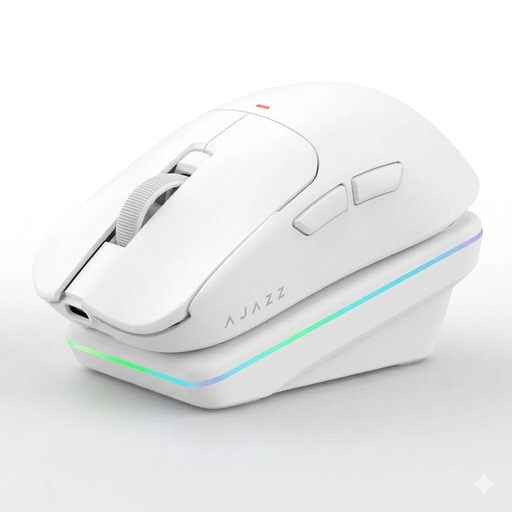
This model is worth comparing if you want 2.4 GHz wireless use with a charging base and a wired option. Its title specifies 56 g; confirm the exact connection modes, button layout and wheel behaviour before choosing it for your game.
 No image available
Consider this model if switching between Bluetooth, 2.4 GHz and USB-C wired connections matters to you. Check its button layout and hand fit; the supplied product details conflict on its weight, so confirm that specification for the exact variant.
Choose enough reachable buttons for the actions you will actually map, rather than aiming for the highest count. Check your game’s binding options before deciding whether a moderate layout or a dense side panel would be useful.
For Corsair’s cited Scimitar wireless line, its manual describes the 2.4 GHz receiver connection as gaming-oriented and Bluetooth as suited to everyday computing. Check the connection guidance for the exact mouse you choose and whether your PC has a suitable USB port.
That depends on the mouse and the changes you want to make. Corsair directs Scimitar wireless users to iCUE for configuration and describes three onboard profile slots; check the exact model’s software compatibility and profile storage before buying.
Check an electrical-waste collection route through your retailer or local authority rather than putting the mouse in general waste. GOV.UK guidance says retailers must offer same-type electrical-waste take-back when a customer buys an item, under the applicable scheme conditions.