Choose by how many card, deck and menu commands you want on the mouse, then check whether its shape, button placement and connection suit longer sessions. A 12-button thumb grid makes sense if you will use many bindings; a less densely arranged set of programmable controls may be easier to manage if you only need a few. Lower weight is another reason to consider a different layout, but it cannot establish whether a mouse will fit your hand.
Who is this choice for?
Shortcut-heavy deck builders
If you regularly open deck views, navigate menus or use communication commands, count the actions you would genuinely assign to thumb buttons. Razer’s Naga V2 HyperSpeed and Logitech G’s G502 X LIGHTSPEED illustrate different control counts, but the useful number is the one you can remember and reach.
Long-session players
For extended card-reading and cursor movement, compare shape, mass and side-button reach together. SteelSeries specifies a 66 g Aerox 5 Wireless; that figure alone cannot tell you how the mouse will feel in your hand.
Players who switch devices
If your large display is connected to a gaming PC but you also use a laptop, check the connection options for each device. Razer and SteelSeries list both 2.4 GHz wireless and Bluetooth on the models discussed here; the modes call for different port and power checks.
What matters when choosing?
Decide how many shortcuts need their own buttons before comparing weight, physical fit and the connection you will use at your large-screen setup.
Many-button MMO layout
Choose it when: you will assign numerous recurring actions and are willing to learn a thumb grid. Razer specifies 21 programmable controls, including a 12-button grid, on the Naga V2 HyperSpeed.
Trade-off: a dense grid adds setup and can be unnecessary when you only use a handful of shortcuts.
General-purpose programmable layout
Choose it when: you want several remappable commands without committing to a full thumb grid. Logitech G specifies 13 customisable controls on the G502 X LIGHTSPEED.
Trade-off: extensive bindings may still require keyboard shortcuts.
Lower-weight multi-genre layout
Choose it when: lower mouse mass matters more to you than maximum button capacity. SteelSeries specifies a 66 g Aerox 5 Wireless with nine programmable buttons.
Trade-off: check that its five-button side panel accommodates the actions you want within reach.
| Concern | What to check | Who this matters to |
|---|
| Shortcut capacity |
List the actions you would bind, then compare button placement and the software options for remapping. |
I want deck views and recurring commands within reach without losing track of which button does what. Around 37% of consumers put directly reachable shortcuts first. |
| Comfort over long sessions |
Compare mass, shape and side-button reach; check the seller’s return terms if you cannot assess fit beforehand. |
When I spend a long session reading cards and moving the pointer, the mouse needs to suit my grip. For around 27% of consumers, physical fit is the primary concern. |
| Connection flexibility |
Check the stated wired, receiver and Bluetooth modes for the exact model, along with the ports and power arrangement they require. |
I move between a gaming PC and another device and want a connection each can use. That flexibility comes first for around 18% of consumers. |
| Fit and return risk |
Check the retailer’s change-of-mind policy before use, and keep that separate from remedies for faulty goods. |
If the side buttons are awkward to reach, I need to understand my options before relying on a trial at home. Around 18% of consumers prioritise avoiding that purchasing risk. |
Buying pitfalls
-
Choosing the highest button count without planning bindings
A 12-button thumb grid offers more places for commands, but buttons you cannot distinguish or do not use add complexity.
Write down your recurring card and interface actions before choosing between a grid and a smaller control layout.
-
Assuming a lighter mouse will fit better
SteelSeries lists the Aerox 5 Wireless at 66 g, but weight does not establish grip comfort or whether you can reach its side controls.
Check the dimensions and button layout, and read the seller’s change-of-mind terms before using a mouse you may need to return.
-
Treating wireless modes as interchangeable
Razer gives different stated battery runtimes for the Naga V2 HyperSpeed’s Bluetooth and 2.4 GHz modes. Connection choice can also affect whether you need a free USB port.
Confirm the mode you intend to use, compatibility with your device and whether the mouse uses replaceable batteries or recharging.
Replacing batteries or making time to recharge can become part of regular use, depending on the model.
-
Relying on an in-store change-of-mind return
Citizens Advice distinguishes changing your mind about a non-faulty shop purchase from a problem with faulty goods. A shop may offer a voluntary change-of-mind policy, but its conditions matter.
Ask about that policy before purchase rather than assuming that trying the buttons at home will qualify for a return.
Relevant brands to consider
Razer
The Naga V2 HyperSpeed is relevant if a large number of thumb-accessible commands is your starting requirement.
- Razer specifies 21 programmable controls, including a 12-button thumb grid, plus 2.4 GHz wireless and Bluetooth.
- The grid is a specialised layout; assess button reach rather than assuming it suits your hand.
Logitech G
The G502 X LIGHTSPEED offers an alternative for players who want several configurable commands without a 12-button thumb grid.
- Logitech G specifies 13 customisable controls and describes macros and game-specific profiles through G HUB.
- Players assigning many separate commands should check whether this control layout meets their needs.
SteelSeries
The Aerox 5 Wireless is worth considering when a lower stated mass matters alongside some side-button capacity.
- SteelSeries specifies a 66 g build, nine programmable buttons and a five-button side panel.
- Check whether the available button positions cover your intended bindings; stated weight does not settle physical fit.
Gaming mice on Joybuy
These gaming mice offer different combinations of stated weight, controls and connection options for a large-screen deck-building setup. Check each model’s button layout against the commands you plan to use.
 No image available
Rapoo VT7 MAX wireless gaming mouse, white
Consider it if you want to assign several recurring commands without choosing a full thumb grid.
The product name states 10 programmable buttons and a weight of 53 g.
Its stated battery life of up to 750 hours depends on enabling low-power mode through a driver update and using the specified 1000 Hz setting; check the expected runtime for your own settings.
View on Joybuy
 No image available
AJAZZ AJ159 APEX wireless gaming mouse with magnetic charging base
Consider it if lower stated weight and a charging base appeal to you, but check how many buttons you can comfortably use for card commands.
The product name states a weight of 56 g. Confirm the exact connection modes and DPI specification for this variant before choosing it on those grounds.
View on Joybuy
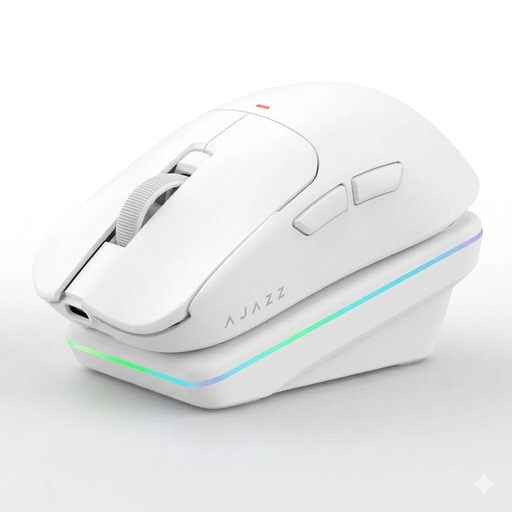 No image available
AJAZZ AJ200 AI MC wireless gaming mouse with charging dock
Consider it if you expect to switch connections, while checking that the reachable controls cover your intended shortcuts.
The product name lists Bluetooth, 2.4G and USB-C modes. Confirm the weight for this variant before using it to decide between lighter models.
View on Joybuy
 No image available
HyperX Pulsefire Fuse wireless gaming mouse
Consider it for a wireless setup if you only need a smaller set of recurring mouse shortcuts.
Before relying on it for a particular set of bindings, confirm the number and placement of its programmable buttons.
View on Joybuy
 No image available
MACHENIKE L9 X1 8K-Blue 3395 wireless mouse
Consider it if mouse mass is a priority, but establish its shortcut options before choosing it for command-heavy play.
Confirm which buttons can be remapped or assigned macros, as well as whether the shape lets you reach them comfortably.
View on Joybuy
Questions about gaming mice
Do deck-building games require a 12-button thumb grid?
No: a thumb grid is most useful when you have enough repeated commands to assign and are comfortable learning their positions. Razer specifies a 12-button grid on the Naga V2 HyperSpeed, while Logitech G and SteelSeries describe different programmable layouts; start with your own list of commands.
Should I use Bluetooth or a 2.4 GHz receiver with my large-screen PC?
Choose the mode your devices support and that suits how you use the mouse. Razer and SteelSeries list both modes on the Naga V2 HyperSpeed and Aerox 5 Wireless respectively; check receiver and USB-port needs, Bluetooth compatibility and the power arrangement for the exact model.
What if the mouse shape or buttons do not suit me?
Check how and where you buy it before relying on a change-of-mind return. Citizens Advice distinguishes a shop’s voluntary policy for non-faulty purchases from remedies for faulty goods and describes cooling-off terms for qualifying distance purchases; review the conditions that apply to your order before opening or using the mouse.
What should I do with an old gaming mouse?
Look for an electrical-waste collection route rather than putting it in general waste. GOV.UK describes retailer take-back for the same type of electrical item when buying a replacement; ask the retailer which arrangements apply, or check your local collection options.


