What to prioritise
For deck-building in a dark room, start with the need that would most affect your play: lighting control, access to recurring commands or a comfortable fit over longer sessions. Then check how the mouse handles the other two.
| Concern |
What to check |
Who this matters to |
| Lighting control |
Check whether the exact model lets you adjust or switch off its lighting, and whether battery-life claims assume lighting is off. |
I want to locate the mouse easily without lighting that distracts me during a turn. Around 37% of consumers put lighting control and low-light orientation first. |
| Buttons and scrolling |
Check the reach of remappable buttons and whether the scroll behaviour suits your menus and lists. |
Repeated commands are worth binding only if I can find the right control without looking down; roughly 36% of consumers prioritise accessible shortcuts and navigation. |
| Fit and connection |
Check the shape against your grip, then weigh cable tolerance against charging or battery upkeep. |
During a long session, I would rather have a shape that feels right than extra controls I struggle to reach. About 27% of consumers place sustained comfort and connection choice first. |
Relevant brands to consider
These examples point to particular mouse lines and features, not to a claim that every model from a brand has the same layout or will suit every grip.
Razer
The Basilisk V3 line is relevant if you want configurable lighting and programmable controls in a right-handed mouse layout.
- Razer describes 10+1 programmable buttons and an adjustable scroll wheel on the wired Basilisk V3.
- Check button reach and shape for your grip; the wired and wireless Basilisk variants also have different controls and power arrangements.
Logitech G
Selected G502 models offer configurable lighting and multiple controls; the G502 HERO is relevant when stored button configurations matter.
- Logitech G lists 11 programmable buttons for the G502 HERO and an active 8-LED lighting array for the distinct G502 X PLUS.
- Those features belong to different models. Compare the exact layout and variant rather than assuming they share every feature.
Corsair
The Nightsabre Wireless is relevant if you are considering programmable controls and stored profiles alongside wireless use.
- Corsair lists 11 programmable buttons and up to five onboard profiles for the Nightsabre Wireless.
- Check the conditions attached to its battery specification and whether its shape and charging arrangement suit your setup.
Joybuy product choices
These mice offer wired or wireless options to consider for dark-room deck-building. Compare their physical controls and lighting arrangements against the particular shortcuts and brightness settings you want; the product name or connection type alone cannot establish a comfortable fit.
 No image available
Razer Cobra Wired Gaming Mouse, Minecraft Edition
Consider this wired option if you want to avoid battery upkeep while choosing a mouse for your dark-room desk. Check whether its lighting can be dimmed to your preferred level and whether the button layout covers your intended shortcuts.
View on Joybuy
 No image available
ASUS ROG Spatha X Wireless Gaming Mouse
Consider this model if you want wireless use and expect to assign several recurring commands. Check that the side-button placement suits your grip, that the RGB controls offer the brightness you want and that the battery-life conditions reflect how you will use the lighting.
View on Joybuy
 No image available
AJAZZ AJ200 AI MC Wireless Gaming Mouse with Charging Dock
Consider this option if a charging dock and a choice of connection modes suit your desk setup. The named variant lists a PAW3311 sensor and up to 24,000 DPI, but that maximum does not decide its suitability for card and menu actions. If mouse-body lighting matters, confirm it separately from the dock lighting; also check the shape against your hand.
View on Joybuy
 No image available
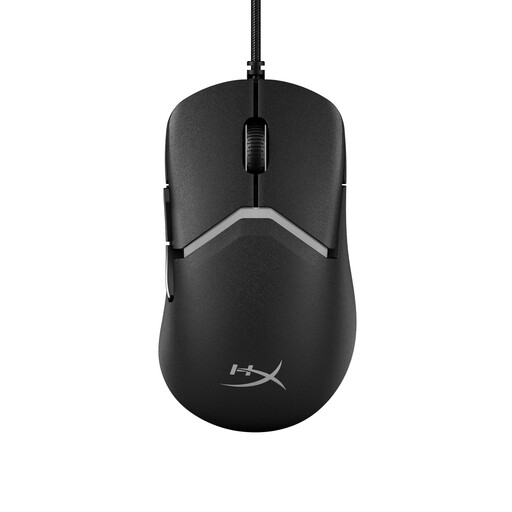
HyperX Pulsefire Saga Wired Gaming Mouse
Consider this wired mouse if you prefer not to manage a battery. Lighting and button customisation can vary by region, so confirm both for this exact variant before relying on them for dark-room orientation or shortcuts. Check the right-handed shape against your grip.
View on Joybuy
 No image available
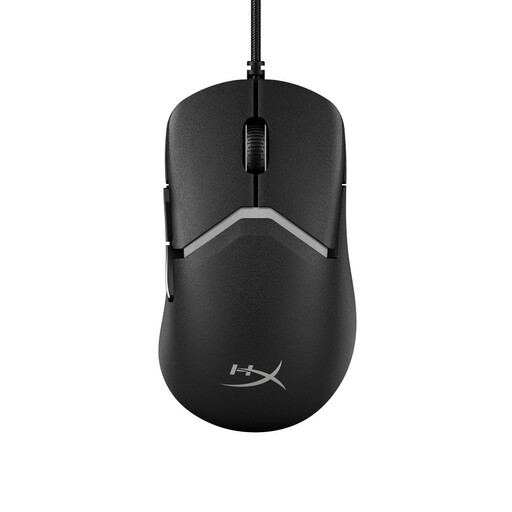
HyperX Pulsefire Saga Pro Wireless Gaming Mouse
Consider this wireless variant if reducing cable clutter matters to you. Confirm lighting and button customisation for this exact regional variant, and check its battery runtime under the settings you intend to use. Its right-handed shape still needs to suit your hand and grip.
View on Joybuy
Common questions
Do deck-building games call for an extremely high-DPI mouse?
No particular maximum DPI is required to choose a mouse for deliberate card and menu interactions. Set a sensitivity you can control comfortably, then give grip fit and reachable controls attention; Joybuy Insights’ gaming-mouse guidance also cautions against choosing by a headline DPI figure alone.
Should I choose a wired or wireless mouse for a dark-room desk?
Choose wired if continuous power matters more to you than removing the cable; choose wireless if a cable-free desk matters more and you are comfortable managing its power. For a wireless mouse, compare battery claims under the connection and lighting settings you intend to use: Razer specifies that its stated Basilisk V3 X HyperSpeed maximum figures are for use without lighting.
How many programmable buttons will I use?
Start by counting the commands you repeat and can comfortably identify by touch, rather than aiming for the largest button count. Manufacturers including Razer, Logitech G and Corsair offer selected mice with multiple programmable controls, but their placement and profile features differ by model.
What should I do with an old gaming mouse?
Take an old mouse to an appropriate electrical-waste collection route rather than placing it in household rubbish. GOV.UK also describes like-for-like retailer take-back when buying a new electrical product; check how the retailer arranges collection or drop-off.


