Choose the button layout around the detective-game commands you use repeatedly: a conventional mouse with several programmable controls suits map, journal and inventory shortcuts, while a 12-button thumb grid makes sense only if you have many bindings to assign. A lighter wireless mouse suits players who keep most commands on the keyboard and put more value on low weight and cable-free movement. Headphones do not, by themselves, call for a particular mouse; check connection, software and hand fit separately.
Who these mouse layouts suit
Shortcut-heavy mystery players
If you frequently switch between a map, case notes, inventory, dialogue and camera tools, reachable mouse buttons may help you keep selected commands close to hand. Decide which actions you would actually assign before choosing a large side panel.
Long-session comfort seekers
If reach and wrist position matter more to you than button count, consider both mouse shape and desk setup. The Health and Safety Executive advises keeping the mouse within easy reach, using a straight wrist, supporting the forearm and avoiding a tight grip.
Minimal-control wireless players
If most commands stay on your keyboard, a lighter wireless design may better match your preference for movement without a cable. Check whether its smaller set of controls still covers the shortcuts you want.
What matters when choosing
Start with the commands you want on the mouse, then assess whether its shape and connection suit the way you play. A higher sensor setting cannot tell you whether a thumb button is comfortable to reach.
Conventional multi-button mouse
Choose it when: You want several map, journal or inventory shortcuts without learning a full thumb grid.
Trade-off: Extra controls are useful only if their positions suit your hand; button count alone does not establish comfort.
12-button thumb grid
Choose it when: You can name enough recurring actions to use the grid and distinguish its buttons by feel.
Trade-off: A dense panel adds controls to learn and may be unnecessary for games with only a few repeated commands.
Lightweight wireless mouse
Choose it when: Low weight and freedom from cable drag matter more to you than numerous dedicated shortcuts.
Trade-off: Fewer mouse controls leave more commands on the keyboard, and wireless use calls for power management.
| Concern | What to check | Who this matters to |
|---|
| Reachable shortcuts |
Count the commands you would assign, then check button positions and configuration software. |
If I regularly open clues, maps and inventory, I want those commands within comfortable reach rather than on a crowded side grid. Around 44% of consumers put shortcut access first. |
| Long-session fit |
Check shell dimensions, grip fit and whether the mouse sits within easy reach with a straight wrist. |
During a long case, I need a relaxed grip and a mouse position that does not make me stretch. For around 33% of consumers, comfortable fit is the main priority. |
| Light wireless handling |
Compare stated weight and connection options; check how the mouse is powered. |
If I leave most shortcuts on the keyboard, I would rather move a lighter mouse without a cable. That handling preference comes first for around 23% of consumers. |
Buying mistakes to avoid
-
Choosing by maximum DPI alone
A sensor setting does not show whether you can reach the map or journal shortcut without changing your grip.
Write down your recurring commands, then choose a layout that accommodates them without awkward thumb reaches.
-
Assuming an ergonomic label guarantees comfort
A contoured shell may still be the wrong size or shape for your hand. The Health and Safety Executive also recommends attention to mouse reach, wrist position, forearm support and grip pressure.
Check dimensions and the seller’s return terms, and position the mouse close enough to use without stretching or gripping tightly.
-
Buying a thumb grid for only a few commands
A 12-button panel adds a layout to learn when you may only need quick access to a map, notebook and inventory.
Map the actions you use repeatedly before deciding whether a grid offers useful controls beyond a conventional layout.
-
Equating wireless with a better fit
Removing a cable does not change button reach or establish that a shape suits your grip.
If wireless handling is important, check the listed connection options, supplied accessories and power method alongside the mouse’s shape.
Relevant brands to consider
Logitech G
For a conventional control-rich layout, Logitech G specifies 11 programmable buttons, onboard profiles and adjustable weights for the G502 HERO.
- The G502 HERO offers several places to assign recurring game commands.
- Consider whether its controls and adjustable-weight design suit your preferred hand feel rather than choosing by button count alone.
Razer
Razer offers different layouts within the models considered here: it describes the Basilisk line as right-handed and suited to palm or claw grip, while specifying the Viper V3 Pro at 54 g.
- Razer specifies 10+1 programmable buttons for the Basilisk V3, giving it a different control emphasis from the lighter Viper V3 Pro.
- Choose between the lines by grip and shortcut needs; low stated weight or an ergonomic description does not establish individual fit.
Corsair
Corsair specifies 16 programmable buttons and an adjustable 12-button Key Slider side panel for the SCIMITAR ELITE WIRELESS SE.
- The side panel provides space for players who genuinely use many thumb-accessible bindings.
- If you need only a few detective-game shortcuts, the grid adds controls you may not use.
Joybuy mouse choices
These gaming mice offer different combinations of programmable controls and wireless connection for detective-game play. Compare the controls you will use, then check grip fit; the products here do not represent every mouse layout discussed above.
 No image available
Rapoo VT7 MAX Wireless Gaming Mouse, White
Consider this model if you want several mouse shortcuts alongside a lightweight wireless design.
The product title specifies 10 programmable buttons, macro support, 53 g weight and an 8K wireless polling rate. Its stated battery-life maximum depends on a driver update and low-power mode; check the settings that apply to your use.
Check the shell dimensions and whether you can reach the buttons comfortably.
View on Joybuy
 No image available
Rapoo VT2 Wireless Gaming Mouse, Purple
Consider this model if you want multiple assignable shortcuts in a lightweight wireless mouse and prefer mechanical switches.
The product title specifies 10 programmable buttons, macro support, 53 g weight, an 8K wireless polling rate and mechanical switches. Its stated battery-life maximum depends on a driver update to enable low-power mode.
Check shell dimensions and button reach before deciding whether its layout suits your grip.
View on Joybuy
 No image available
Razer Viper V3 Pro Wireless Gaming Mouse, Black
Consider this model if most detective-game commands can stay on the keyboard and low weight is your priority.
Razer specifies a 54 g design. The Joybuy product information lists eight programmable controls, 2.4 GHz wireless and wired USB Type-C connectivity, with a dongle and cable listed as included.
Eight controls give you fewer places for dedicated shortcuts than the 10-button mice shown here; check grip fit as well as your planned bindings.
View on Joybuy
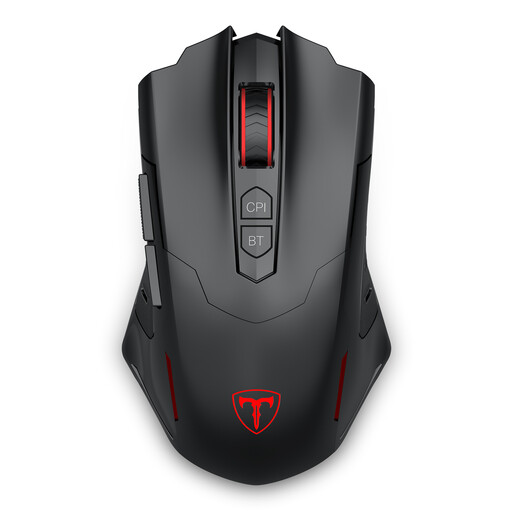 No image available
ET PC400 Wireless Gaming Mouse
Consider this model if seven programmable buttons cover your recurring shortcuts and you want a choice of wireless connection modes.
The product title specifies 2.4G and Bluetooth connectivity, an 8000 DPI sensor setting and RGB backlighting. Stated use time varies with the backlight setting.
Check whether the shape and button positions suit your hand; the product title does not establish how it will fit your grip.
View on Joybuy
Common questions
Do headphones require a particular gaming mouse?
No: using headphones does not itself determine the mouse layout. Choose mouse buttons, grip and connection for your game and desk setup, and check that you have the ports needed if both devices use cables or receivers.
How many programmable buttons do detective games need?
Choose enough reachable buttons for the commands you personally use repeatedly, rather than buying the largest layout by default. Logitech G specifies 11 programmable buttons for the G502 HERO, while Corsair specifies a 12-button side panel on the SCIMITAR ELITE WIRELESS SE; the latter is worth considering when you can identify many bindings you would actually use.
How should I position a mouse for a long session?
Keep it within easy reach so you can use it with a straight wrist and a relaxed grip. The Health and Safety Executive also recommends supporting the forearm; these setup checks matter alongside your choice of mouse shape.


