Shortcut-heavy simulation players
If you repeatedly open maps and menus or adjust the camera and game speed, reachable remappable controls may save trips to the keyboard. Check that you can assign and remember the commands you want.


Choose a gaming mouse around the commands you actually use in economic simulations, then check whether its shape and button placement suit long sessions. Extra programmable controls can put frequent map, camera and speed commands within reach, but they take time to configure; for a compact student setup, also check the connection method and battery or charging routine.
If you repeatedly open maps and menus or adjust the camera and game speed, reachable remappable controls may save trips to the keyboard. Check that you can assign and remember the commands you want.
For lengthy planning sessions, consider shape, weight and thumb-button reach together. A contour or a low stated weight cannot establish how a mouse will feel with your hand and grip.
If you share a compact desk or carry a laptop, consider cable clutter, receiver use, Bluetooth compatibility and how you will keep the mouse powered.
Start with the shortcuts you would genuinely assign. Then assess grip fit, your laptop connection and the power routine you are willing to manage.
| Concern | What to check | Who this matters to |
|---|---|---|
| Shortcut access | Count the commands you would bind, then check button reach and whether the game and configuration software support those assignments. | If I often switch maps, cameras and game speed, I want those commands within easy reach. Around 31% of consumers would put shortcut access first. |
| Long-session comfort | Compare dimensions and weight, and assess the shape and side-button position with your usual grip. | During a long building session, I need a mouse I can hold and operate comfortably, even if that means fewer controls. Physical fit would come first for around 25% of consumers. |
| Compact desk and laptop use | Check Bluetooth compatibility or the USB port needed for a receiver, plus the battery or charging arrangement. | When I move my laptop or work at a crowded desk, a practical wireless connection matters more than a large button bank. Around 19% of consumers would prioritise that flexibility. |
| Useful features and upkeep | Compare the controls you will use and check whether the mouse needs replacement batteries or charging. | I would rather manage a simple power routine than configure features I will leave unused. For around 25% of consumers, that balance would be the primary concern. |
A dense thumb keypad helps only when you can reach, distinguish and remember its assigned commands. Otherwise, configuration adds work without improving your simulation controls.
List the actions you repeat most often before choosing a button layout, and consider where your thumb will rest between presses.
Manufacturer figures depend on the stated connection mode and operating conditions. An AA-powered mouse also has a different upkeep routine from a rechargeable one.
Compare figures for the mode you intend to use, check the exact power arrangement and plan for a spare battery if you choose an AA-powered model.
Button placement, mass and thumb reach affect each grip differently. An adjustable side panel or lightweight shell does not establish individual fit.
Check the dimensions and weight, assess the mouse with your normal grip if possible, and read the seller’s return terms before ordering.
A 2.4 GHz connection generally uses a receiver, while Bluetooth requires a compatible computer. That distinction matters if your laptop has few free ports.
Confirm the exact model’s supported modes and whether your laptop has Bluetooth or an available USB port for its receiver.
Its G305 and G502 X LIGHTSPEED illustrate different approaches to wireless simulation controls: a simpler AA-powered mouse and a model with more configurable controls.
The Basilisk V3 X HyperSpeed is a right-handed wireless option for players considering several accessible commands.
The Scimitar Elite Wireless SE suits consideration when you have enough recurring commands to justify configuring a thumb keypad.
The Aerox 3 Wireless is relevant when carrying a mouse with a laptop and keeping weight down matter more than a large command keypad.
These wireless gaming mice are options to assess for simulation shortcuts and compact student-room setups. Check the controls, fit and connection of each model against your own laptop and playing habits.
 No image available
Consider this model if you want mouse controls for recurring simulation commands in a portable setup.
The product title lists 10 programmable buttons and a weight of 53 g. Its stated battery life is up to 750 hours; check the driver-update requirement for low-power mode and the connection your computer needs. Assess button reach with your grip.
 No image available
This is another option if you intend to assign several frequently used simulation commands to mouse buttons.
The product title lists 10 programmable buttons and a weight of 53 g. Its stated battery life is up to 750 hours, subject to the driver update needed for low-power mode. Check the connection and whether the button positions suit your hand.
 No image available
Consider this variant if you want configurable simulation shortcuts and are comfortable with a mechanical-switch click.
The product title lists 10 programmable buttons, mechanical switches and a weight of 53 g. Its stated battery life is up to 750 hours, with a driver update required for low-power mode. Check whether its click sound suits a shared room.
 No image available
The charging base may appeal if you want a regular place to leave your mouse on a compact desk.
The product title states 56 g and includes a magnetic charging base. Confirm the supported connection modes and how many buttons you can remap before planning simulation shortcuts.
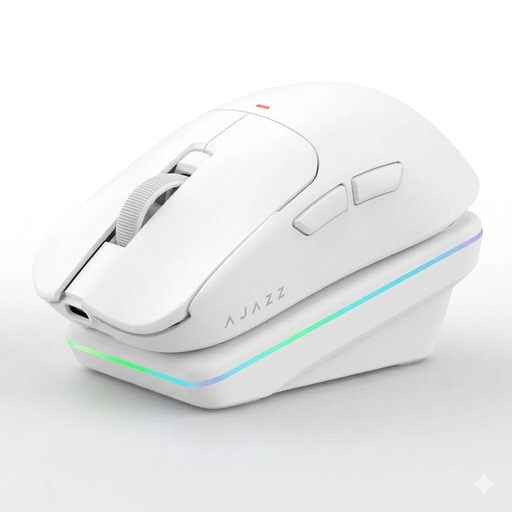 No image available
The charging dock makes this a model to consider if you prefer a dedicated spot for the mouse between sessions.
Check the exact connection modes for your laptop, which buttons can be remapped for simulation commands and the model’s weight before relying on those details.
Choose enough reachable controls for the commands you will actually assign, rather than choosing the largest button count. A simpler mouse can suffice if you prefer keyboard shortcuts; if you repeatedly use map, camera, pause or speed commands, check how many of those actions the game lets you bind and whether you can remember their mouse positions.
Use a connection that the exact mouse and your laptop both support. Bluetooth can leave a USB port free; a 2.4 GHz connection generally needs its receiver. Check the supported modes rather than assuming every wireless mouse offers both.
Check the mouse’s configuration software if you want to remap buttons or create game-specific profiles. Logitech G describes these functions through G HUB for the G502 X LIGHTSPEED, while Corsair describes button assignment and three onboard profile slots for the Scimitar Elite Wireless SE. Also confirm that your intended commands can be bound in the game.
Do not assume battery power removes a mouse from electrical-equipment disposal arrangements. GOV.UK guidance says battery-powered products can still be electrical and electronic equipment; check the collection options available in your area for the mouse and its battery.