Fast-swipe competitive players
If practice involves repeated flicks, wide turns and lifting the mouse to reposition it, look for a manageable weight and a shape that stays controlled throughout those movements.


Choose a mouse shape you can control through repeated swipes before treating a low quoted weight or high polling rate as decisive. A lightweight symmetrical shell suits players who prefer a neutral shape; a contoured right-handed shell may suit those who want more hand contact during long sessions, while extra buttons matter if you regularly bind game actions to them. A large screen alone does not establish a required mouse setting.
If practice involves repeated flicks, wide turns and lifting the mouse to reposition it, look for a manageable weight and a shape that stays controlled throughout those movements.
Right-handed players considering a contoured shell need to judge whether its hand contact feels steadier over extended practice, rather than choosing by weight alone.
If game actions need accessible mouse controls as well as movement input, weigh button reach against how securely you can hold the mouse during a fast swipe.
For competitive movement practice on a large screen, settle on a controllable shell and enough clear mouse-mat space, then consider reporting settings and extra controls.
| Concern | What to check | Who this matters to |
|---|---|---|
| Weight and broad swipes | Compare the quoted weight of the exact models, then check whether your grip and mouse-mat space allow comfortable lift-and-recentre movements. | Repeated wide turns make me want a mouse I can move and reposition without losing control. Around 36% of consumers put low-mass movement first. |
| Shape and sustained control | Check handedness, shell contour and whether you can reach side buttons without changing your usual grip. | During longer practice, I need the shell to stay secure through small adjustments as well as fast swipes. Shape and hand contact come first for around 29% of consumers. |
| Polling and setup | Check the exact model’s supported rate, required receiver and settings software; try the setting with your PC and game. | I want to tune mouse reporting without assuming a higher setting will improve my play. Around 21% of consumers prioritise input setup. |
| Programmable actions | List the commands you would bind and check whether the buttons are reachable without accidental presses. | If I use frequent pings or equipment actions, I want those controls within reach while keeping a secure grip. Extra bindings are the primary need for around 14% of consumers. |
A high DPI or polling-rate figure cannot tell you whether a mouse stays secure in your hand during repeated movement. The cited Razer and Logitech G models also differ in shape and size.
Decide on handedness and shell shape first. Check your normal grip, side-button reach and lift-and-recentre movement before giving maximum settings more weight.
Polling rate describes how often the mouse reports to the PC, not a setting determined by screen size. Overclockers UK describes 1,000Hz as a widely used starting point.
Try higher rates only if the exact mouse supports them and the setting works comfortably with your PC and game.
SteelSeries lists nine programmable buttons on the Aerox 5, but more controls are useful only if you can reach the actions you need without disturbing your grip.
Write down your repeat commands and compare their placement with a simpler mouse before choosing a multi-button layout.
Changing your mind about comfort and reporting a faulty or misdescribed mouse are different situations. Use and damage can affect a change-of-mind refund; they do not erase separate remedies for a fault.
Read the seller’s return instructions before testing fit, keep proof of purchase and describe any fault or mismatch promptly.
Razer’s UK pages list the symmetrical Viper V4 Pro at 49g and the contoured DeathAdder V4 Pro at 56g. They represent different shape choices for lightweight movement practice.
Logitech G lists the 60g PRO X SUPERLIGHT 2 DEX as an asymmetrical model and the 53g PRO X SUPERLIGHT 2c as a compact model. Consider which shell size and shape suit your grip.
SteelSeries lists the Aerox 5 at 66g with nine programmable buttons and a five-button side panel, making button access a reason to consider it alongside movement handling.
These mice cover lightweight movement-focused choices, programmable controls and a right-handed shape. Compare each shell and its confirmed listing details against the movements and bindings you actually practise.
 No image available
Consider this model if a lightweight symmetrical shell appeals for repeated swipes, but check that its shape stays secure in your grip.
The listing names a 54g weight, Focus Pro 35K Sensor Gen-2 and HyperPolling support up to 8,000Hz. Treat the higher polling setting as something to try with your PC and game.
 No image available
Consider its stated 56g weight if you want a low-mass mouse for repeated movement, while checking shell fit and button reach for your grip.
The title lists an 8KHz polling rate and a magnetic charging base. Confirm the exact sensor sensitivity and connection modes before relying on those details: the listing’s descriptions conflict with its title.
 No image available
This is an option to examine if you prefer an ergonomic-style shell and want to remap controls; check its handedness and how it fits your grip.
The title names a PAW3311 sensor and BT, 2.4G and USB-C connection options. Confirm the exact weight before making a close weight comparison, as the listing gives both 63g and 65g.
 No image available
Consider this model if you want to assess low moving weight alongside several mouse-bound actions; check the shell shape and button reach before choosing it.
The title lists 53g, an 8K wireless polling rate and 10 programmable buttons. Confirm the required receiver and setup for 8K use, then test the setting with your PC and game.
 No image available
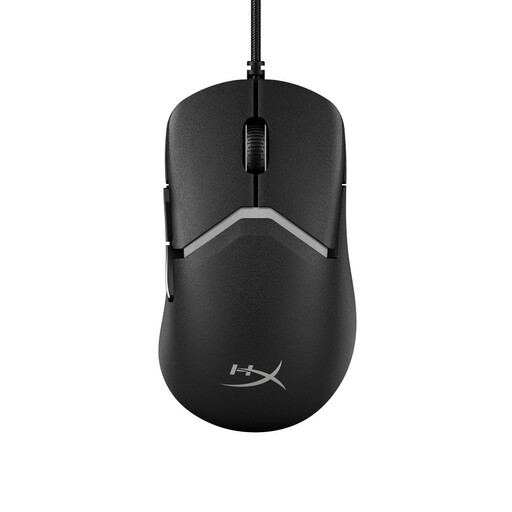
Consider its right-handed ergonomic shape if hand contact matters during longer practice, and check how the textured grips feel with your usual hold.
Before comparing it closely with movement-focused alternatives, confirm the exact weight, polling rate and sensor specifications for this model.
No: display size alone does not establish a polling-rate requirement. Overclockers UK describes 1,000Hz as a widely used setting with a 1ms reporting interval; choose a higher supported rate only after checking your mouse shape and trying the setting with your PC and game.
Check the exact model’s supported rate, the required receiver, what comes in the box and how its settings are changed. For the Razer Viper V3 Pro, the cited Joybuy listing says a HyperPolling wireless dongle and USB cable are included; check your own listing before setting it up.
For a qualifying online purchase, GOV.UK says you have 14 days from receiving the item to tell the trader you want to cancel, followed by another 14 days to return it. Check the applicable cancellation conditions before testing fit: handling beyond what would be permitted in a shop can affect a change-of-mind refund.
A fault or description mismatch is separate from changing your mind about the shape. Perth & Kinross Council’s Consumer Rights Act guidance describes a 30-day period from delivery or possession for rejecting goods that do not conform, with other remedies potentially available afterwards; report the problem to the seller and keep proof of purchase.