What matters when choosing
Choose the connection and control layout around your review routine, then check how the exact mouse feels and behaves at a dark desk. The concerns below separate consumers by the need they would put first.
Configurable wired scrolling
Consider it: When switching between deliberate scroll steps and rapid movement through recordings matters most.
Trade-off: A cable stays on the desk, though there is no wireless battery to manage. Razer specifies both scroll behaviours for the Basilisk V3 35K.
Illuminated wireless controls
Consider it: When cable-free placement and configurable mouse lighting take priority at your review desk.
Trade-off: Charging becomes part of the routine, and lighting settings can affect runtime; Logitech G says the G502 X PLUS dims its lighting during movement.
Lighter wireless design
Consider it: When frequent pointer movement makes stated mouse weight more important to you than a dense control layout.
Trade-off: Shape remains a personal fit decision, and battery claims depend on operating mode. SteelSeries specifies the Aerox 5 Wireless at 66 g.
| Concern | What to check | Who this matters to |
|---|
| Timeline navigation |
Check the exact model’s scroll modes and whether its assignable controls can trigger shortcuts in your video application. |
If I keep returning to key plays, I want to move through a long timeline and repeat commands without losing my place. Around 36% of consumers would put navigation and shortcuts first. |
| Grip and sustained movement |
Compare stated weight, dimensions, handedness and grip guidance; check the retailer’s return terms before judging fit from a description. |
During a long review session, I need a shape that suits my hand as well as a weight I can move comfortably. Comfort and fit come first for around 29% of consumers. |
| Low-light visibility |
Check whether the mouse itself has lighting you can dim, make static or switch off; do not treat RGB as a screen-comfort feature. |
At a dark desk, I want to find the mouse without bright, distracting effects. Around 21% of consumers would prioritise being able to locate the mouse in low light. |
| Cable-free placement |
Confirm the connection mode you plan to use and read battery claims alongside their mode and lighting conditions. |
I want room to reposition the mouse without a cable, and I can accommodate charging. That placement need would lead the decision for around 14% of consumers. |
Joybuy mouse options
These wireless gaming mice offer different approaches to desk placement and review shortcuts. If rapid timeline scrolling or visibility of the mouse itself is essential, check those features on the exact variant rather than assuming that wireless connectivity or a charging dock provides them.
 No image available
Rapoo VT7 MAX Wireless Gaming Mouse, White
Consider this if cable-free placement, a stated 53 g weight and controls for recurring review actions are priorities; check that your video application accepts your intended bindings.
The product name specifies 10 programmable buttons and macro support. Its up-to-750-hour battery claim depends on low-power mode and a driver update.
If switching scroll behaviours or locating the mouse by its lighting matters to you, confirm those features for this model. Check its dimensions against your grip.
View on Joybuy
 No image available
ASUS TUF Gaming M4 Wireless Gaming Mouse, Black
This wireless model is worth considering if you want to place the mouse without a cable while reviewing footage.
If you plan to assign playback shortcuts, confirm the available button mappings and how they work with your video application. Check scroll behaviour, mouse lighting and dimensions if they affect your setup.
When comparing weights, note whether the figure for the battery configuration you intend to use includes the battery and dongle.
View on Joybuy
 No image available
AJAZZ AJ200 AI MC Wireless Gaming Mouse with Charging Dock
Consider this model if you want a charging dock and a choice of Bluetooth, 2.4G and USB-C connections for your review desk.
The product name states a PAW3311 sensor and 63 g weight, but the description gives a different weight; confirm the figure for this variant before comparing it with other mice.
The described RGB lighting is on the dock. If you need the mouse itself to be visible in low light, or need selectable scroll behaviour for timeline work, confirm those features separately.
View on Joybuy
 No image available
AJAZZ AJ159 APEX Wireless Gaming Mouse with Magnetic Charging Base
This model may suit a desk where stated mouse weight and the charging-base arrangement matter more than a dense control layout.
Its product name states 56 g, 2.4G and wired connection modes, and an 8KHz polling rate. Check which connection modes apply to the exact variant before relying on them.
Confirm button mapping and scroll behaviour if you use repeated timeline shortcuts. Lighting described for the dock should not be taken as confirmation of lighting on the mouse.
View on Joybuy
 No image available
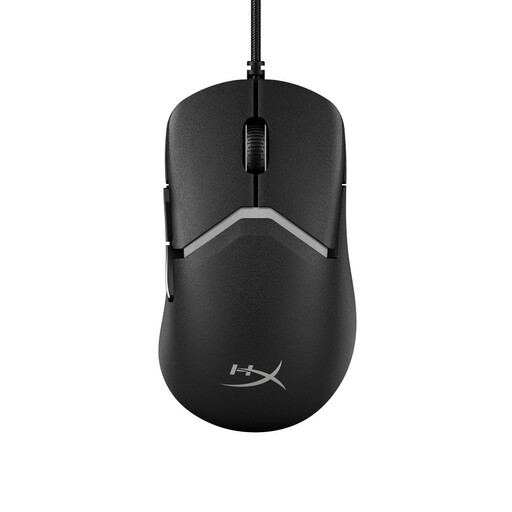
HyperX Pulsefire Saga Pro Wireless Gaming Mouse
Consider this wireless mouse if cable-free placement is important and you are prepared to check its controls against your review workflow.
Confirm the button mappings and scroll behaviour you need before assigning timeline commands. If low-light mouse visibility matters, check whether RGB lighting applies to this regional variant.
Compare battery runtime and dimensions for the exact model when planning long sessions and assessing grip fit.
View on Joybuy
Frequently asked questions
Is RGB worth choosing for footage review in a dark room?
Choose RGB if being able to locate the mouse in low ambient light matters to you, not as a remedy for screen glare or eye discomfort. Check whether lighting on the exact mouse can be dimmed or made static, and manage monitor and room lighting separately.
Which scroll setting helps with long tournament recordings?
Tactile scrolling suits deliberate steps, while free-spin can suit faster movement through a long timeline. Razer specifies both modes and automatic Smart-Reel switching for the Basilisk V3 35K; confirm the modes on any other model and check how scrolling behaves in your video application.
How should I read a wireless mouse battery claim?
Read the connection and efficiency conditions alongside the quoted runtime. SteelSeries states up to 180 hours for the Aerox 5 Wireless in Bluetooth or High Efficiency Mode, compared with 80+ hours in default 2.4 GHz mode; choose the figure relevant to how you intend to use it.
What if a mouse bought from a UK trader is faulty?
A faulty mouse may give you statutory remedies under the Consumer Rights Act 2015; the appropriate remedy depends on the facts and timing. The Act’s explanatory notes describe a minimum 30-day period for the short-term right to reject, with its starting point dependent on relevant events such as delivery or transfer of ownership. A retailer’s voluntary change-of-mind policy is separate from those statutory rights.
How can I dispose of a replaced gaming mouse?
Check an available electrical-equipment recycling or take-back route rather than treating the mouse as ordinary waste. GOV.UK describes the UK waste electrical and electronic equipment framework as intended to reduce disposal to landfill and encourage recovery, reuse and recycling; practical arrangements can be checked with the seller, manufacturer or local authority.


