Choose a gaming mouse that fits your hand and connection needs before paying attention to maximum DPI or polling-rate figures. A straightforward wireless model may suit a student desk, while a contoured shape, lower weight or Bluetooth is worth considering when it solves a specific grip or laptop-use problem. Manufacturer specifications distinguish these options, but do not establish a high DPI or polling-rate requirement for football games.
Who these mice may suit
Students seeking straightforward wireless play
If a cable-free desk and manageable battery routine matter more than extra controls, consider a receiver-based mouse and check its shape before choosing. Logitech G states that its G305 LIGHTSPEED runs for up to 250 hours on one AA battery.
Right-handed players focused on fit
For longer sessions, consider hand shape and your usual grip before button count. Razer describes the DeathAdder V2 X HyperSpeed as a right-handed ergonomic mouse with both HyperSpeed wireless and Bluetooth; that shape will not suit everyone.
Players managing a compact desk
If you frequently reposition your mouse or switch between a gaming receiver and laptop Bluetooth, compare weight, dimensions and connection modes together. SteelSeries offers both wireless modes on the Aerox 3 Wireless Gen 2, but its performance features are not a requirement for football games.
What matters when choosing
For football games in a student room, start with hand fit and the space available for movement. Then choose a connection and power routine that works with your desk and laptop.
| Concern | What to check | Who this matters to |
|---|
| Shape and grip |
Check handedness, dimensions and how the shape accommodates your usual palm, claw or fingertip grip. |
If my hand feels strained during longer games, I need a shape I can hold comfortably rather than a higher headline sensitivity. Around 33% of consumers put fit first. |
| Wireless setup and power |
Check for a 2.4 GHz receiver, whether Bluetooth is needed, and the battery type or charging method. |
I want to clear the cable from my desk without adding a power routine that interrupts play. For around 27% of consumers, connection and battery practicality are the primary concern. |
| Weight and movement space |
Compare mouse weight and dimensions with your available mousepad area; consider shape alongside weight. |
When desk space is tight, I need to reposition the mouse without an awkward grip. Lower-mass movement is the main priority for around 20% of consumers. |
| Controls and settings |
Identify the shortcuts and sensitivity adjustments you would use, then check the controls and software needed for them. |
I want to keep familiar controls within reach, but extra buttons are only useful if I will configure them. Around 20% of consumers prioritise customisation. |
Buying pitfalls
-
Choosing by maximum DPI or polling rate alone
A large specification figure does not establish a football-game requirement, while shape and grip affect everyday control. Logitech’s mouse-shape guidance links grip style with control and precision.
Choose a suitable shape and connection first, then compare settings you intend to use.
-
Assuming Bluetooth and 2.4 GHz serve the same purpose
Dual-wireless mice offer different connection choices, and stated battery runtimes can differ between modes. Razer and SteelSeries list their wireless modes separately.
If you intend to play through a 2.4 GHz receiver, check that your setup has a suitable USB connection. Use Bluetooth availability as a separate consideration for laptop use.
-
Overlooking the replaceable-battery routine
A long stated runtime does not remove the need to replace a cell when it runs out.
Check whether the mouse takes an AA or AAA battery and whether one is included; compare a rechargeable model if you would rather charge than keep spare cells.
Replaceable-cell models require the appropriate spare batteries over their working life.
Brands to consider
Logitech G
The G305 LIGHTSPEED illustrates a receiver-based wireless option with replaceable power.
- Logitech G specifies a HERO sensor, a 200–12,000 DPI range and up to 250 hours on one AA battery for the G305.
- An AA battery needs replacing, and buyers who require Bluetooth should confirm connectivity before choosing a model.
Razer
The DeathAdder V2 X HyperSpeed is a right-handed ergonomic option offering HyperSpeed wireless and Bluetooth.
- Razer specifies seven programmable buttons and operation with one AA or AAA battery.
- Its contoured right-handed shape needs to suit your hand and grip; stated battery life varies by wireless mode and battery type.
SteelSeries
The Aerox 3 Wireless Gen 2 illustrates a lighter mouse with Bluetooth and 2.4 GHz connectivity.
- SteelSeries specifies up to 200 hours in Bluetooth mode or up to 120 hours in 2.4 GHz mode.
- Its performance-focused settings do not establish that high polling or low stated click latency is needed for football games.
Joybuy mouse choices
These gaming mice offer different approaches to wireless play at a student desk. Compare their shape, power routine and stated connection modes against your own setup rather than treating advanced sensor figures as a requirement.
 No image available
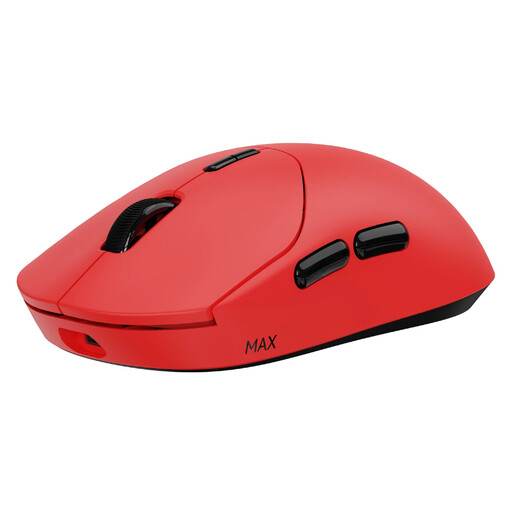
RAPOO VT2 MAX Wireless Gaming Mouse, Red
Consider this model if you want a wireless mouse with a stated 53 g weight and configurable controls for a compact desk.
Its name lists 10 programmable buttons, 8K wireless polling and up to 750 hours of battery life. The stated battery figure applies at 1000 Hz, with a driver update needed to unlock low-power mode; check the settings you intend to use and whether the shape fits your hand.
View on Joybuy
 No image available
MACHENIKE L9X1 Advanced Wireless Mouse
This model is worth comparing if you want a lighter mouse that can connect to a laptop in more than one way.
Its name specifies 49 g, wired, 2.4G and Bluetooth modes, and a PAW3395 sensor. Check whether its shape suits your grip before choosing it for its low stated weight.
View on Joybuy
 No image available
AJAZZ AJ200 AI MC Gaming Mouse with Charging Dock
Consider the ergonomic shape if you favour a palm or claw grip, but check that its size works for your hand.
The product name specifies Bluetooth, 2.4G and USB-C connection options, a PAW3311 sensor and a charging dock. Check the weight for this exact variant before choosing it primarily for low mass.
View on Joybuy
 No image available
AJAZZ AJ159 APEX Gaming Mouse with Charging Base
This is an option to compare if you want a light mouse with 2.4G wireless play and a charging base.
Its name specifies 56 g, a PAW3950 sensor, a colour screen and 2.4G or wired operation. If Bluetooth switching matters, confirm the modes for this exact variant before buying.
View on Joybuy
 No image available
HyperX Pulsefire Fuse Wireless Gaming Mouse
Consider this model if you prefer a right-handed shape and would rather recharge a mouse than replace its battery.
Check that the shape fits your grip and that its battery runtime suits your sessions. If a particular sensitivity range matters, confirm the specification for this variant.
View on Joybuy
Frequently asked questions
Should I use Bluetooth or a 2.4 GHz receiver for football games?
If your mouse offers both, choose its dedicated 2.4 GHz receiver when that is your preferred gaming connection, and use Bluetooth when laptop connection convenience matters more. Check your available USB port and compare battery-life claims by mode; Bluetooth availability does not mean a mouse cannot be used for football games.
Do football games require maximum DPI or a high polling rate?
Do not choose a mouse for maximum DPI or polling rate alone. Start with a shape you can control comfortably and sensitivity settings you can adjust; a high headline figure does not by itself establish a football-game requirement.
What should I check on a replaceable-battery wireless mouse?
Check the supported cell, the conditions behind its stated runtime and whether a battery is included. Logitech G specifies up to 250 hours on one AA for the G305 LIGHTSPEED; Razer says the DeathAdder V2 X HyperSpeed operates with one AA or AAA at a time.
What can I do with an old gaming mouse in the UK?
Look for an appropriate electrical-equipment collection or retailer take-back route. The UK Office for Product Safety and Standards and Department for Environment, Food & Rural Affairs describe the Waste Electrical and Electronic Equipment regulations as encouraging recovery, reuse and recycling of electrical products and components; check the arrangements available locally.


