Shortcut-heavy builders
If you repeatedly select tools, move the camera or open menus, reachable programmable controls may help—provided your game and mouse software allow the bindings you want.


Choose a gaming mouse for building games by checking its shape, reachable controls and scroll behaviour before focusing on its DPI figure. Extra buttons are useful when you have commands you can and will bind; wired use avoids battery management, while wireless use calls for a check of charging and connection options. Headphones do not require a special mouse, but a headset receiver may affect which USB ports remain free.
If you repeatedly select tools, move the camera or open menus, reachable programmable controls may help—provided your game and mouse software allow the bindings you want.
If cursor movement and scrolling occupy much of your play, consider hand fit, weight and wheel behaviour alongside button layout.
If your headset and other peripherals occupy USB ports, check whether the mouse connects by receiver, Bluetooth or both. Shared-receiver support depends on the particular compatible devices.
Start with the controls you would actually use and a shape you can hold comfortably. Then check scrolling and whether your headset setup leaves room for the mouse’s connection.
| Concern | What to check | Who this matters to |
|---|---|---|
| Shortcut access | Count the commands you would put on the mouse; check button reach and whether your game and mouse software allow those bindings. | If I switch tools or open menus repeatedly, I want those commands within comfortable reach. Around 40% of consumers put shortcut access first. |
| Fit and scrolling | Check handedness, grip and listed weight; decide whether you need deliberate scroll steps, fast scrolling or both. | When I spend a long session moving around a map, the mouse needs to feel manageable and the wheel needs to suit how I navigate. Fit and scrolling come first for around 30% of consumers. |
| Connection and ports | Check for a free receiver port, usable Bluetooth and any wired-while-charging option. | With a headset and other peripherals connected, I need a mouse connection that works with the ports I have. Connection is the primary concern for around 20% of consumers. |
| Simple setup | Decide whether you need programmable controls or wireless modes at all; check that the connection suits your computer. | If I mainly point, click and scroll, I would rather avoid configuring controls I will not use. Around 10% of consumers prioritise a simpler setup. |
A sensor setting does not tell you whether the mouse fits your hand or whether its wheel and buttons suit frequent map and menu use.
List your repeat commands and preferred scroll behaviour, then compare shape, controls and connection before treating adjustable DPI as a deciding feature.
A mouse may need a USB receiver, support Bluetooth or offer both. A headset receiver can occupy a port you intended to use for the mouse.
Check your available ports and the exact mouse connection options. Only count on a shared receiver when your particular peripherals are compatible.
If there is no compatible free port, you may need a suitable hub or adaptor.
A dense thumb-button layout adds controls to learn and reach, without helping much if you use only a few repeat commands.
Identify the commands you would bind before choosing an MMO-style layout; otherwise, compare mice with fewer programmable controls.
The G502 X models are worth examining if you want several configurable controls and a wheel with distinct scrolling modes.
The right-handed Basilisk models offer an alternative to a dense MMO-style button grid.
The Scimitar Elite Wireless SE is relevant when many building-game commands could be assigned to thumb buttons.
These mice offer different wired, wireless and button-layout options for building games. Check the controls you intend to use, hand fit and connection needs for each model.
 No image available
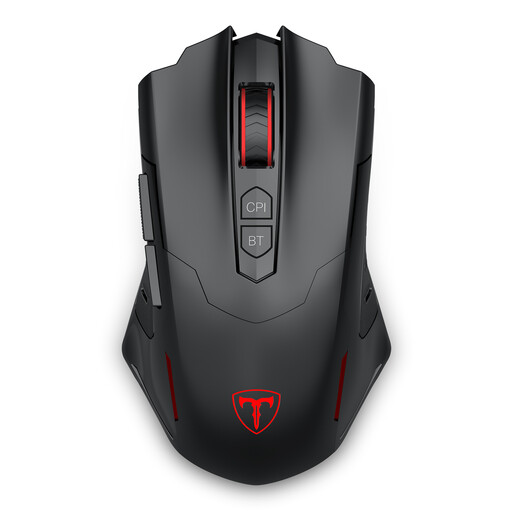
Consider its 10 programmable buttons if you have repeat building-game commands to assign; check that your game permits the intended bindings.
The title lists a 53 g weight and wireless operation. Confirm the scroll behaviour and whether its connection suits your available ports.
 No image available
Its seven programmable buttons may suit a smaller set of frequent commands, subject to the bindings your game allows.
The title lists 2.4G and Bluetooth connection modes and adjustable sensitivity up to 8000 DPI. Check hand fit and wheel behaviour for map navigation.
 No image available
Consider it if switching connection types matters alongside remappable commands; confirm the intended bindings with your game and software.
The title lists Bluetooth, 2.4G and USB-C modes. Its stated weight differs between listing sections, so check the current product details if weight affects your choice; also check wheel behaviour.
 No image available
The wired design suits a setup where you prefer a cable to managing a wireless connection or battery.
If shortcuts or scrolling are priorities, check the controls, wheel behaviour and compatibility with your platform and game before choosing it.
 No image available
Consider this model if a low listed weight and a choice of connection methods matter more to you than a specified side-button layout.
The title lists 49 g and wired, 2.4G and Bluetooth modes. Check its programmable controls, wheel behaviour and fit against your building-game needs.
No: wearing headphones does not create a special mouse sensor, DPI or button requirement. If your headset uses a USB receiver, check the remaining ports before choosing a wireless mouse. Razer describes a shared-dongle option for compatible HyperSpeed mouse and keyboard peripherals, not for every wireless device.
Choose wired if you prefer a continuously powered connection and do not mind a cable; consider wireless if cable-free use matters more to you. For a wireless model, check its receiver or Bluetooth options, charging needs and any wired-while-charging capability rather than assuming all models work alike.
Extra buttons can help when you repeatedly use commands that your game and mouse software allow you to bind. Choose a layout you can reach comfortably; a dense side-button grid is less compelling if you only need a few shortcuts.
Check the applicable online change-of-mind cancellation terms and the seller’s return process before ordering, especially if you need to assess the mouse’s shape. Fit preferences are distinct from faults: a faulty or misdescribed mouse may give rise to separate statutory remedies.
Faulty or misdescribed goods can give rise to statutory remedies separately from a retailer’s voluntary returns policy. GOV.UK says a full refund must be offered for an item that is faulty or not as described; contact the seller promptly and keep your order details when reporting the problem.