Choose the control layout around the commands you actually use: a thumb-grid mouse suits numerous recurring shortcuts, while a smaller multi-control layout with a configurable scroll wheel suits players who spend more time navigating menus and maps. For a dark room, check that lighting can be adjusted to your liking, then weigh hand fit and the convenience of a cable against wireless charging or battery management.
Who this choice matters to
Shortcut-heavy management players
If you regularly assign game actions, camera controls or menu commands to mouse buttons, the number and placement of reachable controls matter more than button count alone. Corsair and Razer describe different programmable-control layouts in their SCIMITAR and Basilisk ranges.
Dark-room setup customisers
If visible mouse lighting is part of your desk setup, look for controls that let you change its appearance without giving up the button layout you need. Logitech G and Razer describe configurable lighting on the models discussed here.
Long-session comfort buyers
If you spend extended sessions moving between maps and menus, consider whether your usual grip leaves the scroll wheel and side buttons within comfortable reach. SCAN UK’s gaming-mouse buying guide puts particular emphasis on finding a comfortable shape.
What to check before choosing
Start with your most frequent mouse actions, then assess lighting, grip and connection as separate decisions. A dense thumb grid and a configurable scroll wheel solve different control problems; neither removes the need to check hand fit.
| Concern |
What to check |
Who this matters to |
| Recurring commands |
Count buttons you can identify by feel; check the software needed for your intended assignments. |
If I use the same game commands repeatedly, I want them close to my thumb without confusing one button for another. Roughly 33% of consumers would put direct shortcut access first. |
| Mouse lighting |
Check the exact model’s lighting controls, including brightness and whether lighting can be turned off. |
At a dark desk, I want a say in how much my mouse lights up rather than having a fixed effect. Around 27% of consumers would make lighting control their primary concern. |
| Hand fit |
Compare shape, dimensions and side-button reach with the mouse and grip you currently use. |
During a long session, I need to reach the wheel and buttons without changing to an awkward grip. About 27% of consumers would prioritise comfortable fit. |
| Connection |
Choose between a cable and battery or charging management; for wireless models, check connection modes and battery conditions. |
I want either a clear desk or a mouse that is ready without charging, depending on which inconvenience bothers me more. Roughly 13% of consumers would put connection simplicity first. |
Common buying mistakes
-
Choosing by DPI instead of control layout
A sensor sensitivity figure does not tell you how many game commands you can reach. Corsair’s SCIMITAR RGB ELITE, for example, is distinguished by its 12-button side grid, while Razer’s Basilisk V3 35K offers a configurable scroll wheel and secondary control assignments.
List the commands you intend to assign before choosing between a thumb grid and a smaller layout.
-
Expecting RGB to make dark-room play comfortable
Mouse lighting changes the appearance of the desk; it does not establish whether your screen and room setup feel comfortable. On a wireless mouse, lighting settings can also affect how often you need to manage the battery.
Check the controls for dimming or disabling lighting, and read any battery figure alongside its stated lighting and connection conditions.
-
Overlooking grip and thumb reach
Extra buttons are useful only when you can reach and distinguish them. SCAN UK highlights comfort as a central mouse-selection consideration, while Corsair’s movable SCIMITAR RGB ELITE side-button cluster addresses positioning for that particular model.
Compare the mouse’s shape and button placement with your current grip, and check the seller’s return process before ordering if fit is uncertain.
Brands and product lines to consider
Corsair
The wired SCIMITAR RGB ELITE is a thumb-grid option for players who intend to assign many management-game commands.
- Corsair specifies 17 programmable buttons and a Key Slider system for repositioning the side-button cluster on this model.
- A dense grid still has to suit your thumb reach and grip; the button count alone cannot establish that it will feel easier to use.
Razer
The Basilisk models offer multi-control layouts for players who value scrolling and configurable assignments without choosing a 12-button thumb grid.
- Razer describes configurable scrolling on the wired Basilisk V3 35K and 10+1 programmable buttons on the distinct Basilisk V3 Pro.
- Check Synapse compatibility and the controls on the exact Basilisk variant before relying on secondary assignments.
Logitech G
The G502 X PLUS is a wireless option for players considering additional controls alongside adjustable mouse lighting.
- Logitech G specifies LIGHTSYNC RGB and an eight-LED lighting array that dims during movement on the G502 X PLUS.
- Check whether its particular control layout accommodates your intended shortcuts, and account for wireless charging.
Joybuy product choices
These mice offer different ways to approach management-game controls, lighting and connection choice. Compare each listing’s stated features with the shortcuts you plan to assign, particularly when a button count or lighting control matters to you.
 No image available
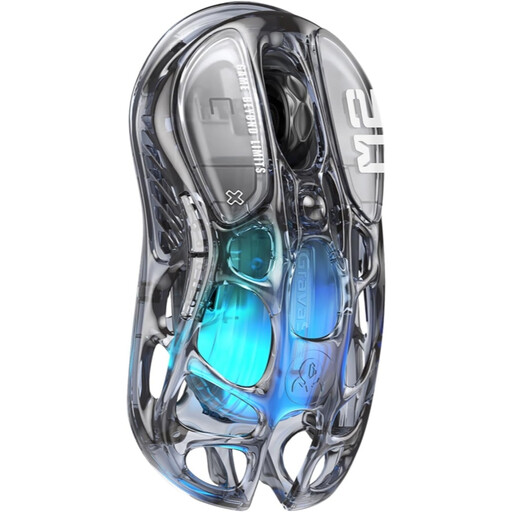
GravaStar Mercury M2 Transparent, Chinese Retail Version, Transparent Black
Consider this mouse if you want five buttons and a choice of wired, Bluetooth or 2.4 GHz use. Its title specifies five RGB modes and a 79 g weight.
As this is identified as a Chinese Retail Version, check software compatibility, the remapping and lighting controls you need, and the shape before ordering.
View on Joybuy
 No image available
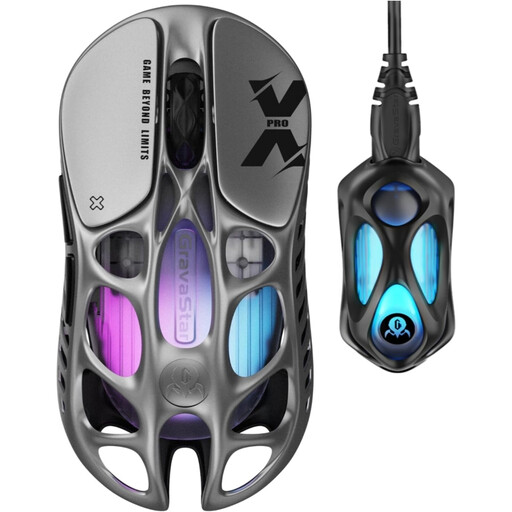
GravaStar Mercury X Pro, Chinese Retail Version, Silver
This is a choice to examine if five programmable buttons cover your planned shortcuts and you want RGB lighting. The title specifies a 49 g weight, an 8K dongle and a magnesium-alloy hollow design.
Check software compatibility and the lighting settings for this Chinese Retail Version, as well as whether its shape suits your grip.
View on Joybuy
 No image available
AJAZZ AJ200 AI MC wireless mouse with charging dock
Consider its remapping and macro options if recurring commands are your priority. The title identifies Bluetooth, 2.4 GHz and USB-C connection modes and includes a charging dock.
The stated RGB lighting is on the dock; check whether the mouse itself has lighting if that matters to you. Confirm the exact weight before using it to judge fit.
View on Joybuy
 No image available
Razer Cobra wired gaming mouse, Minecraft Edition
A wired connection may suit you if you would rather avoid charging. Before planning your shortcuts around this model, check its programmable-button count.
If lighting control is important at your desk, check the available brightness and off settings for this edition.
View on Joybuy
 No image available
HyperX Pulsefire Fuse wireless gaming mouse
Consider this wireless mouse if you want to avoid a desk cable while retaining controls you can assign to game actions. Check the button count against your planned shortcuts before choosing it.
If adjustable RGB is central to your dark-room setup, confirm that the lighting controls are available for this particular regional version.
View on Joybuy
Questions about choosing a mouse
Do I need RGB lighting to play management games in a dark room?
No. RGB changes the mouse’s appearance, not the number of commands you can assign. If you want it, check the exact model’s controls for adjusting or disabling the lighting.
Is a thumb-grid mouse always the right choice for management games?
No. A thumb grid makes sense when you intend to assign many recurring commands and can use its buttons comfortably. If your main actions involve scrolling through lists, maps and menus, consider a configurable scroll wheel and a smaller control layout instead.
Should I choose a wired or wireless mouse?
Choose wired if avoiding charging matters more than removing the cable; consider wireless if a cable-free desk is more useful to you. For a wireless model, check its connection modes and the conditions attached to any stated battery runtime, particularly when using lighting.
What if a mouse does not fit comfortably after an online purchase in the UK?
For a UK online purchase, GOV.UK explains that customers have a limited-time cancellation right even when an item is not faulty. Check the applicable cancellation process and handle the mouse carefully while assessing its fit; rights relating to faulty or misdescribed goods are a separate matter.


