A lightweight mouse that suits your grip is a sensible starting point for repeated swipes; choose additional controls if accessible bindings matter more to your practice. A dark room does not remove the need for a suitable tracking surface, sensible wireless receiver placement and a check of the exact model’s lighting.
Who this choice affects
Rapid-swipe competitive players
If you repeatedly practise flicks and broad directional corrections, consider mouse mass and a shape you can control before comparing extra commands. Razer and Logitech G list lightweight competitive wireless models, but their specifications cannot establish personal grip fit.
Claw- or fingertip-grip players
Sidewalls, rear shape and button reach can affect whether a mouse feels manageable in your grip. Razer describes its Viper V3 HyperSpeed as shaped for claw or fingertip use; check the fit of the particular model you intend to buy.
Players avoiding distractions in a dark room
If visible lighting bothers you, check both the mouse and any charging dock. For inconsistent tracking, Logitech Support advises checking the surface and sensor, as well as receiver placement for wireless mice.
What to prioritise
Start with grip and the movements you practise, then decide whether you need extra buttons or a particular connection setup. Treat lighting and tracking surface as checks for the whole dark-room setup, not as substitutes for mouse fit.
| Concern | What to check | Who this matters to |
|---|
| Movement and input |
Compare stated mass and supported polling modes, then check whether your grip remains controlled during broad swipes. A headline DPI figure alone does not settle the choice. |
If I practise repeated flicks, I want a mouse I can move and stop consistently. Around 50% of consumers put movement and input first. |
| Grip and controls |
Check shape, handedness and side-button reach; choose extra programmable controls only if you will use the bindings. |
When buttons interrupt my grip or commands are hard to reach, the control layout matters more than chasing the lowest stated weight. Around 30% of consumers prioritise grip and controls. |
| Dark-room setup |
Check the tracking surface, wireless receiver position and lighting on the exact mouse or dock. Logitech Support advises avoiding reflective or highly glossy surfaces when troubleshooting tracking. |
I want dependable movement without distracting lights while I practise in a dim room. For around 20% of consumers, the setup is the primary concern. |
Buying pitfalls
-
Choosing by DPI or polling rate alone
Those figures do not tell you whether the shape and button positions suit your grip during repeated corrections. Razer describes higher polling rates as more frequent mouse-to-PC reporting, not as a measure of hand fit.
Shortlist shapes you can use comfortably, then compare weight, controls and the polling mode your setup supports.
-
Assuming darkness is the tracking problem
Logitech Support identifies unsuitable surfaces and debris near the sensor among possible causes of inconsistent movement.
Try a consistent mouse mat and check the sensor opening before replacing a mouse because tracking skips.
If your desk has a reflective or highly glossy surface, a suitable mouse mat may also be needed.
-
Leaving a wireless receiver far from the mouse
Receiver position and nearby 2.4 GHz devices can affect a wireless setup. In its troubleshooting guidance, Logitech Support recommends placing the receiver within 20 cm of the mouse and away from wireless routers and other 2.4 GHz devices.
Where the mouse includes an extender or suitable cable, use it to place the receiver near the mat, then test movement before changing sensitivity settings.
Relevant brands
Razer
The Viper V3 lines are relevant if you are considering lightweight wireless mice for repeated movement drills.
- Razer lists a 54 g design and adjustable sensor settings for the Viper V3 Pro.
- That stated mass does not establish whether its shape suits your hand; check the exact variant and fit.
Logitech G
The PRO X SUPERLIGHT 2 is a lightweight wireless option for players comparing straightforward competitive-mouse layouts.
- Logitech G lists a 60 g chassis, HERO 2 sensor and a maximum 8 kHz LIGHTSPEED polling rate.
- Check its shape and click feel for your grip rather than treating polling rate as a fit test.
SteelSeries
The Aerox 5 Wireless is relevant if movement practice also calls for directly accessible bindings.
- SteelSeries lists a 66 g design and nine programmable buttons for this model.
- Its additional controls are worth prioritising only if they suit the commands you actually use.
Joybuy product choices
These mice offer wired and wireless options for movement practice, including models with additional controls. Check grip fit and any visible lighting on the exact variant before choosing for a dark room.
 No image available
Razer DeathAdder V3 Ergonomic Esports Mouse
For wired movement drills, consider whether its right-handed ergonomic shape suits your grip. Check the exact variant’s lighting if it could distract you in a dark room.
View on Joybuy
 No image available
RAPOO VT2 MAX Wireless Gaming Mouse, Pink
Consider this model if you want a stated 53 g wireless mouse and would use its 10 programmable buttons. Its title lists 8,000 Hz wireless polling; the stated battery life of up to 750 hours applies at 1,000 Hz in the described low-power mode. Check shape and lighting on the exact variant.
View on Joybuy
 No image available
AJAZZ AJ159 APEX Gaming Mouse with Magnetic Charging Base
For movement practice, its title states 56 g and 8,000 Hz polling, with 2.4 GHz wireless and wired use. Confirm the connection modes before ordering: the title says dual-mode while the description says tri-mode. The dock has a colour screen and RGB backlighting, so check whether those effects can be switched off.
View on Joybuy
 No image available
AJAZZ AJ200 AI MC Gaming Mouse with Charging Dock
Consider this model if you want a choice of Bluetooth, 2.4 GHz wireless and USB-C wired connections. Its descriptions give different weights, 63 g and 65 g, so confirm the exact figure if mass guides your choice. The dock has RGB lighting; check whether it can be disabled for dark-room use.
View on Joybuy
 No image available
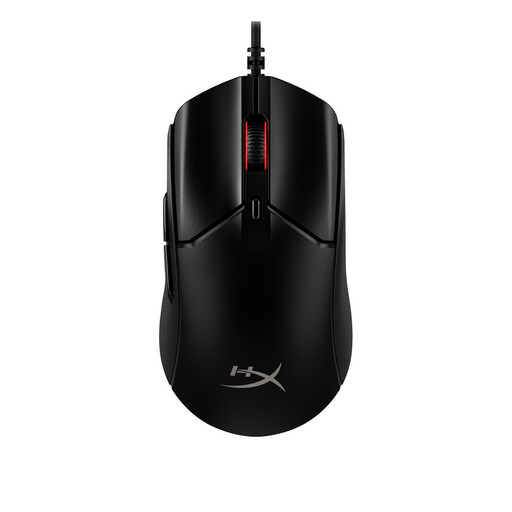
HyperX Pulsefire Haste Black Wired Gaming Mouse 2
For a wired practice setup, consider whether the described flexible cable and shape suit your movements. Check the exact variant’s weight, polling rate and lighting if those details affect your choice.
View on Joybuy
Common questions
Will an optical gaming mouse track in a dark room?
Do not choose a different mouse solely because the room is dark. Logitech Support advises checking the sensor and tracking surface when movement is inconsistent, and avoiding glass, reflective, grooved or very glossy surfaces.
Where should I put a wireless mouse receiver?
Keep it close to the mouse and away from likely interference. For its wireless troubleshooting guidance, Logitech Support recommends a receiver position within 20 cm of the mouse and at least 2 metres from wireless routers and other 2.4 GHz devices; this is a setup check, not a guarantee for every model.
Do I need 8,000 Hz polling for movement practice?
Not necessarily: prioritise a shape you can control and check whether your setup supports the mouse’s stated polling mode. Razer says higher polling rates shorten reporting intervals and describes the visual benefit alongside a high-refresh-rate monitor; the specification alone cannot establish how much difference you will notice.


