What matters when choosing?
Settle hand fit and your main movement need before comparing connection modes and headline settings. The percentages below describe consumers by their primary concern for this home-office practice decision; each row represents a different priority.
| Concern |
What to check |
Who this matters to |
| Fast movement |
Compare stated weight, shell dimensions and grip guidance for repeated swipes and lift-offs. |
If I frequently lift and reposition the mouse, I want a shell I can move without fighting my grip. Around 34% of consumers put fast movement first. |
| Shape and comfort |
Check handedness, hump and width, button reach and the retailer's fit-related return terms. |
During long work and practice sessions, I need the shape to support my usual grip without awkward finger placement. For around 33% of consumers, fit and comfort are the main concern. |
| Desk connectivity |
Confirm available wired, 2.4 GHz and Bluetooth modes, plus the included receiver and charging arrangement. |
If I move between work devices and a gaming PC, I need practical switching without losing track of which mode I use for practice. Around 20% of consumers prioritise desk connectivity. |
| Feature sufficiency |
Check whether the polling mode you want works with the included hardware and chosen connection. |
I would rather confirm the features I will use than choose by the largest specification figure. Avoiding unnecessary features is the primary concern for around 13% of consumers. |
Joybuy product choices for a shared work-and-play desk
These mice offer different combinations of shell design and connection options. Compare their fit and the mode you would use for movement practice rather than treating the list as a ranking of game performance.
 Image unavailable
AJAZZ AJ159 APEX gaming mouse with magnetic charging base
Consider this 56 g mouse if frequent repositioning and a charging base suit your shared desk. Its title names 2.4 GHz and wired modes, while other listing details describe Bluetooth too; confirm the connection options and which mode supports the advertised 8 kHz polling before choosing it for practice.
Check the shell dimensions against your grip. The listing also gives differing maximum-DPI figures, so confirm the setting if it matters to you.
View on Joybuy
 Image unavailable
Razer DeathAdder V3 ergonomic esports mouse
Consider its right-handed ergonomic shape if you prefer shaped hand contact and a cable is acceptable at your practice desk. Check its dimensions and button reach against your grip; it is not a cable-free or left-handed option.
View on Joybuy
 Image unavailable
RAPOO VT2 MAX wireless gaming mouse, pink
This 53 g variant is worth examining if you want a lighter listed mouse with programmable controls for a work-and-play desk. The title specifies 8K wireless polling and 10 programmable buttons; confirm the connection requirements and whether the shell fits your grip.
Do not read the stated battery-life figure as applying to every setting: the listing ties it to 1000 Hz.
View on Joybuy
 Image unavailable
AJAZZ AJ200 AI MC tri-mode gaming mouse with charging dock
Its listed Bluetooth, 2.4 GHz and USB-C modes make it an option to examine if one mouse needs to serve work devices and a gaming PC. The listing describes an ergonomic fit for medium-to-large hands; compare its dimensions with your grip rather than relying on that description alone.
The listing gives both 63 g and 65 g for its weight, so confirm the figure if mouse mass is central to your choice.
View on Joybuy
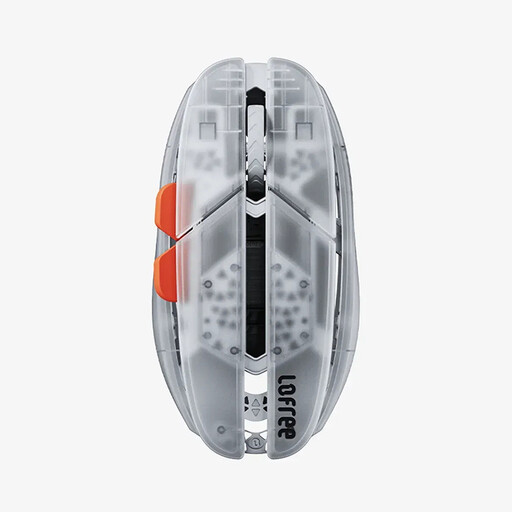 Image unavailable
lofree Hypace OE923 tri-mode mouse, semi-transparent version
Consider this listed 47 g mouse if low stated weight and switching between work and gaming connections are both priorities. Its title identifies Bluetooth, 2.4 GHz and wired modes, a magnesium-alloy frame and a PC shell.
Check its dimensions and grip guidance before choosing it for repeated lift-offs. If polling rate matters to your practice, confirm the setting available in the mode you plan to use.
View on Joybuy
Common questions
Should I use Bluetooth for competitive movement practice?
Choose a wired connection or the mouse's dedicated 2.4 GHz receiver when competitive responsiveness is your priority. Bluetooth can be useful for switching to a work device, but check which mode supports the settings advertised for the particular mouse.
Do I need 4K or 8K polling at a home-office desk?
Not automatically: establish shape, fit and your intended connection first. Higher settings can bring model-specific requirements; Pulsar requires a separate dongle for 8K on the X2 v3, while ZOWIE states shorter EC2-DW battery life at 4 kHz than at 1 kHz.
How should I position a wireless receiver on a shared desk?
Follow the mouse maker's receiver-placement instructions and choose a practical position for your desk layout. ZOWIE describes its enhanced receiver as designed to reduce interference, but that description does not establish how every desk's wireless environment will behave.
What can I do with an old mouse?
Consider reusing it or taking it to a suitable electrical-recycling collection point rather than putting it in general waste. Recycle Your Electricals advises that items with a plug, battery or cable can be reused or recycled; check the collection point's instructions for batteries.


