
24/7 Customer Support

Free returns

Same-day & Next-day Delivery

Quality Guaranteed

Unlock Your Welcome Offers: FREE Delivery | Up to 80% OFF | Free 30-day JoyPlus trial
Download the APP
A gaming mouse can improve control, comfort and customisation, but the specifications on the box do not always tell the whole story. A high DPI figure may sound impressive while offering little practical benefit, and a wireless model may become inconvenient if its battery, receiver or software does not suit your setup.
This guide explains the key features to compare, common buying traps and suitable options for different types of UK PC gamer.
A high DPI gaming mouse is not automatically more accurate. DPI describes sensitivity, not the overall quality of tracking. Sensor consistency, lift-off behaviour, surface compatibility and software controls also matter.
Most players use a much lower sensitivity than the maximum figure printed on the packaging. Look instead for adjustable DPI steps, reliable tracking and the ability to save suitable profiles for different games.
A wireless gaming mouse using a 2.4GHz receiver can offer responsive performance without cable drag. However, Bluetooth is generally more suitable for office work and multi-device use than competitive gaming. Check whether the advertised polling rate applies to wireless mode, wired mode or both.
Also consider receiver placement. A receiver hidden behind a desktop PC may experience more interference than one positioned close to the mouse using an extension cable or charging dock.
Weight and button count are easy to compare, but hand size and grip style are just as important. A symmetrical mouse may suit fingertip or claw users, while an ergonomic gaming mouse is often shaped for right-handed palm or relaxed claw grips.
A large MMO mouse can provide useful macros, but its additional side buttons may feel crowded for FPS games. Similarly, an ultra-lightweight gaming mouse may feel agile but lack the broader support preferred by users with larger hands.
A wired gaming mouse connects directly by USB and does not require battery management. A flexible cable or low-drag design can reduce resistance during wide swipes. Wireless models offer a cleaner desk, but check battery capacity, charging method and whether a cable can be used while charging.
The polling rate indicates how often the mouse reports its position to the computer. 1,000Hz is widely supported and reports every millisecond. An 8K polling rate mouse can report more frequently, but it may increase system workload and power consumption. It is most relevant to users with high-refresh-rate monitors and competitive games where small timing differences matter.
DPI settings should be adjustable in useful increments rather than offering a large number with limited control. Some models also provide independent X and Y sensitivity, which can help users who prefer different horizontal and vertical movement.
Sensor claims such as glass tracking or a stated accuracy percentage should still be considered alongside your mouse mat, desk surface and preferred sensitivity. A clean, consistent surface remains important even with a high DPI gaming mouse.
A mouse weighing around 50–65g may feel easier to move during low-sensitivity FPS play. Heavier designs can provide a more planted feel, particularly for MMO or general desktop use. PTFE or ETFE feet are intended to reduce friction, but they work best on a clean, smooth mouse mat.
For longer sessions, prioritise a shape that supports your hand without forcing your fingers into an unnatural position. Button placement should also be reachable without changing your grip.

Why This Fits Their Persona: A straightforward gaming mouse for PC users who want dependable USB connectivity, adjustable sensitivity and everyday usability without managing a battery.
Its 8,000 DPI sensor and 1,000Hz report rate are clearly stated, avoiding vague performance language. Wired USB also removes battery and wireless receiver concerns.
Six buttons, programmable controls through Logitech G HUB and LIGHTSYNC RGB customisation.
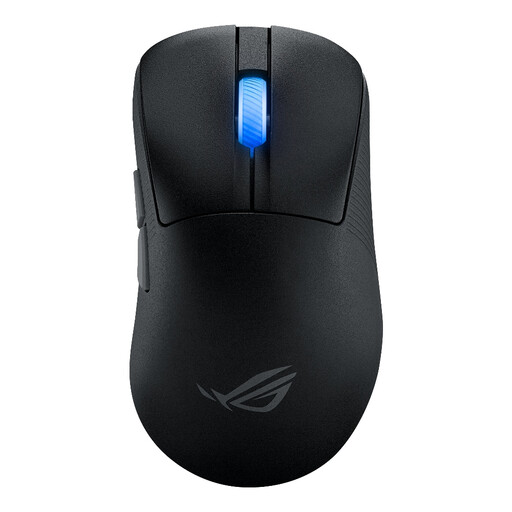
Why This Fits Their Persona: Suitable for FPS players who want a light ergonomic shape, multiple connection options and high polling-rate support for a compatible PC and monitor.
The specifications distinguish wireless and wired polling rates: up to 4,000Hz via 2.4GHz and up to 8,000Hz when wired with the relevant booster.
54g body, tri-mode connectivity, 42,000 DPI sensor and 100-million-click optical switches.

Why This Fits Their Persona: Designed for MMO and MOBA players who need many accessible commands for games with skills, items and macros.
The 12-button layout is clearly specified, including six side buttons, while the 1,000Hz rate is stated for both wireless and wired modes.
Hot-swappable switches, magnetic charging dock and stated battery life of up to 67 hours with RGB disabled.

Why This Fits Their Persona: A practical match for players who want a lightweight wireless esports gaming mouse and extended use between charges.
Its stated 8,000Hz wireless rate avoids the common issue where a high polling rate only applies when wired. The battery figure is specified at 1,000Hz, making the usage condition clearer.
53g weight, optical switches rated at 120 million clicks, 30,000 DPI and up to 750 hours of stated battery life at 1,000Hz.
We have compiled a complete, real-time list of products that fully satisfy these strict selection criteria and UK safety regulations.
Not necessarily. A wired model avoids charging and offers a direct connection, while a suitable 2.4GHz wireless gaming mouse can provide responsive performance without cable drag. Compare the stated connection mode, polling rate and receiver arrangement rather than relying on the word “wireless” or “wired” alone.
Most players do not need 8,000Hz reporting. It may be relevant if you use a high-refresh-rate monitor and play fast competitive titles, but it can consume more power and system resources. A reliable 1,000Hz model remains suitable for many gaming and everyday PC tasks.
Lifespan depends on switch construction, use, cleaning and accidental damage. Product specifications often list a click rating, such as 70 million or 100 million clicks, but this is not a guarantee of service life. For UK buyers, retain proof of purchase and review the seller’s warranty, returns and safety information before completing the order.