Low-distraction bedroom players
If desk lighting might disturb someone sharing the room, look for lighting controls you can use with your setup. Razer says brightness and effects can be adjusted on compatible Chroma devices.


A compact wired mouse suits a fixed desk if its cable can be kept clear; wireless removes the tether but brings battery or charging upkeep. In a shared bedroom, lighting control and hand fit can matter as much as desk space. Before choosing either route, confirm that your device and platform game accept mouse input.
If desk lighting might disturb someone sharing the room, look for lighting controls you can use with your setup. Razer says brightness and effects can be adjusted on compatible Chroma devices.
A wireless mouse removes the trailing cable from a cramped desk or bedside setup, but introduces battery replacement or charging. Logitech G specifies one AA battery for its G305 LIGHTSPEED.
Hand orientation and side-button access deserve attention if a right-handed layout is uncomfortable. CORSAIR describes the M75 Wireless as ambidextrous, with swappable magnetic side buttons.
Once you know your game accepts mouse input, decide which issue would most affect play at your desk, then check the exact model rather than choosing by its highest sensitivity figure.
| Concern | What to check | Who this matters to |
|---|---|---|
| Desk lighting | Check whether lights can be dimmed or set to a less animated effect on your setup. | If I play while someone else is resting, I want the mouse lights to stay unobtrusive; around 36% of consumers put lighting control first. |
| Cable clearance | Choose between a routed cable and wireless power upkeep; check the required connection and battery-life conditions. | On a cramped desk, I would rather manage charging or batteries than have a cable cross my mouse space. For around 29% of consumers, cable clearance is the main concern. |
| Compact control | Consider the exact shape and weight alongside sensitivity adjustment and the space available for movement. | When timed movements call for frequent corrections, I need a mouse I can control comfortably in the space I have; roughly 21% of consumers prioritise that feel. |
| Hand fit | Confirm the stated hand orientation and whether side buttons are accessible from the hand you use. | If I play left-handed, a symmetrical outline alone will not tell me whether the buttons suit me; hand fit comes first for around 14% of consumers. |
The Razer Cobra has RGB underglow. Razer offers brightness and effect controls for compatible Chroma devices, but the lighting still needs to be set up for the room.
If visual distraction matters, check the controls for the exact mouse and choose a dim or non-animated setting where supported.
Logitech G states that the G305 LIGHTSPEED runs for up to 250 hours on one AA battery. Removing a cable does not remove the need to manage power.
Decide whether you would rather route a cable, replace batteries or charge a mouse before comparing sensor figures.
The G305 requires replacement AA batteries during ownership.
Razer describes the Cobra as right-handed and symmetrical, while CORSAIR describes the M75 Wireless as ambidextrous with swappable side buttons. Their button layouts are therefore a more useful check than outline alone.
Confirm the stated hand orientation and side-button arrangement of the exact model, particularly for left-handed use.
Razer lists the Cobra at 58 g, while a Joybuy listing bearing the Cobra name states 83.5 g. A shared name does not resolve which variant a listing describes.
Check the model identifier and manufacturer specification against the item you intend to order before relying on its stated weight.
The G305 LIGHTSPEED illustrates a wireless choice for players who want to clear a mouse cable from the desk.
The wired Cobra illustrates a compact choice for a fixed desk where its cable can be routed clear.
The M75 Wireless is a reference for choosing an ambidextrous shape and adjustable side-button layout.
These wired and wireless gaming mice offer different ways to manage cable space and controls in a shared-bedroom setup. Check lighting, power needs and game compatibility for the particular mouse you choose.
 Image unavailable
Consider this model if you want the option to play without a trailing cable. Its title specifies wired, 2.4G and Bluetooth modes, a PAW3395 sensor and a 49 g weight. Check its lighting behaviour and power requirements for your setup.
 Image unavailable
For a cable-free desk, consider whether this mouse fits the hand you use and the connection available on your device. Check the battery arrangement, in-use weight and lighting behaviour before ordering.
 Image unavailable
Consider this mouse if wireless use and a charging base suit your desk. Its title specifies a PAW3950 sensor, 56 g weight and a base with a colour screen. Confirm the connection modes and sensitivity specification for the exact variant, and check whether the base lighting suits a shared room.
 Image unavailable
This is a wireless option to consider if a mouse cable would get in the way. Its title specifies five adjustable DPI settings and LED lighting. If click sound or light is important in your room, check both for the exact item rather than assuming either will be unobtrusive; check its power requirements too.
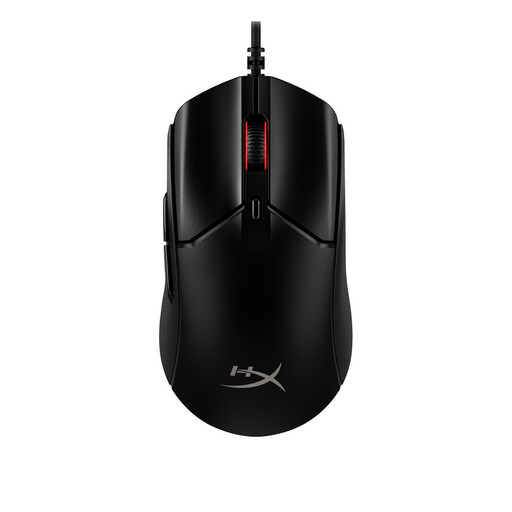 Image unavailable
A wired mouse may suit a fixed desk if you can route its cable clear of your playing space. Check the exact model and its hand fit, weight and sensitivity settings if those details would decide your choice.
Choose lighting you can adjust, then set a lower brightness or less animated effect where supported. Razer says compatible Chroma devices offer LED brightness and effect controls; check the controls for the exact mouse you intend to use.
Razer says the Cobra has one onboard memory profile for the last used Razer Synapse profile, including custom DPI and button settings. Check that the particular settings you need are stored before relying on it away from your usual software setup.
No mouse should be assumed to work with every game or console. Confirm mouse-input support for your particular device and game before choosing a model by its weight, connection or sensitivity.
Keep an old electrical mouse and spent batteries out of household rubbish. GOV.UK advises using appropriate electrical-waste and battery collection routes; check the collection options available locally when replacing the mouse.