Choose reachable extra buttons if you regularly assign building, inventory or communication commands to your mouse; a less crowded layout makes more sense if most shortcuts stay on your keyboard. For a bright-room setup, check hand fit and tracking on the surface you actually use before treating RGB lighting as a deciding feature.
Who this choice affects
The useful number of mouse controls depends on which sandbox-game actions you want under your thumb, while fit and desk setup matter regardless of your shortcut preferences.
Shortcut-heavy sandbox builders
If you repeatedly switch tools, open inventories or use communication commands, reachable programmable controls may let you assign some of those actions to the mouse. Check their positions as well as their count: Logitech G, Razer and SteelSeries describe different button layouts on their named models.
Long-session players
If you build or explore for extended periods, consider how the shape fits your hand and whether you can reach the controls without changing grip. The UK Health and Safety Executive also advises keeping a mouse within easy reach so it can be used with a straight wrist.
Bright-room desk-set-up users
If your desk surface varies or you use a mouse mat, focus on consistent tracking where you will actually play. Razer Support describes surface calibration for supported mice; check whether that option applies to the model and software you intend to use.
What to check when choosing
Decide which actions need mouse buttons, then check grip and surface behaviour. Treat lighting as a separate appearance preference, not a substitute for those checks.
| Concern |
What to check |
Who this matters to |
| Command access |
List the actions you would bind, then check thumb reach and the model’s remapping options. |
When building means frequent tool, inventory and communication changes, I want those recurring commands within reach without shifting my grip. Around 36% of consumers put command access first. |
| Long-session comfort |
Check shape, handedness and stated weight where available; position the mouse within easy reach. |
For extended building sessions, I need a shape I can hold and controls I can reach comfortably. Around 29% of consumers prioritise long-session fit and control. |
| Tracking surface |
Assess the intended desk or mat and check whether the exact mouse supports surface calibration. |
If my desk surface is inconsistent, I need dependable cursor movement on the surface I will use. Roughly 21% of consumers make tracking consistency their primary concern. |
| Bright-room appearance |
Decide whether RGB lighting matters to you after checking layout, fit and surface setup. |
In a bright room, I want a setup I like looking at without letting lighting distract from usable controls. Around 14% of consumers place appearance first. |
Common buying mistakes
-
Treating RGB as a bright-room performance feature
Lighting changes a mouse’s appearance, but it does not establish better tracking or more usable commands. Its visual effect may also be less noticeable in a well-lit room.
Choose the shape, controls and tracking surface first; consider RGB if you still want the visual customisation.
-
Choosing the largest button count without testing thumb reach
Corsair lists 16 programmable buttons for the SCIMITAR ELITE WIRELESS, while Razer lists 19 for the Naga V2 HyperSpeed. A dense layout helps only when you can distinguish and reach the controls without disrupting your grip.
Write down the actions you will assign, then compare a moderate layout with a dense thumb panel and try the shape where possible.
-
Expecting a high DPI figure to fix an inconsistent surface
A sensitivity specification does not establish how a mouse will behave on your particular desk or mat. Razer Support describes surface calibration for supported mice, rather than a setting available on every model.
Use a consistent surface, check calibration compatibility and assess tracking on the surface you intend to keep.
-
Overlooking desk position during long sessions
Even a well-fitting mouse can be awkward to use if you must reach for it. The UK Health and Safety Executive advises placing a mouse within easy reach and using it with a straight wrist.
Leave space beside the keyboard for a comfortable mouse position, support your forearm and change activity or take breaks as appropriate.
Brands to consider
These model-specific examples illustrate different control layouts; a brand name alone cannot tell you whether a mouse fits your hand or your command bindings.
Logitech G
The G502 range includes wired and LIGHTSPEED wireless models with multiple assignable controls.
- Logitech G lists 13 customisable controls for the G502 X LIGHTSPEED and 11 programmable buttons with onboard profiles for the wired G502 HERO.
- Check the exact variant and button placement; the two models do not have an identical layout or connection type.
Razer
Basilisk and Naga models address different levels of shortcut use.
- Razer lists 10+1 programmable buttons for the Basilisk V3 and 19 for the Naga V2 HyperSpeed.
- The denser Naga layout is worth considering only if you need those bindings and can comfortably reach them; check the shape of either model for your grip.
SteelSeries
The Rival 5 offers a moderate button layout for players who want shortcuts without a full thumb grid.
- SteelSeries specifies nine programmable buttons, a five-button side panel and a stated weight of 85 g for the Rival 5.
- Check whether its particular side-button arrangement suits your thumb and whether nine controls cover the actions you want to assign.
Corsair
The SCIMITAR ELITE WIRELESS is an option for extensive mouse-bound commands.
- Corsair specifies 16 programmable buttons and an adjustable 12-button side panel for this model.
- A dense panel adds controls to learn and reach; it is less relevant if most of your sandbox shortcuts remain on the keyboard.
Joybuy products for this setup
These gaming mice cover several shortcut layouts, from models listing ten programmable buttons to a simpler wired option. The mouse-and-mat bundle addresses surface setup as well; compare its included game and software requirements with what you actually need for sandbox play.
 No image available
Rapoo VT2 wireless gaming mouse, purple
Consider this model if you want to assign several recurring building or inventory actions to mouse buttons. Its title specifies ten programmable buttons, macro capability, a stated 53 g weight and wireless operation. Check the shape and button reach for your grip, and confirm that its configuration software suits your setup.
View on Joybuy
 No image available
Rapoo VT2 MAX wireless gaming mouse, white
This is another ten-button option for recurring mouse-bound commands. The title specifies macro capability, wireless operation, a stated 53 g weight and optical switches. Check whether the click feel, shape and side-button positions work for you; the stated battery duration depends on its operating settings.
View on Joybuy
 No image available
AJAZZ AJ200 AI MC wireless gaming mouse with charging dock
Consider this model if you want some remappable commands rather than a dense thumb grid, alongside a choice of connection modes. Its title lists Bluetooth, 2.4G wireless and USB-C modes; the product information describes six buttons and macro recording. Confirm the hand fit and product weight before choosing it, as the stated weights conflict.
View on Joybuy
 No image available
ONIKUMA CW905 wired gaming mouse
This wired option may suit a setup where you need only a few mouse-side actions. Its product information describes seven buttons and six preset DPI levels, but confirm which buttons can actually be remapped before relying on custom bindings. The product warning advises using a mouse pad and avoiding highly reflective or glass surfaces.
View on Joybuy
 No image available
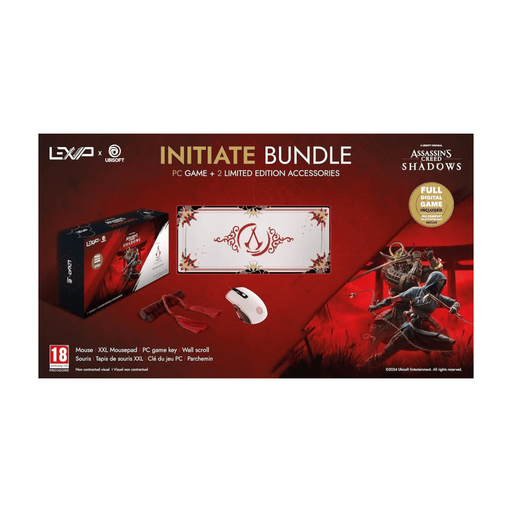
Lexip X Ubisoft Assassin's Creed Shadows Initiate Box, mouse and mat bundle
Consider this bundle if you also need a mouse mat for a consistent playing surface. It includes a wired mouse, mat and Assassin's Creed Shadows PC game code; the game is separate from the sandbox use discussed here. The mouse software is listed for Windows, and the game code requires a Ubisoft account and internet access. Check those requirements and the mouse’s fit before choosing the bundle.
View on Joybuy
Frequently asked questions
Does a bright room mean I need a special gaming-mouse sensor?
Room brightness alone is not a reason to choose a particular sensor from these models. Focus on the desk or mouse mat you will use and check the exact mouse’s options: Razer Support describes surface calibration for supported mice in compatible Synapse software.
How many mouse buttons do I need for sandbox building?
Choose enough reachable controls for the actions you genuinely want off the keyboard. For reference, SteelSeries lists nine programmable buttons on the Rival 5, Logitech G lists 13 controls on the G502 X LIGHTSPEED, and Corsair lists 16 buttons on the SCIMITAR ELITE WIRELESS. Those counts do not tell you whether a particular side layout fits your thumb.
Where should I place the mouse for a long building session?
Keep it within easy reach so you can use it with a straight wrist. That follows UK Health and Safety Executive workstation guidance; also check that the mouse shape and button positions let you avoid an awkward reach during play.


