Shortcut-heavy settlement builders
If you regularly use build, camera, menu or tool commands, you may want to move some of them from the keyboard to mouse buttons. The layout is worth learning only if those buttons are comfortable to reach.


Choose a gaming mouse by the shortcuts you will actually assign and the way you navigate maps and menus. A dense side keypad suits players willing to learn many bindings; a comfortable shape and useful wheel controls may matter more if scrolling and long sessions dominate. Bright room lighting does not, by itself, make RGB mouse lighting a performance requirement.
If you regularly use build, camera, menu or tool commands, you may want to move some of them from the keyboard to mouse buttons. The layout is worth learning only if those buttons are comfortable to reach.
If you spend extended sessions moving around the map and browsing construction menus, pay close attention to grip fit and wheel behaviour. SCAN UK’s gaming-mouse buying guide likewise emphasises comfort when choosing a mouse.
If you need only a few extra controls, a straightforward wired setup may appeal more than a dense button layout. Consider whether a cable on the desk is preferable to managing a wireless connection and charging.
Count the commands you would bind before choosing a button layout, then assess grip and scrolling for the time you spend navigating. Decide separately whether a cable or wireless connection fits your desk.
| Concern | What to check | Who this matters to |
|---|---|---|
| Shortcut capacity | Count your repeated commands; check button placement and whether the required actions can be assigned. | If I repeatedly switch between building tools, menus and camera controls, I want shortcuts I can reach without losing my grip. Around 36% of consumers put shortcut access first. |
| Comfort and navigation | Compare the shell with your grip and hand size, then assess whether the wheel suits precise menu steps and faster scrolling. | During a long building session, I need the mouse to remain comfortable while I move around the map and work through menus. Comfort and navigation come first for around 36% of consumers. |
| Connection simplicity | Choose between cable management and charging; if buying wireless for gaming, check its connection modes. | I would rather have enough controls with a setup I can manage easily than spend time on features I will not use. Around 28% of consumers primarily favour a simpler connection and control setup. |
A high advertised sensitivity does not tell you whether the shell fits your grip or the controls are easy to use through a long session.
Start with hand fit, button placement and wheel behaviour, then adjust sensitivity in-game to a level you can control comfortably.
A dense side panel takes practice, and its value depends on having commands you genuinely want to bind. CORSAIR’s SCIMITAR ELITE WIRELESS SE, for example, uses a repositionable 12-button side panel.
List your recurring actions before choosing a keypad-style mouse; if the list is short, compare less crowded layouts as well.
Connection modes can serve different uses. CORSAIR’s guidance for the SCIMITAR ELITE WIRELESS family identifies Bluetooth with everyday computing and describes its 2.4 GHz wireless connection as the gaming-oriented option.
If you choose that mouse for gaming, check how to use its 2.4 GHz receiver; choose Bluetooth when its convenience better suits the task.
Mouse lighting is a visual preference, not a substitute for comfortable controls or a way to address screen glare.
Assess the grip, wheel, buttons and connection on their own merits. Deal with glare as a separate display and workspace question.
The wired G502 X is a reference point if you want extra commands without a full thumb keypad.
The Basilisk V3 family offers right-handed shapes with programmable controls and wheel options for buyers who frequently navigate menus and maps.
The SCIMITAR ELITE WIRELESS SE is a reference point for players prepared to map numerous commands to a dedicated side panel.
These models offer different ways to approach settlement-building controls, from wired mice with a modest set of bindings to wireless models with more programmable buttons. Compare their actual layouts with the commands you intend to use; this selection is not a ranking of comfort or game performance.
 Image unavailable
Consider this wired option if you want to keep a small number of recurring commands close at hand rather than learn a side keypad.
USB connection; blue variant. Check the available button bindings, wheel behaviour and shell fit against your own setup.
 Image unavailable
Consider this model if you want to choose between wired and wireless connections while setting up your own mouse controls.
The named variant includes a charging dock and lists Bluetooth, 2.4 GHz and USB-C modes, plus a PAW3311 sensor and 24000 DPI maximum. Confirm the exact weight and whether the shell fits your hand before buying.
 Image unavailable
This is a wired option to assess if you want to customise controls without managing a wireless connection.
Minecraft Edition variant. Check the button layout, available scroll controls and exact weight if any of those will determine your choice.
 Image unavailable
Consider this model if you want several assignable controls and are willing to configure them for recurring building actions.
The named variant lists 10 programmable buttons, macro support and a stated weight of 53 g. Confirm its wireless connection mode, wheel behaviour and hand fit for your gaming setup.
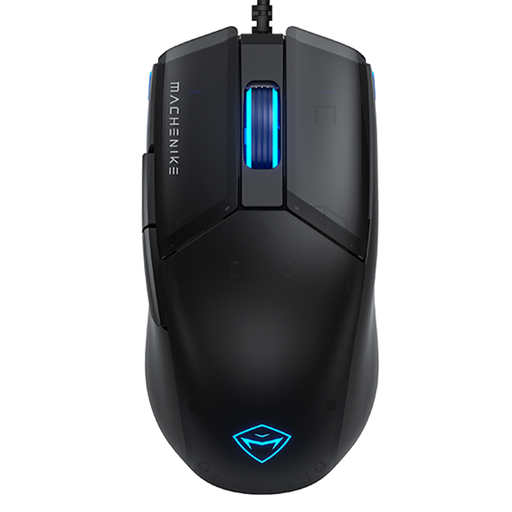 Image unavailable
Consider this wired mouse if you want to assess a straightforward connection and assignable controls for recurring actions.
Black variant. Check the number and position of its buttons, shell fit and wheel behaviour before deciding whether it suits long building sessions.
No: choose RGB lighting as a visual preference, not as a requirement for mouse control in a bright room. Assess grip, scrolling and button placement separately, and address screen glare through the display and workspace setup.
Choose wired if avoiding charging matters more to you than keeping a cable off the desk. For a wireless mouse, check its gaming connection mode: CORSAIR’s guidance for the SCIMITAR ELITE WIRELESS family identifies 2.4 GHz as the gaming-oriented option and Bluetooth with everyday computing.
No single DPI setting suits every player. Choose a shape and control layout you can use comfortably, then adjust sensitivity in-game rather than deciding by the highest advertised maximum.
Look for an electrical-waste recycling option rather than putting an old mouse in general waste. UK government guidance covers waste electrical and electronic equipment under WEEE regulations; check your local authority’s arrangements for household electricals.