What matters when choosing
Start with the commands you would actually assign to the mouse, then assess grip and desk space before deciding whether a cable or charging routine is easier to accommodate.
| Concern |
What to check |
Who this matters to |
| Accessible commands |
List your repeated build, camera and interface actions. Check button reach and whether the exact model lets you remap them on your computer. |
If I keep switching between building tools and camera controls, I want buttons I can reach without changing my grip; around 42% of consumers put command access first. |
| Grip and desk position |
Check shape, handedness and usable mouse space. The Health and Safety Executive advises placing the mouse in line with your elbow. |
During a long session at a small desk, I need room to move without reaching awkwardly; comfort and workable positioning come first for around 33% of consumers. |
| Setup simplicity |
Decide whether you would rather route a cable or manage charging. Confirm software compatibility if you plan to save custom controls. |
When my mouse stays at one student-room desk, I want the connection and settings to be straightforward to live with; around 25% of consumers make setup simplicity their primary concern. |
Brands to consider
These brands provide useful model examples for comparing controls and grip; a brand name alone cannot establish which shape will suit your hand.
Logitech G
The wired G502 models are worth examining if you want several configurable controls at a fixed desk.
- Logitech G lists 11 programmable buttons and onboard profiles for the G502 HERO. It specifies the G502 X at 89 g and describes a configurable DPI-shift button and dual-mode tilt wheel.
- The sculpted, control-heavy layout may not suit every hand or someone who prefers a simpler, symmetrical mouse. Check the exact model rather than treating G502 variants as interchangeable.
Razer
The Basilisk V3 offers a right-handed shape and scrolling options for players who use the wheel frequently.
- Razer lists 10+1 programmable buttons and tactile, free-spin and automatic-switching wheel modes for the Basilisk V3.
- Its shape will not fit every grip, and additional scroll modes matter only if they suit your game controls and habits.
SteelSeries
The wired Rival 5 is a model to compare if you want multiple side controls and are attentive to listed mouse weight.
- SteelSeries lists nine programmable buttons, a five-button side layout and an 85 g specified weight for the Rival 5.
- Its button arrangement needs to suit your thumb reach. Listed weight does not establish how comfortable the mouse will feel to you.
Joybuy product choices
These gaming mice include wired choices for a fixed desk and a model listed for wireless or wired use. Compare their controls, grip and connection arrangements against the space available in your room.
 No image available
ONIKUMA CW905 wired gaming mouse
Consider this for a fixed desk if you want to avoid charging the mouse while assigning frequently used game actions.
The product name describes programmable buttons and adjustable sensitivity levels. Check which buttons can be assigned and whether the configuration software works on your computer; grip fit remains personal.
View on Joybuy
 No image available
RAPOO Mice-VT9PRO-4K White
If you are considering this model for repeated game commands, confirm the button layout before choosing it.
Also check the exact connection modes and charging requirements for this variant so they fit your desk setup.
View on Joybuy
 No image available
AJAZZ AJ159 APEX wireless gaming mouse, 56 g
Consider this model if you want the option to move the mouse without a cable but can accommodate charging at your desk.
The product name lists a 56 g weight, 2.4 GHz wireless and wired connection modes, and a magnetic charging base. Check the physical button layout before relying on it for several game commands.
View on Joybuy
 No image available
Razer Cobra wired gaming mouse, Minecraft Edition
This wired model is an option for a fixed desk if avoiding mouse charging matters more to you than removing a cable.
Before choosing it for settlement-building shortcuts, check the reachable controls and configuration-software support for your computer. Confirm the exact variant’s weight if that affects your choice.
View on Joybuy
 No image available
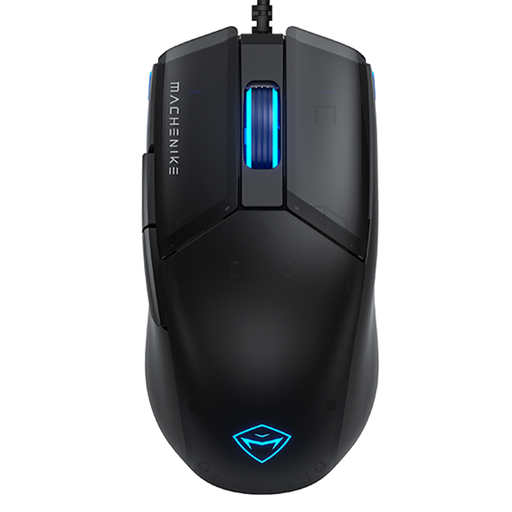
Machenike M7 Pro wired mouse, Black
For a mouse that stays at one desk, this wired model avoids a charging routine, provided you have a clear cable route.
If custom game commands are important, check its button layout, configuration software and compatibility with your computer before buying.
View on Joybuy
Common questions
How many mouse buttons do I need for a settlement-building game?
Choose enough reachable buttons for the actions you actually repeat; there is no universal target. SteelSeries lists nine programmable buttons for the Rival 5, while Logitech G lists 11 for the G502 HERO and Razer lists 10+1 for the Basilisk V3. Their layouts matter as much as those counts.
How should I position a mouse on a small student desk?
Keep enough clear space to move the mouse and position it in line with your elbow. The Health and Safety Executive also advises keeping the screen and keyboard central rather than twisting your back.
What should I check about mouse software and returns?
Check that configuration software supports the exact mouse and your computer before relying on custom button assignments. Logitech G documents DPI changes and button remapping in G HUB for supported devices; confirm the functions available for your chosen model and check the seller’s applicable return terms separately.
Does a CE or UKCA mark settle whether a mouse is suitable for purchase?
No: a marking alone does not establish that an individual mouse meets every applicable requirement. GOV.UK guidance updated on 21 August 2026 says Great Britain continues to recognise CE marking alongside or in place of UKCA marking where the aims and requirements of the relevant product regulations meet UK needs. That guidance applies to England, Scotland and Wales; check the applicable route separately for Northern Ireland.
What should I do with an old gaming mouse?
Check for a suitable electrical-equipment collection or retailer take-back route rather than treating the mouse as ordinary household waste. UK government guidance on waste electrical and electronic equipment describes recovery, reuse and recycling as aims of that regime.


