Shortcut-heavy zoo builders
If you regularly move between building tools, camera controls, terrain tools and management panels, reachable programmable buttons may matter more to you than the lowest possible mouse weight.


Choose a mouse with reachable programmable buttons if you often use the same building and management commands, but check whether its shape and button placement suit your hand. If clearing a cable from the shared desk matters more, consider wireless; if repeated broad movements are your priority, compare weight alongside grip and controls. A high DPI figure or RGB lighting alone does not settle this choice.
If you regularly move between building tools, camera controls, terrain tools and management panels, reachable programmable buttons may matter more to you than the lowest possible mouse weight.
If another person shares your bedroom desk, removing a mouse cable may simplify the workspace. Check the shape and configurable controls as well as the connection.
If you make repeated broad movements while building, a lower stated weight may be a priority. You may need to accept fewer conveniently placed shortcut controls.
For a shared-bedroom zoo-building setup, decide whether shortcut access, cable clearance or lighter movement is your main priority. Then check hand fit and how the mouse will work on your desk.
| Concern | What to check | Who this matters to |
|---|---|---|
| Reachable shortcuts | Check programmable-button placement against your thumb and whether saved profiles require software. | When I move repeatedly between building tools and management panels, I want my most-used commands within comfortable reach; around 38% of consumers put shortcut access first. |
| Cable-free desk space | Confirm the connection mode, receiver placement and power arrangement for the exact model. | If I share a small desk, I want one less cable in the working area without overlooking the mouse’s power routine; roughly 31% of consumers prioritise cable clearance. |
| Low weight for repeated movement | Compare stated weight for the exact variant, then check shape and available controls. | For longer building sessions with broad mouse movements, I would put a lighter feel ahead of extra buttons; around 31% of consumers make low weight their primary concern. |
A large DPI range does not tell you whether the mouse’s shape, side controls or weight will suit building and management play.
Prioritise grip fit and the controls you expect to use. Once set up, adjust sensitivity to suit your display and desk space.
Button counts and layouts differ between mice. Extra controls offer little practical value if you cannot reach them comfortably or press them by mistake.
Identify the commands you would assign, inspect the exact button layout and check the applicable return terms before buying.
Wireless connection methods and power arrangements vary, so two cable-free mice may require different routines.
Check the exact model’s power method, receiver requirements and the conditions attached to any battery-life claim.
Depending on the model, you may need to recharge it or replace batteries.
Coventry City Council identifies computer mice as waste electrical and electronic equipment and advises against putting electrical appliances in household bins.
When replacing a mouse in the UK, check your local authority’s electrical-recycling or collection arrangements.
Its G502 HERO and PRO X SUPERLIGHT 2 illustrate different priorities: programmable controls and lower stated weight.
The Basilisk V3 X HyperSpeed is a right-handed wireless option with configurable controls.
The wired Rival 5 is an option to examine when side controls matter more than removing a desk cable.
These wireless mice are options for keeping a mouse cable off the shared desk. Compare their stated controls, weight where dependable, and power arrangements against the way you build and manage your virtual zoo.
 No image available
Consider this model if both cable clearance and assignable building shortcuts matter to you.
The title specifies 53 g and 10 programmable buttons. Check the shape and button reach for your hand, and whether its click sound suits the shared room.
 No image available
Consider it if you want a cable-free mouse with buttons to assign to repeated game actions.
The title specifies 53 g, 10 programmable buttons and a mechanical switch. Check the button positions and click sound for your shared-bedroom setup; the stated battery-life claim depends on a driver update to enable low-power mode.
 No image available
This model is worth considering if cable clearance and a lighter stated weight matter more to you than a known shortcut-button count.
The title specifies 56 g, 2.4G wireless and wired modes, and a magnetic charging base. Inspect the button layout before relying on it for frequent shortcuts, and check its click sound for the room.
 No image available
Consider it if you want wireless desk use and a charging dock, while checking whether its controls fit your usual commands.
The title lists Bluetooth, 2.4G and USB-C modes. Confirm the exact model’s weight before choosing it for low-weight movement: the supplied weight figures conflict. Check hand fit and click sound too.
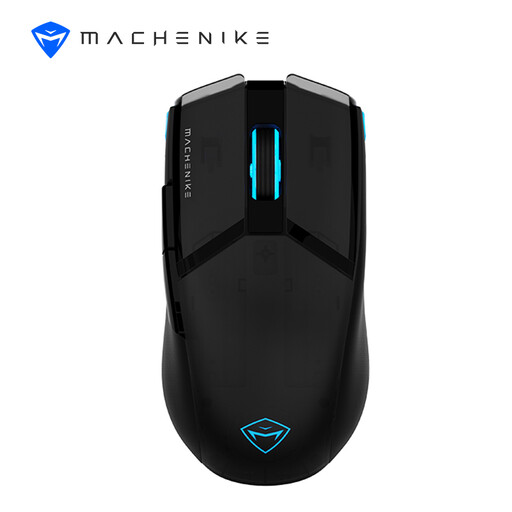 No image available
This dual-mode wireless mouse is an option if keeping a cable off the desk is your main priority.
Before choosing it for lighter movement or repeated shortcuts, confirm the exact weight, button count and layout. Check its shape and click sound against the needs of your shared room.
Not necessarily: DPI is an adjustable sensor setting, not proof that a mouse will make building easier. Choose a shape and button layout you can use comfortably, then set sensitivity to suit your display and desk space.
Wireless can be worthwhile if removing a cable is an important workspace benefit. Check the exact mouse’s connection and power arrangements: Razer lists 2.4 GHz wireless and Bluetooth for the Basilisk V3 X HyperSpeed, while Logitech G lists LIGHTSPEED wireless for the PRO X SUPERLIGHT 2.
Check how the mouse fits on the desk, where a cable or wireless receiver would go, and whether the controls suit your hand. If clicks or lighting could disturb the other person, check those characteristics for the exact model rather than assuming all gaming mice behave alike.
Use an appropriate local electrical-waste collection or recycling route rather than putting it in household rubbish. Coventry City Council identifies mice as waste electrical and electronic equipment; check your own local authority’s arrangements for where to take one.