What to check before buying
For long economic-simulation sessions, decide whether comfortable reach, repeated commands or desk flexibility is your primary concern. Then check the controls and connection features that serve that need.
| Concern |
What to check |
Who this matters to |
| Comfort and reach |
Check handedness and whether you can reach the side buttons while keeping your forearm supported and wrist straight. |
If I play for hours, I want a shape and desk position that do not make me stretch or grip harder. Around 42% of consumers would put comfortable reach first. |
| Repeated commands |
Count the shortcuts you regularly use, then assess whether the side buttons and wheel controls are easy to distinguish. |
When I repeatedly use build tools or change game speed, I want those commands close at hand without pressing the wrong button. For around 33% of consumers, shortcut access would be the primary concern. |
| Desk and control flexibility |
Choose the connection mode you need and check whether the wheel offers the scrolling behaviour you prefer; for wireless models, check the power arrangement. |
I want the connection and scrolling style to work across my games and desk setup without an inconvenient power routine. Roughly 25% of consumers would prioritise that flexibility. |
Brands to consider
These product lines illustrate different control layouts; a brand name alone does not establish fit for a long session.
Logitech G
The wired G502 X is an option to examine if you want a lighter conventional layout rather than a full MMO thumb grid.
- Logitech G lists an 89 g weight, an adjustable DPI-shift button and a dual-mode tilt wheel for the G502 X.
- Its stated weight and controls do not establish hand fit or whether it can accommodate all your shortcuts.
Razer
The Basilisk V3 offers a moderate-control layout, while the Naga V2 HyperSpeed takes a thumb-grid approach.
- Razer lists 10+1 programmable buttons and configurable scrolling for the Basilisk V3; the Naga V2 HyperSpeed has a 12-button thumb grid and 21 programmable controls.
- Both are described as right-handed designs. Check handedness, thumb reach and how much setup you are willing to do.
SteelSeries
The wired Rival 5 offers additional shortcuts without moving to a 12-button thumb grid.
- SteelSeries specifies nine programmable buttons, a five-button side layout and an 85 g stated weight for the Rival 5.
- Those specifications cannot tell you whether its shape and button positions suit your hand.
Corsair
The Scimitar Elite Wireless SE is a thumb-grid option for players planning to map many commands.
- Corsair lists 16 customisable buttons and an adjustable Key Slider for positioning the side controls.
- Check the grid’s reach in your grip and allow time to learn a button map that avoids mistaken presses.
Gaming mice on Joybuy
These mice cover lighter multi-button, wired and flexible-connection options for long simulation sessions. Compare their individual controls and fit rather than treating the list as a single solution to every shortcut need.
 No image available
Rapoo VT7 MAX Wireless Gaming Mouse, White
Consider this model if you want a lighter mouse and enough controls to map recurring commands. Its listed weight is 53 g, and its name specifies 10 programmable buttons. The stated battery duration of up to 750 hours applies at 1000 Hz after a driver update enables low-power mode; check whether that setup suits you, as well as the side-button reach.
View on Joybuy
 No image available
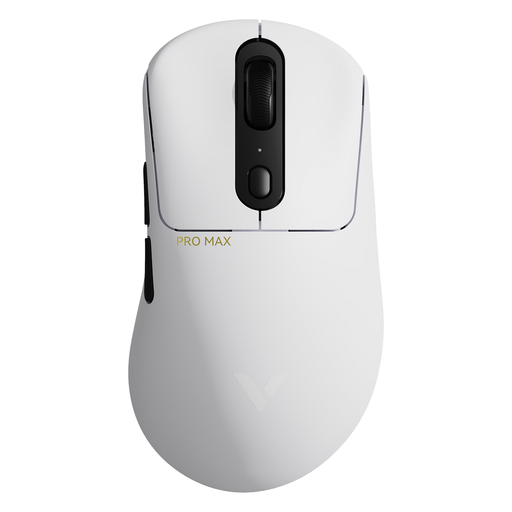
RAPOO Mice-VT3PRO MAX, White
If you want a lighter mouse for recurring simulation commands, check this variant’s weight and button layout before deciding. Its product descriptions give different programmable-button counts and differ on the sensor and DPI details, so confirm the configuration you would receive.
View on Joybuy
 No image available
AJAZZ AJ200 AI MC Wireless Gaming Mouse with Charging Dock
This variant is worth examining if you switch between desk connections: its name lists Bluetooth, 2.4G and USB-C modes, along with a charging dock and PAW3311 sensor. Confirm its weight and how many buttons you can map, since the weight descriptions conflict and the programmable-button count affects shortcut planning.
View on Joybuy
 No image available
Razer Cobra Wired Gaming Mouse – Minecraft Edition
A wired mouse avoids wireless battery upkeep if that suits your desk. Before relying on this Minecraft Edition model for simulation shortcuts, check the number and placement of its programmable buttons; also confirm its weight, as the product descriptions conflict.
View on Joybuy
 No image available
HyperX Pulsefire Fuse Wireless Gaming Mouse
Consider this wireless model if a cable-free desk matters to you. Check its button count and reach before planning a shortcut map, and confirm its weight and battery duration if either will affect your choice for long sessions.
View on Joybuy
Common questions
Is a lighter mouse automatically more comfortable for a long session?
No. A lower stated weight means less mouse mass to move, but it cannot establish how a shape fits your hand. The Health and Safety Executive advises keeping the mouse close, your wrist straight and your grip relaxed, so assess the mouse alongside your desk setup.
How many programmable buttons do economic simulations need?
Choose enough buttons for the commands you actually repeat and can reach reliably. SteelSeries lists nine programmable buttons on the Rival 5, while Razer lists a 12-button thumb grid and 21 programmable controls on the Naga V2 HyperSpeed; the larger layout is useful only if you will map and distinguish those extra controls.
Should I choose wired, 2.4 GHz wireless or Bluetooth?
Choose wired if avoiding battery or charging upkeep matters most; consider wireless if removing the cable better suits your desk. Razer lists both 2.4 GHz and Bluetooth for the Naga V2 HyperSpeed, with battery claims that vary by mode and battery type, so check the conditions for the connection you intend to use.
What can I do if a mouse bought from a UK trader is faulty?
The Consumer Rights Act 2015 provides remedies when goods bought from a trader do not conform to the contract, including a short-term right to reject or a right to repair or replacement, with other remedies potentially available under the Act’s conditions. Keep your order evidence and contact the seller about the fault; these statutory remedies are distinct from a retailer’s change-of-mind return policy.


