Players short of cable clearance
If a mouse cable crosses your limited movement area, a compact 2.4 GHz wireless mouse is a useful starting point. Leave room to position its receiver without crowding the mousepad.


Start with an unobstructed mouse area and a shape that suits your grip, rather than choosing by a headline DPI figure alone. A 2.4 GHz wireless mouse makes sense if its cable would cross your movement area; a wired mouse can work if you can route the cable clear. Choose extra buttons when you have repeated commands you will actually bind and practise, and allow space for any receiver or charging dock.
If a mouse cable crosses your limited movement area, a compact 2.4 GHz wireless mouse is a useful starting point. Leave room to position its receiver without crowding the mousepad.
Repeated small aiming corrections make hand fit worth checking. Logitech G describes the PRO X SUPERLIGHT 2c as a compact mouse for people who prefer that shape because of their hand size or grip style; compactness alone does not establish comfort.
If you regularly use pings, abilities or inventory commands while learning a map, deliberate side-button bindings may be useful. Work out which actions you would move from the keyboard before choosing a button-heavy mouse.
For map learning at a small desk, decide whether your main obstacle is a cable in the mouse path, a shell that feels difficult to control, or commands that need easier access.
Choose when: A cable crosses your mouse area and a compact shape suits your hand and grip.
Trade-off: You need to manage charging or batteries, and find space for the receiver.
Choose when: You can route the cable clear and would rather not manage wireless power.
Trade-off: The cable can still catch on a keyboard or desk edge.
Choose when: You have enough repeated game actions to make a planned set of bindings worthwhile.
Trade-off: More controls take time to configure and memorise.
| Concern | What to check | Who this matters to |
|---|---|---|
| Clear mouse movement | Check for a 2.4 GHz receiver and where it will sit; plan for charging or battery replacement. | If a cable cuts across my limited mouse area, I want an unobstructed path for aiming. Around 39% of consumers would make desk clearance their primary concern. |
| Shape and control | Compare the shell with your grip and the clear width and depth of your mousepad; do not judge fit by weight alone. | When making repeated small corrections, I need a shape I can hold comfortably within the space available. Roughly 38% of consumers would put shell fit and control first. |
| Useful shortcuts | List the commands you would bind, then check the exact model’s button layout and profile options. | If I use pings, abilities or inventory commands repeatedly, I want bindings I can reach and remember. About 23% of consumers would prioritise command access. |
Desk clearance and hand fit are separate questions. Logitech G describes the PRO X SUPERLIGHT 2c’s compact shape in terms of hand size and grip preference; it will not suit every grip simply because desk space is tight.
Measure your clear mousepad area, then assess the shell against the grip you normally use.
Unused controls add setup work and can make accidental presses harder to avoid.
Write down the actions you repeatedly use. If the list is short, focus on shape and connection before button count.
Battery-life claims do not tell you whether a mouse needs charging or replacement batteries. Logitech G lists up to 250 hours for the G305 from one AA battery.
Choose the power method you are prepared to maintain, and check the stated conditions before comparing battery-life figures.
A replaceable-battery mouse also means keeping suitable spare batteries available.
Oxfordshire County Council advises that items with electrical or electronic parts, a plug or a battery should not go in general waste.
Check your local authority’s electrical-recycling arrangements when you replace a mouse.
Relevant examples range from the compact PRO X SUPERLIGHT 2c to the AA-powered G305; their specifications describe different models, not every Logitech G mouse.
Its Cobra, Viper V3 Pro and Naga V3 Pro illustrate wired, lightweight wireless and button-heavy choices for different playing styles.
The Aerox 3 Wireless is relevant if one mouse needs both a 2.4 GHz gaming connection and Bluetooth for another compatible device.
These models offer wireless choices for keeping a small mouse area clear, plus a wired option for desks where the cable can be routed out of the way. Check each mouse’s shape and the space its accessories need before choosing.
 Image unavailable
Consider it if a mouse cable would cross your aiming area, but check that the charging base has a suitable place on your desk.
The listed variant states 56 g, 2.4 GHz wireless and wired modes, a PAW3950 sensor and a magnetic charging base. Check the shell dimensions against your grip and mousepad.
 Image unavailable
This is an option if you want a cable-free mouse path and have repeated commands worth assigning to buttons; plan those bindings before relying on them.
The product title states 53 g and 10 programmable buttons. Its stated battery-life figure is tied to 1000 Hz use, so check the conditions against your preferred settings and charging routine.
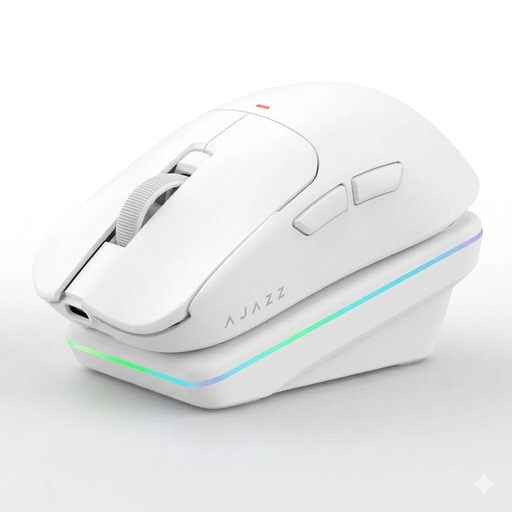 Image unavailable
Consider it if you want to move the mouse cable out of your playing area and have room elsewhere for a charging dock.
The title lists Bluetooth, 2.4 GHz and USB-C modes. Confirm the dock contents and shell fit; the stated weight differs between the title and product description.
 Image unavailable
This suits a setup where clearing the mouse cable is the priority. Joybuy describes a USB-receiver connection; decide where the receiver will sit before buying.
If mouse weight, shell dimensions or the number of buttons will determine your choice, check those details for this exact model.
 Image unavailable
Consider this wired option if you can keep its cable clear of the mouse path and prefer not to manage wireless power.
Check the Minecraft Edition’s dimensions and design against your desk and grip; a clear cable route remains necessary.
For this gaming setup, start by checking that the mouse has a 2.4 GHz receiver for the PC; Bluetooth is useful if you also want to connect it to another compatible device. SteelSeries lists both modes for the Aerox 3 Wireless, so check which connection you intend to use.
No, not unless you have repeated actions you intend to bind and practise. Razer lists up to 23 programmable buttons on the Naga V3 Pro, but a large button count adds little to a setup that uses only a few standard commands.
Begin with a sensitivity you can use consistently and bind only the actions you reach for often. If you move between computers, check whether your exact mouse can retain the configuration you need; Razer says the Cobra stores one onboard profile based on the last Razer Synapse profile used.
Keep an unwanted electrical mouse out of general waste. Oxfordshire County Council identifies electrical items as waste electrical and electronic equipment; ask your local authority which electrical-recycling or collection route applies where you live.