Choose a compact wireless mouse if limited movement space and cable clutter are your main obstacles when designing a theme park at a small desk. If you repeatedly use construction, camera and interface commands, prioritise reachable programmable controls and a scroll wheel that suits those actions instead. In either case, check the shape against your grip before letting a headline DPI figure decide.
Who is this for?
Small-desk wireless designers
If your keyboard, notebook or controller leaves little mouse space, a compact wireless shape is worth considering for easier positioning without a movement cable. Check that it still feels comfortable in your usual grip.
Shortcut-focused park builders
If you frequently repeat camera, building, terrain or interface actions, accessible buttons and scroll-wheel inputs may matter more to you than a minimal mouse footprint.
Long-session comfort prioritisers
If you spend extended sessions refining layouts, compare shell shapes against your palm, claw or fingertip grip before choosing by DPI or polling-rate figures. SCAN UK’s gaming-mouse buying guide places particular emphasis on finding a comfortable shape.
What matters when choosing?
Start with the space available beside your keyboard and the grip you use, then decide how many commands you genuinely want on the mouse.
| Concern |
What to check |
Who this matters to |
| Desk space and cables |
Measure your usable mouse area and check whether your computer can use the mouse’s stated wireless connection. |
With a keyboard taking up most of my desk, I want room to move the mouse without dragging a cable across other controls. Around 36% of consumers would put desk clearance first. |
| Shortcuts and scrolling |
Count the commands you would assign, then check button reach, software support and available scroll-wheel modes. |
When I keep switching between building tools and the camera, I want the commands I repeat within easy reach. Shortcut access would be the main concern for roughly 29% of consumers. |
| Grip and comfort |
Compare the shell’s dimensions and shape with a mouse you find comfortable in your usual grip. |
For a long layout session, I need a shape my hand can settle into, even if a smaller mouse would leave more desk space. About 21% of consumers would prioritise grip fit. |
| Movement and sensitivity |
Compare stated weight alongside shape and controls; treat DPI as a sensitivity setting, not a comfort measure. |
If I reposition the pointer frequently, I want movement to feel manageable within the space I have. Around 14% of consumers would put movement and response first. |
Mistakes to avoid
-
Choosing by maximum DPI alone
A high sensitivity figure cannot tell you whether the shell fits your hand or clears the objects on your desk. SCAN UK’s gaming-mouse buying guide identifies comfort as a particularly difficult part of the choice.
Identify your usual palm, claw or fingertip grip, then compare dimensions and controls among shapes you can use comfortably.
-
Assuming compact means comfortable for everyone
A short mouse may make positioning easier at a crowded desk but can feel different during careful, sustained movements. Hand size and grip affect that judgement.
Compare the shape with a mouse you already use; if you cannot try it, check the seller’s return terms before ordering.
-
Choosing buttons you cannot reach
Extra programmable controls only help your theme-park workflow if you can reach them and assign commands you actually repeat.
Write down your intended shortcuts, then check the side-button arrangement and required software rather than choosing by button count alone.
Relevant brands to consider
Logitech G
The G305 and G502 X illustrate different priorities: a wireless option on one hand and a design with additional controls on the other.
- Logitech G states that the G305 runs for up to 250 hours on one AA battery. Its G502 X specifications include an adjustable DPI-shift button and a dual-mode tilt wheel.
- Battery claims and control specifications do not establish which shape will fit your hand; check grip and button reach for the model you choose.
Razer
The compact wireless Orochi V2 and control-focused Basilisk V3 address different small-desk trade-offs.
- Razer describes the Orochi V2 as compact and under 60 g without its battery. It lists 10+1 programmable buttons for the Basilisk V3.
- The Orochi V2’s stated weight excludes the battery, while the Basilisk V3’s extra controls are useful only if their positions and setup suit your commands.
SteelSeries
The Aerox 5 Wireless is a reference point for combining wireless movement with several programmable controls.
- SteelSeries states a 66 g weight and nine programmable buttons for the Aerox 5 Wireless.
- Check whether its perforated shell and side-button positions feel right for your grip rather than treating the stated weight as a comfort guarantee.
Joybuy product choices
These wireless gaming mice offer different combinations of connection options, stated weight and controls for working at a small desk. Check each model’s shape and the commands you need before choosing.
 No image available
AJAZZ AJ200 AI MC Wireless Gaming Mouse with Charging Dock
Consider this model if you want wireless movement beside a crowded keyboard and a charging dock. Its title lists Bluetooth, 2.4 GHz and USB-C connection options and a PAW3311 sensor. Check the mouse’s dimensions against your grip, and confirm its weight if that will influence your choice.
View on Joybuy
 No image available
RAPOO VT2 MAX Wireless Gaming Mouse, White
Consider this model if you want wireless movement and several places to assign repeated building commands. Its title lists a 53 g weight and 10 programmable buttons. The stated battery life of up to 750 hours depends on updating the driver to enable low-power mode; check the shape and button positions for your hand.
View on Joybuy
 No image available
AJAZZ AJ159 APEX Wireless Gaming Mouse with Magnetic Charging Base
Consider this model if a charging base and cable-free movement appeal for your small desk. Its title states a 56 g weight and 2.4 GHz wireless and wired modes. Confirm the exact connection options before buying, and compare its dimensions with your usual grip.
View on Joybuy
 No image available
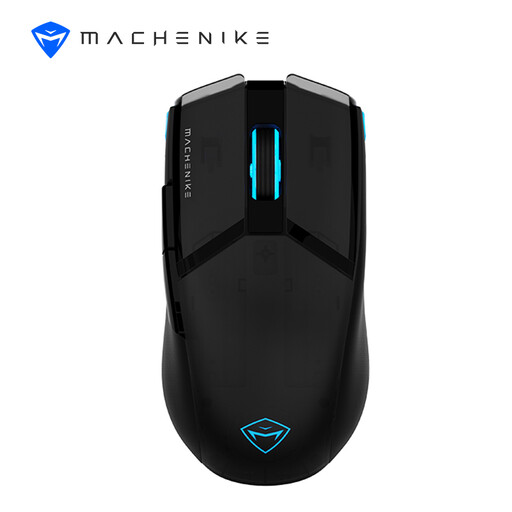
MACHENIKE M7 Pro PAW3395 Dual-Mode Gaming Mouse
Consider this model if you want a wireless mouse with a wired option for theme-park building sessions. Its title identifies a PAW3395 sensor and a 26,000 DPI figure. Check the physical dimensions, button arrangement and grip fit rather than using the DPI figure to judge comfort.
View on Joybuy
 No image available
HyperX Pulsefire Fuse Wireless Gaming Mouse
Consider this model if removing a movement cable is your main priority. For its stated 2.4 GHz receiver connection, check that your computer has a compatible USB port available. Compare the mouse’s dimensions and control layout with your desk space and usual grip.
View on Joybuy
Common questions
Should I choose a compact wireless mouse or one with more buttons?
Choose compact wireless when mouse space and cable clearance limit your movement; favour more reachable controls when repeated building and camera commands are the bigger frustration. Compare either shape with your usual grip before ordering.
Do I need a very high DPI setting for theme-park design?
No particular DPI figure is established as necessary for designing a theme park. Choose a sensitivity you can use within your available mouse space, then weigh shape and control layout rather than deciding by the maximum figure.
What should I check before buying a wireless gaming mouse?
Check that your computer supports the stated connection method and that a receiver, if used, will not take a USB port you need for something else. Compare battery claims under their stated conditions, including whether a quoted mouse weight excludes the battery.


