Who this choice affects

Small-desk ranked players

If the keyboard leaves little clear mouse space, consider where the cable or wireless receiver will sit as well as how easily you can reposition the mouse. Scan UK emphasises that shape and comfort remain central to the choice.

Players with frequent shortcuts

If you regularly use mouse-accessible game commands, compare controls you can reach without looking. Logitech G lists 13 customisable controls for the G502 X LIGHTSPEED, while Razer lists up to 23 programmable buttons for the Naga V3 Pro; neither count establishes how well the layout will suit your grip.

Players sensitive to grip fit

Across repeated matches, button reach and the way your hand rests on the shell may matter more than a headline sensor figure. Scan UK advises choosing a shape that feels comfortable for your grip.

What matters when choosing

Lightweight wireless

Choose it when: You frequently reposition the mouse and want no moving cable in your limited desk space.

Trade-off: Check that its shape and available controls cover your regular strategy-game commands.

Wireless multi-button

Choose it when: You have recurring commands that you can assign to distinct, reachable mouse controls.

Trade-off: A denser layout takes more effort to learn and may not suit your grip.

Wired with extra controls

Choose it when: You want additional controls without managing a wireless charge.

Trade-off: The cable needs a route that will not catch during mouse movement.

ConcernWhat to checkWho this matters to
Clear movement space Check the available mouse area and whether a cable, receiver or charging lead will obstruct it. If the keyboard leaves little room, I want to reposition the mouse without a cable catching. Around 31% of consumers put clear movement space first.
Command access Compare the physical controls with commands you use every match; check remapping support for your operating system. When I use frequent unit-group or camera commands, I need controls I can identify without looking. For around 25% of consumers, command access is the main concern.
Consistent cursor control Check connection options, supported sensitivity settings and whether your preferred settings can be retained. During ranked matches, I want to return to a familiar sensitivity rather than chase the highest advertised DPI. Consistent control comes first for around 25% of consumers.
Grip fit Compare the mouse dimensions and shape with your hand, grip and access to side buttons. If my hand position makes buttons awkward to reach, extra controls will not help me use them comfortably. Around 19% of consumers prioritise grip fit.

Buying pitfalls

  • Choosing by maximum DPI or polling rate alone

    Those figures describe available settings, not whether a mouse fits your hand or makes strategy-game commands easier to use.

    Start with your preferred sensitivity, shape and button reach; then check which sensor and connection settings the model supports.

  • Buying more buttons without a binding plan

    Additional controls add layout complexity if you cannot distinguish and reach them reliably during play.

    List the commands you use regularly, then assess the physical button positions before relying on software layers.

  • Assuming wireless clears the entire desk

    Removing the moving mouse cable does not remove the need to position a receiver or arrange charging access. Battery-life figures can also depend on settings.

    Plan where the receiver and charging lead will go, and compare battery claims only under their stated conditions.

Brands to consider

Logitech G

Its range includes lightweight wireless models and G502 models with more controls; G HUB supports button remapping and profiles.

  • Logitech G lists the PRO X Superlight 2 at 60 g and the G502 X LIGHTSPEED with 13 fully customisable controls.
  • Those specifications describe different models, so choose by the shape and control layout you need rather than treating them as features of one mouse.

Razer

The Viper, Basilisk and Naga examples span simpler competitive layouts and models with more shortcut controls.

  • Razer specifies the Viper V3 Pro at 54 g, the Basilisk V3 with 11 programmable buttons and the Naga V3 Pro with up to 23.
  • A dense button layout may be unnecessary if you use only a few bindings, and its controls still need to suit your grip.

Corsair

The M75 WIRELESS is an option to examine if an ambidextrous shape and adjustable side-button arrangement matter to you.

  • Corsair describes the M75 WIRELESS as an 89 g ambidextrous mouse with swappable magnetic side buttons.
  • Check its shape and stated weight against your movement and grip preferences; Corsair's battery-life claim of up to 105 hours assumes RGB is off.

Joybuy product choices

These gaming mice cover wireless choices for keeping a cable out of the movement area and a wired choice for players who can route its cable clear. Compare shape and reachable controls before choosing one for ranked play.

White RAPOO VT2 MAX wireless gaming mouse

RAPOO VT2 MAX wireless gaming mouse, white

Consider this wireless model if you want movement space without a mouse cable and have recurring commands to assign. Its title lists 53 g, 8K wireless polling and 10 programmable buttons; check its dimensions and whether those buttons suit your grip.

View on Joybuy

AJAZZ AJ200 AI MC wireless gaming mouse with charging dock

AJAZZ AJ200 AI MC wireless gaming mouse with charging dock

Consider this model if a wireless setup and charging dock suit your desk arrangement. The title specifies a PAW3311 sensor and adjustable DPI up to 24,000; confirm the connection modes, weight and shape for the variant you are buying.

View on Joybuy

AJAZZ AJ159 APEX wireless gaming mouse with magnetic charging base

AJAZZ AJ159 APEX wireless gaming mouse with magnetic charging base

This is a wireless option to consider if you reposition the mouse often. Its title lists 56 g, a PAW3950 sensor and 8KHz polling; check which connection modes apply to this variant, along with its button layout and dimensions.

View on Joybuy
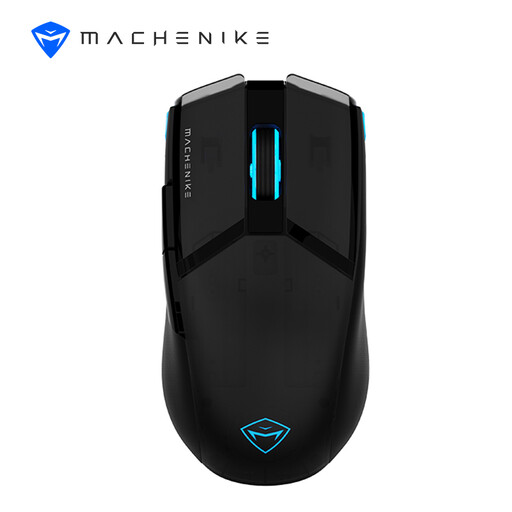
MACHENIKE M7 Pro wireless gaming mouse

MACHENIKE M7 Pro wireless gaming mouse

Consider this wireless model if keeping a mouse cable out of your movement area is the priority. Its title lists a PAW3395 sensor and 26000 DPI; check the weight, dimensions and number of usable controls before deciding whether it fits your setup.

View on Joybuy

ONIKUMA CW905 wired gaming mouse

ONIKUMA CW905 wired gaming mouse

This wired choice suits a desk where you can keep the cable clear of mouse movement. Check its dimensions, physical button layout and whether its controls can be remapped for the commands you use in ranked matches.

View on Joybuy

Frequently asked questions

Should I choose a wireless or wired mouse for a small desk?

Choose wireless if a cable would cross your mouse area or catch on the desk edge; choose wired if you can route the cable clear and prefer not to manage charging. Scan UK says high-end wireless gaming mice are competitive with wired options, but connection type does not settle the question of shape or grip fit.

How many mouse buttons do I need for a strategy game?

Choose enough reachable controls for the commands you actually use repeatedly, rather than buying by button count alone. Logitech G lists 13 customisable controls for the G502 X LIGHTSPEED and Razer lists up to 23 programmable buttons for the Naga V3 Pro; assess whether you can distinguish the controls without looking.

Do I need mouse software to set up game-specific bindings?

You may need the manufacturer's software for full button remapping and game profiles. Logitech G says G HUB supports remapping and profiles; check the software and operating-system requirements for the particular mouse you choose.

What should I do with an old gaming mouse?

Check your local council's electrical-waste collection arrangements or a retailer take-back option before disposing of it. GOV.UK identifies the Waste Electrical and Electronic Equipment Regulations 2013, as amended, as the framework underpinning UK electrical-equipment waste rules; the practical collection route depends on local arrangements.