For theme-park building in a student room, choose a mouse by the controls you will actually use, the space available on your desk and the shape that suits your hand—not by maximum DPI alone. Reachable extra buttons may help if you regularly assign building shortcuts; a compact mouse makes more sense if desk fit matters most, while a simpler model can suffice when you keep most commands on the keyboard.
Who is choosing this mouse?
Shortcut-heavy park builders
If you repeatedly place scenery, edit paths and rides, move the camera and open menus, you may want a few frequently used commands within reach on the mouse. Frontier Developments documents keyboard-and-mouse controls for these kinds of tasks in Planet Coaster 2.
Small-desk student players
When mouse movement and cable routing compete for space on a student-room desk, shell size, weight and connection type become practical choices alongside button layout.
Value-focused mixed-use players
If you are comfortable keeping most building commands on the keyboard, consider whether you would use additional mouse controls before choosing a more feature-heavy design. Check the seller’s return and warranty terms for the model you select.
What matters when choosing?
Start with the commands you would move onto the mouse, then check hand fit and the space available for movement. Decide whether a cable or wireless power routine works better for your desk before comparing less relevant headline specifications.
| Concern |
What to check |
Who this matters to |
| Reachable shortcuts and scrolling |
Check button positions against your grip and whether the wheel has the scrolling modes you would use. |
I often switch between placing objects and navigating menus, so I want a few repeat commands within easy reach. Around 42% of consumers put accessible shortcuts first. |
| Desk fit and connection |
Check usable mouse space, shell size and weight, then allow room for a cable or wireless receiver as appropriate. |
My desk has little room for mouse movement, and the connection must fit around the rest of my setup. For around 25% of consumers, desk fit is the primary concern. |
| Sufficient core controls |
Decide how many commands need mouse buttons and whether your settings must travel between computers. |
I am happy using keyboard shortcuts and do not want extra controls that I will leave unused. Sufficient everyday control comes first for around 33% of consumers. |
Buying pitfalls
-
Choosing by maximum DPI alone
Park building involves placement, editing, camera movement and menus as well as pointer movement. A high maximum DPI does not tell you whether the buttons, wheel or shell will suit those tasks.
Prioritise a controllable sensitivity, reachable buttons and a comfortable grip. Check sensor settings without treating the largest number as a shortcut to a better fit.
-
Assuming more buttons will always help
Extra controls are useful only if you can reach them reliably and remember what you assigned to them; an awkward position can cause accidental presses.
Choose a few commands you repeat often, then check button placement against your hand size and normal grip.
-
Overlooking wireless power arrangements
Wireless mice differ in how they are powered and connected. For example, Logitech G describes the G305 as using an AA battery, while the G309 has different power options.
Check the exact model’s battery or charging method, receiver and any accessory needed for the setup you intend to use.
A replaceable battery or a model-compatible optional charging accessory may become part of your routine.
Brands to consider
Logitech G
Relevant if you are weighing a wireless mouse against wired models with more shortcut controls.
- Logitech G lists a quoted 250-hour AA-battery life for the G305 and 11 programmable buttons with onboard profile storage for the G502 HERO.
- Those features belong to different models; check the exact mouse for its shape, connection and button layout.
Razer
Relevant if you are choosing between a shortcut-focused right-handed shape and a smaller wired format.
- Razer specifies 11 programmable buttons and several wheel modes for the Basilisk V3, while listing the compact wired Cobra at 58 g.
- The Basilisk’s right-handed ergonomic shape will not suit every hand or preference; compare the individual shells rather than the brand name.
SteelSeries
Relevant if you want to examine a wired mouse with several thumb-side controls.
- SteelSeries specifies nine programmable buttons, including a five-button side layout, and an 85 g weight for the Rival 5.
- The stated layout and weight cannot establish whether its side controls will be comfortable or reachable for your hand.
Joybuy mice for this setup
These mice offer different combinations of shortcut controls, shell weight and wired or wireless desk setups for theme-park building. Compare each model’s stated features with the commands you plan to use and the room you have to move it.
 No image available
RAPOO VT2 MAX wireless mouse, White
Consider this model if you want mouse-side commands without a desk cable. Its title specifies 10 programmable buttons and a 53 g weight; check whether the button positions suit your grip.
The stated battery-life figure depends on a driver update to unlock low-power mode. Confirm the power and charging arrangement before choosing it.
View on Joybuy
 No image available
Razer DeathAdder V3 ergonomic gaming mouse
Consider its ergonomic shape if you prefer that style of grip for longer building sessions. Check that its right-handed form, wired connection and available buttons suit your hand, cable route and shortcut list.
View on Joybuy
 No image available
ET PC400 dual-mode wireless mouse
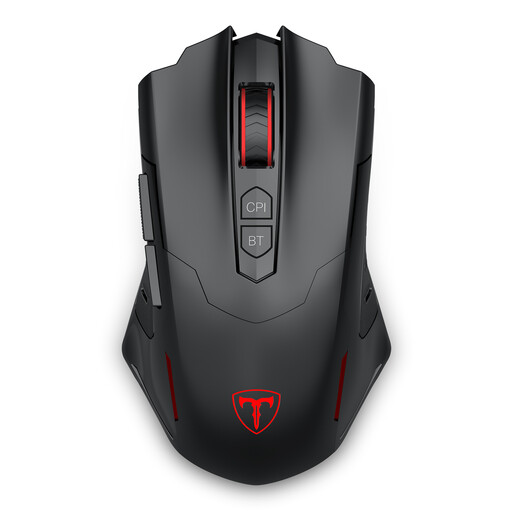
This is worth comparing if you want configurable commands and a choice of connections. Its title specifies seven programmable buttons, 2.4G and Bluetooth modes, and 8000 DPI. Check its dimensions against your desk and confirm the charging arrangement and included accessories.
View on Joybuy
 No image available
AJAZZ AJ159 APEX wireless mouse with charging base
Its stated 56 g weight may appeal if you prefer a lighter mouse for repeated camera movement. Confirm the exact connection modes and programmable-button count before relying on it for a particular shortcut setup.
View on Joybuy
 No image available
MACHENIKE L9X1 tri-mode gaming mouse
Consider it if a lighter shell and connection flexibility matter more to you than a stated shortcut-button count. Its title specifies 49 g and wired, 2.4G and Bluetooth modes; check button programming and charging arrangements if either is central to your setup.
View on Joybuy
Common questions
Do I need a very high DPI setting to build a theme park?
No particular maximum DPI figure is the deciding requirement for this task. Set a sensitivity you can control, then assess button reach, scrolling and grip fit; Frontier Developments’ Planet Coaster 2 controls also involve placement, camera movement and other keyboard-and-mouse commands.
How should I set up extra mouse buttons for park building?
Start with a few commands you repeat often, then test whether you can press their assigned buttons without changing your grip. Planet Coaster 2 has a range of keyboard-and-mouse controls, but assigning every available button at once need not make them easier to remember.
Should I choose a wired or wireless mouse for a student-room desk?
Choose wired if you can route the cable comfortably and prefer not to manage wireless power; choose wireless if removing the desk cable matters more. Check the exact model’s battery or charging method and connection options, since these differ even between mice from the same brand.


